
Building Agent Networks for Agent Fabric
An agent network is a coordinated group of agents, brokers, LLMs, and MCP servers that acts as a central hub for defining, validating, and executing agentic processes across your enterprise.
An agent network provides the building blocks of your agentic deployment while MuleSoft Agent Fabric helps you maximize the potential of every AI agent with centralized discovery, orchestration across agents and tools, cross-ecosystem governance, and full transparency into agentic interactions.
You define your agent network in a simple, human-readable YAML file in Anypoint Code Builder. This approach abstracts away the underlying technical complexities, allowing you to focus on the business constraints and context of your process without needing to understand the inner workings of the orchestration engine.
At the start of a new agent network project, MuleSoft provides a YAML template and Agent Script file to give you a head start. You can use MuleSoft Vibes to configure your network, publish the assets to Anypoint Exchange, and deploy your agent network instance.
Key Benefits of Agent Networks
Create robust, automated agent networks with these key benefits.
-
Simplified Development
Define your agent processes in an intentional way using a simple YAML file, which is easier and faster than writing complex code.
-
Safety and Governance
Ensure control and compliance across every agent and tool interaction with enterprise-grade governance.
-
Observability
Gain insight into agent actions with a visual trace of their decision-making.
-
Flexibility
Coordinate any type of agent and tool, regardless of where it’s built and deployed so you can build a diverse network of agents.
-
Tool and Agent Invocation
Manage the invocation of both deterministic (tool-based) and probabilistic (LLM-based) actions.
The Guided Determinism Pattern
Brokers in agent network 2.0 architecture use a guided deterministic approach by separating steps requiring probabilistic LLM reasoning from those requiring deterministic control-flow logic.
-
Probabilistic (LLM-based) nodes handle complex, open-ended decisions that require nuanced judgment, such as classification or AI-powered thinking.
-
Deterministic nodes manage all remaining predefined execution paths, ensuring a fixed and guaranteed workflow after a key probabilistic judgment has been finalized.
This structure allows brokers to apply high-level LLM intelligence where complex judgment is needed, while the overall agent graph maintains reliable, rule-based predictability across the operational flow.
Agent Network Components
Agent networks use LLMs for reasoning and planning capabilities and integrate with Anypoint Connector for MCP (Model Context Protocol) and Anypoint Connector for Agent2Agent (A2A) communication.
- Broker
-
An intelligent routing service that coordinates task delegation across A2A-compliant agents in your enterprise. You define a broker and its nodes in Agent Script. Nodes are connected in a graph that encapsulates all steps that describe the orchestration of agents, tools, and LLMs. A graph-based approach to agent brokers ensures that connected paths guarantee a specific order of operations and enable more complex orchestration that combines deterministic and non-deterministic elements.
After you publish your agent network, brokers appear as specialized agents in Anypoint Exchange and can be reused by other brokers.
A broker graph is composed of these elements:
- Nodes
-
Each "step" within a graph. Nodes can be used to orchestrate actions with LLM-powered reasoning or perform deterministic actions like routing.
- Trigger
-
An entry point into a graph. Triggers specify events, calls, or messages that execute workflows. All graphs must start on an A2A trigger.
- Edges
-
Transitions from node to node. Input data enters the node and output data exits the node.
- Agent
-
An autonomous software component that uses goals, context, and available tools, often via a LLM, to decide and execute actions on behalf of a user or system.
Agents can be defined either locally in the agent network or externally in a different agent network or elsewhere in your company. Your agent network can use both locally defined and externally defined agents to complete tasks.
Agent assets must be A2A-compliant.
- MCP server
-
A service that implements the Model Context Protocol (MCP) to expose tools and data to AI clients, enabling LLMs to invoke external capabilities through a standard interface.
MCP servers can be defined either locally in the agent network or externally in a different agent network or elsewhere in your company. Your agent network can use both locally defined and externally defined MCP servers to complete tasks.
- Registry
-
A section within an agent network project that defines the assets, connections, and policies necessary to build, execute, and govern a broker. Assets defined in this section of an agent network file are published to Exchange and become reusable. You can also reference existing assets from Exchange in a graph without needing to define them in the registry section.
Agent Network YAML and Agent Script
An agent network project defines a structured configuration for multi-agent systems, enabling orchestration of AI agents with external services, tools, and inter-agent communication. This format provides a declarative way to define agent capabilities, dependencies, and service integrations.
An agent network project includes these files:
/my-agent-network-project
  - exchange.json
  - agent-network.yaml
  /brokers
    - broker1.agent
-
exchange.json: Contains asset metadata available in Anypoint Exchange after publishing your agent network assets. -
agent-network.yaml: Contains a registry section that defines Exchange assets used in your project and a context section that defines connections and policies for the project. -
.agentfiles: Contain broker and node definitions and configurations that enable multi-agent orchestration in your project.
For more information, see Agent Network 2.0 Project File Reference.
For a complete, working example you can use as a starting point for your own agent network project, see Example: Building an IT Investigation Broker. The example walks through a fully configured agent-network.yaml, exchange.json, and /brokers directory that you can adapt to your own project.
|
Agent Network Architecture
This diagram shows an agent network deployed to a shared space in CloudHub 2.0 using a single Omni Gateway for ingress and egress. The network includes agents and MCP servers and is observed in Anypoint Monitoring.
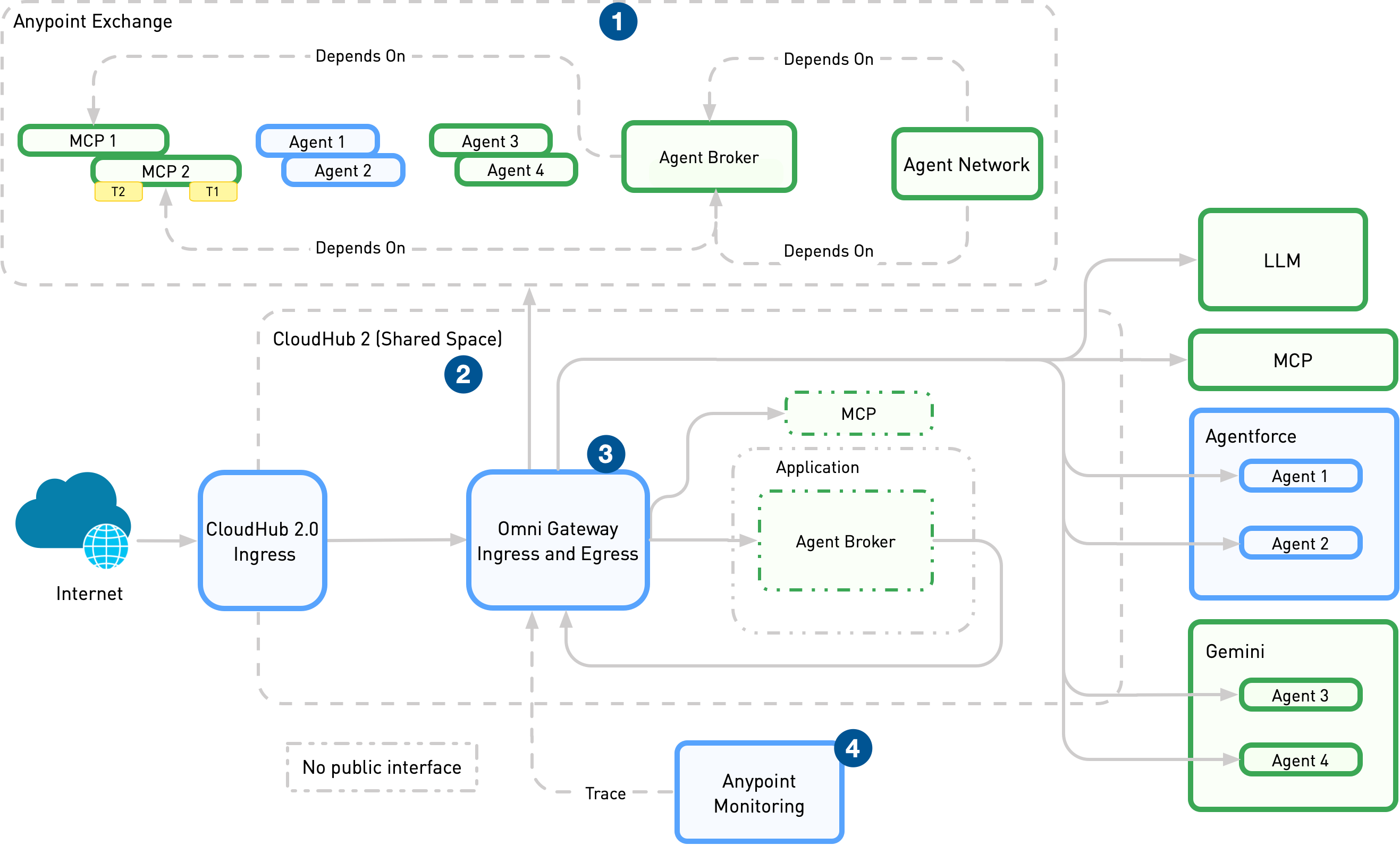
| 1 | Publish the agentic assets to Anypoint Exchange for discovery and reuse after you define the agent network (brokers, agents, MCP servers) in the agent network YAML in Anypoint Code Builder. | ||
| 2 | Deploy the agentic assets to CloudHub 2.0 (managed in Runtime Manager). | ||
| 3 | Enforce policies, manage connections, and emit telemetry through a single Omni Gateway that handles both ingress to brokers/API endpoints and egress to external agents and services.
|
||
| 4 | Collect logs, metrics, and traces from Omni Gateway and runtimes in Anypoint Monitoring. |
Agent Network Assets in Anypoint Exchange
Agent network projects support these asset types in Exchange:
- Agent Network
-
An agent network project is published in Exchange as an agent network asset. The asset is a .zip file that contains all project files. To learn more, see Agent Network YAML and Agent Script or Agent Network 2.0 Project File Reference.
- Agents
-
Programs that perform tasks autonomously or semiautonomously. AI agents use the Agent2Agent (A2A) protocol to communicate and collaborate with each other to perform tasks.
When you publish agent network projects to Exchange, the individual agentic assets defined in the agent network project file are registered as either agents or MCP servers. Brokers are published with the agent asset type and are automatically tagged as brokers for easy identification.
- LLMs (Large Language Models)
-
AI assets for processing, understanding, and generating human-readable language. Agent network projects support various LLMs. The LLM asset type defines only the provider and contract information. You define the model and connectivity details in the agent network file.
- MCP Servers
-
Applications or APIs exposed through the Model Context Protocol (MCP). MCP is an open protocol designed to standardize how applications provide context and capabilities to LLMs and AI agents. In the agent network file, MCP server assets are defined as
Tools.
Large Language Models
Agent network brokers support the latest models from OpenAI, Azure OpenAI, Bedrock OpenAI, and Gemini, as well as LLM Proxies.
-
Bedrock OpenAI uses the openai.prefix for model names (for example,openai.gpt-5.5), which differs from the model names used with OpenAI and Azure OpenAI. -
LLM Proxy
Agent network brokers only support access to OpenAI and Gemini through Omni Gateway LLM Proxy. Transcoding other models to OpenAI format to use in agent networks is not supported.
This table details requirements and recommended models.
| Model Provider | Required Endpoint | Required Capabilities | Suggested Models |
|---|---|---|---|
OpenAI |
|
|
|
Gemini |
|
|
|
Agent networks support text-based messages and responses. Image and binary message types aren’t supported.
For configuration options, see the LLM Section of the Agent Script file reference.
A2A Protocol in Agent Networks
The Agent2Agent (A2A) Protocol governs agent-to-agent communication and powers orchestration, observability, and governance features in agent networks. For more information, see Using A2A Protocol in Agent Networks.