
Working with Secure Properties Using MuleSoft Vibes
Instead of manually creating files and editing XML, use MuleSoft Vibes to set up secure properties conversationally. MuleSoft Vibes can automatically encrypt values, create configuration files, update XML, and validate your setup.
For information about secure properties concepts and manual configuration, see Defining and Securing Properties for a Mule Application.
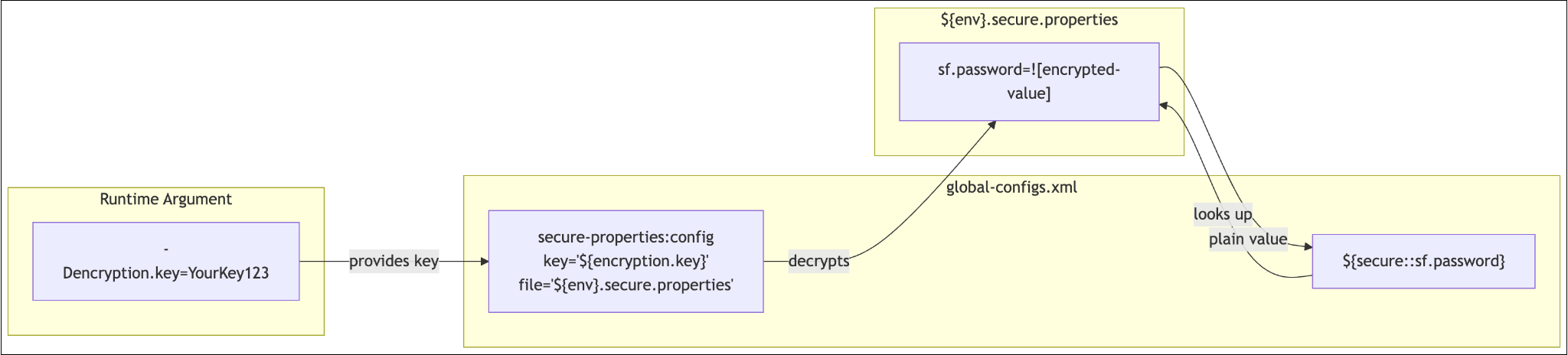
Set Up Secure Properties from Scratch
To set up secure properties, send a message to MuleSoft Vibes that asks to configure secure properties for your credentials and specifies the encryption algorithm to use.
For example:
Set up secure properties for my Salesforce credentials using AES/CBC encryption
MuleSoft Vibes:
-
Adds the
mule-secure-configuration-property-moduledependency topom.xml -
Adds the
<secure-properties:config>element toglobal-configs.xml -
Adds the required namespace and schema location
-
Updates connector configurations to use
${secure::}references -
Creates the
.secure.propertiesfile structure
Encrypt a Value
To encrypt a specific value, send a message to MuleSoft Vibes that includes the value to encrypt, your encryption key, and the algorithm to use.
For example:
Encrypt the value 'MyPassword123' using my encryption key MuleSecureKey024 with AES CBC
MuleSoft Vibes runs the secure-properties-tool and returns the encrypted value ready to paste into your properties file.
Add a New Credential to an Existing Setup
To add a new encrypted property, send a message to MuleSoft Vibes that specifies the property name and value to encrypt.
For example:
Add a new secure property called 'netsuite.password' with the value 'NS-Prod-Pass!' to my secure properties files
MuleSoft Vibes encrypts the value and adds it to the appropriate .secure.properties file.
Switch from Plaintext to Secure
To convert existing plaintext credentials to secure properties, send this message to MuleSoft Vibes:
Convert all the plaintext Salesforce credentials in my project to use secure properties
MuleSoft Vibes:
-
Scans for hardcoded or plaintext credential values
-
Encrypts each value
-
Moves them to
.secure.propertiesfiles -
Updates XML references from
${salesforce.password}to${secure::salesforce.password}
Set Up Multi-Environment Secure Properties
To create environment-specific secure properties files, send a message to MuleSoft Vibes that specifies the environment name and requests the $site.secure.properties pattern.
For example:
Create a secure properties file for prod with the ${env}.secure.properties pattern
MuleSoft Vibes creates the environment-specific file and configures the dynamic file reference in global-configs.xml.
For more information about multi-environment configuration, see int-create-secure-configs.adoc#create-prop-file.
Validate Your Setup
To check if your secure properties are configured correctly, send this message to MuleSoft Vibes:
Check if my secure properties are configured correctly
MuleSoft Vibes validates:
-
The dependency is in
pom.xml -
The
<secure-properties:config>element exists with the correct namespace -
Referenced keys exist in the
.secure.propertiesfiles -
The encryption key is configured in
launch.jsonfor local runs
Rotate the Encryption Key
To change your encryption key and re-encrypt all values, send a message to MuleSoft Vibes that specifies the old key, the new key, and asks to re-encrypt all values.
For example:
Rotate my encryption key from MuleSecureKey024 to NewSecureKey2025 and re-encrypt all values
MuleSoft Vibes:
-
Decrypts all values with the old key
-
Re-encrypts with the new key
-
Updates all
.secure.propertiesfiles -
Updates
launch.jsonwith the new key
Skills MuleSoft Vibes Uses
When you ask MuleSoft Vibes to work with secure properties, it invokes specialized skills that handle the tasks:
| Skill | What It Does |
|---|---|
Secure Mule App |
Scans for sensitive data, encrypts values using the secure-properties-tool JAR, creates |
Manage Global Configurations |
Creates the |
Build Mule Integration |
When generating new flows that need credentials, automatically includes secure property placeholders and wires up the secure config element. |
These skills work together. For example, when you say "convert my plaintext credentials to secure properties," MuleSoft Vibes uses Secure Mule App to encrypt and create the files, then Manage Global Configurations to wire up the XML config element and validate everything builds.
For more information about skills in MuleSoft Vibes, see Using Skills with MuleSoft Vibes.
Common MuleSoft Vibes Prompts for Secure Properties
Use these example prompts to work with secure properties:
| What You Want | What to Ask MuleSoft Vibes |
|---|---|
Initial setup |
"Set up secure properties for this project" |
Encrypt a single value |
"Encrypt 'my-secret' with key X using AES CBC" |
Add credentials |
"Add encrypted DB credentials to my secure properties" |
Convert plaintext |
"Move my hardcoded passwords to secure properties" |
Production setup |
"Create a prod secure properties file" |
Check configuration |
"Validate my secure properties setup" |
Debug issues |
"Why is my secure property not resolving?" |
Key rotation |
"Rotate my encryption key to a new value" |