
Monitoring API Conformance
| We updated the terminology in the API Governance UI to reflect a broader range of asset types. Where Governance previously used "APIs," it now uses "Services." There are no changes to functionality. During this transition, you may see a mix of the new and previous terms in our documentation. |
After you configure governance profiles for your APIs and the resulting governance data is available, you can monitor and report on your organization’s conformance.
Test Profile Settings Using Draft Profiles
Consider using draft profiles to test profile settings. This enables you to limit the scope of the profiles to just what you need before alerting the API owners about identified conformance issues.
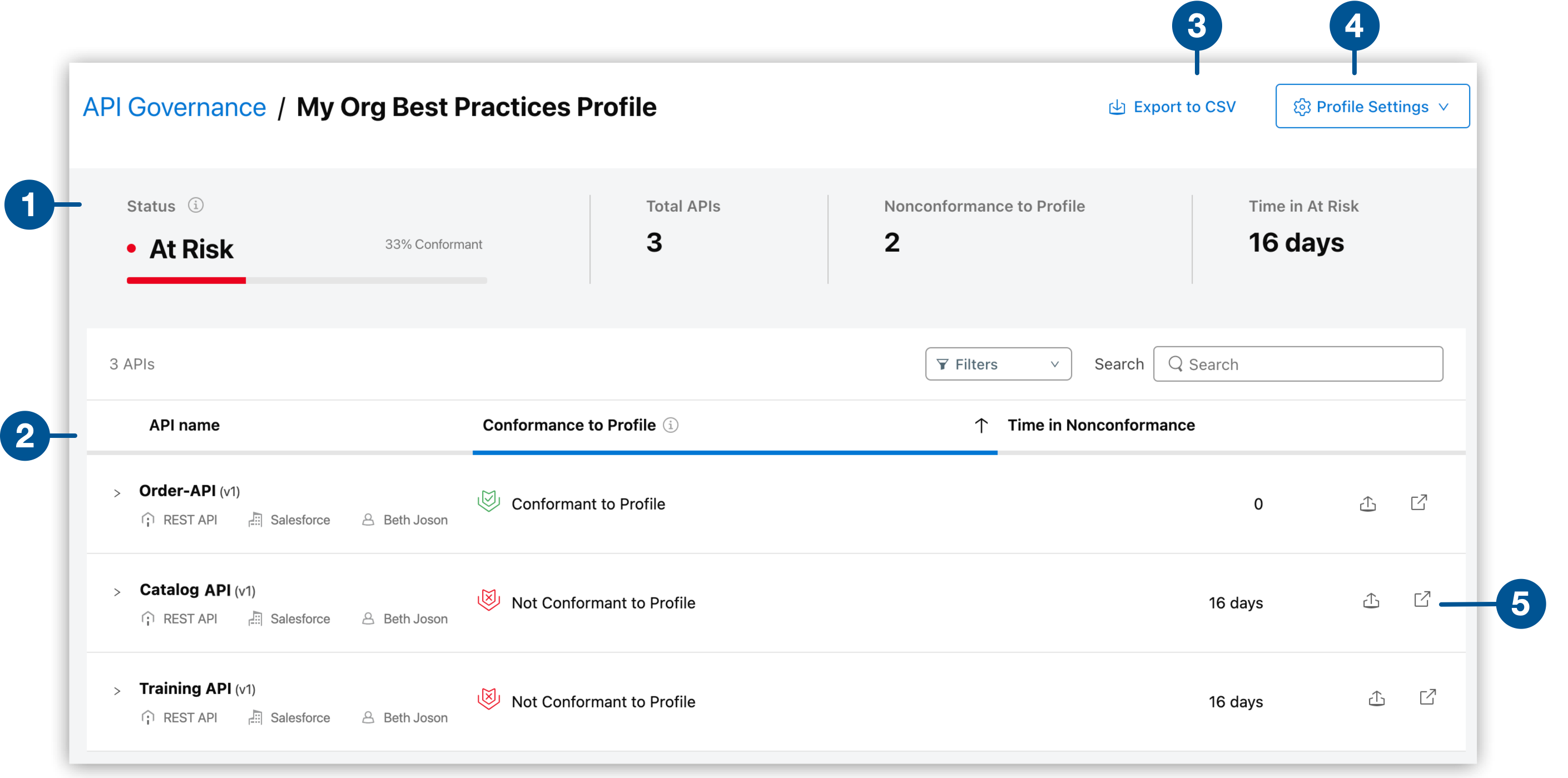
| 1 | View a summary of conformance for the selected draft profile. |
| 2 | View the APIs targeted by the draft profile. These APIs are governed, but their conformance information isn’t shown outside of the draft profile view unless they’re also targeted by an active profile. |
| 3 | Export a conformance report in CSV format for all APIs targeted by this draft profile. |
| 4 | View, edit, or duplicate profile settings. |
| 5 | Export a report of only this API’s conformance information or open the API in Exchange. |
To test profile settings using draft profiles:
-
On the Governance console, select the Profiles tab.
-
Select Draft.
-
Select a profile.
-
View conformance information.
-
Edit the profile settings and view the conformance results for different selections until you target the desired set of APIs and apply the optimal set of rules to them.
-
Activate the profile to share the conformance information across Anypoint Platform so that developers can take action to resolve the conformance issues in APIs they own.
Monitor Conformance Information for Active Profiles
To view conformance information for services targeted by active profiles, view the summary information in the governance console and in validation reports.
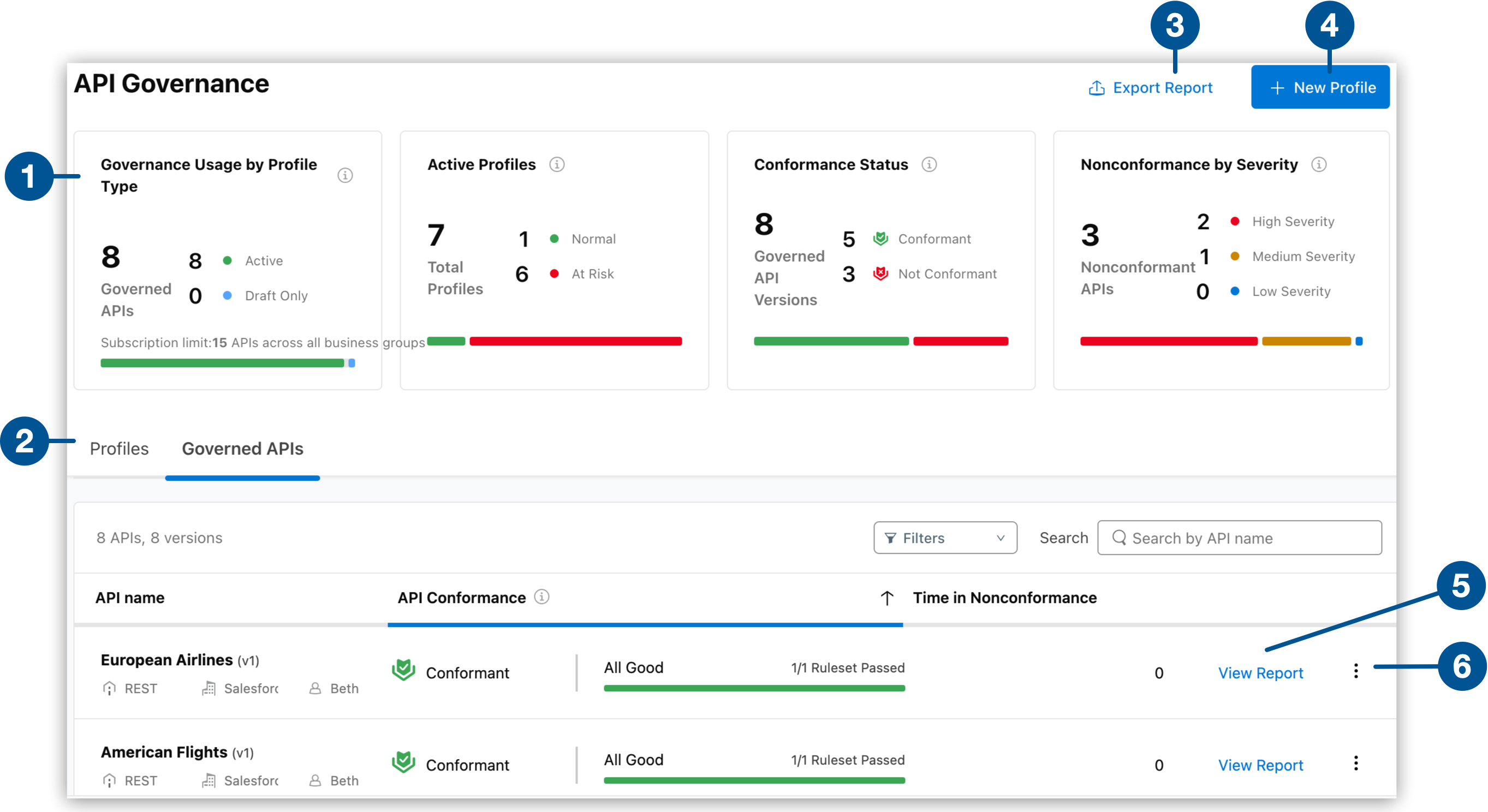
| 1 | View a summary of your governance usage and conformance status information to monitor your organization’s conformance. |
| 2 | View, filter, search, and act on a summary list of your active and draft governance profiles or your governed services. |
| 3 | Export conformance reports in CSV format. |
| 4 | Create a profile and save it as draft or active. |
| 5 | View the comprehensive governance report for a service. |
| 6 | Select from the more options menu to take relevant actions. You can export reports for a selected profile or service, view, edit, or delete a profile, notify service owners, or open a service in Exchange. |
| Only API Governance and organization administrators can create, edit, and delete profiles. |
Use the summary on the governance console to monitor your governance:
- Governance Usage by Profile Type
-
Shows the usage of governance, including number of governed services, total number of services by profile type, and subscription limit information. Because some services might be in both active and draft profiles, this tile specifies how many are in draft only.
- Active Profile Status
-
Shows profile statuses for active profiles based on the percentage of conformant APIs in the profiles:
-
Normal:
More than 70% of APIs are conformant.
-
At Risk:
Fewer than 70% of APIs are conformant.
-
- Conformance Status
-
Shows the breakdown of conformance for the APIs targeted by your governance profiles as follows:
-
Conformant:
The APIs pass all applied governance rulesets.
-
Not Conformant:
The APIs fail at least one governance ruleset.
-
Not Validated:
The APIs are not validated because they are not included in a governance profile.
-
- Nonconformance by Severity
-
Shows the severity of API nonconformance to rulesets based on the percentage of all of the required rulesets that the APIs passed. The higher the severity, the fewer rulesets the APIs passed.
-
High Severity:
0 - 40% rulesets passed
-
Medium Severity:
41% - 80% rulesets passed
-
Low Severity:
81% - 99% rulesets passed
-
Monitor Cross-Gateway Conformance
If you have connected third-party gateway providers, API Governance provides a unified conformance view across all gateways and MuleSoft APIs in a single report.
|
Cross-gateway conformance monitoring is available only in the enhanced MuleSoft experience. |
API Governance Usage Reports
You can view usage reports to understand and monitor your monthly usage of API Governance. See Viewing Usage Reports for API Governance.
Governance Validation Report
You can view conformance details for governed services in their governance validation reports in API Governance and API Manager. See Finding and Fixing Conformance Issues.
Export Conformance Information
You can export profile and conformance information in CSV format from several places in the Governance console.
Conformance Information by Profile
To export profile information:
-
On the Governance console, select the Profiles tab.
-
Click Export Report.
The exported CSV file contains conformance information for each profile in your organization. The information includes:
-
Organization ID
-
Profile IDs
-
Profile name
-
Profile type (ACTIVE or DRAFT)
-
Total APIs validated
-
Number of conformant APIs (pass)
-
Number of nonconformant APIs (fail)
-
Timestamp
-
Associated tags in Exchange
-
Governed Services Targeted by Active Profiles
To export a report of all governed services targeted by your active profiles:
-
On the Governance console, select the Governed Services tab.
-
Click Export Report.
The exported CSV file contains conformance information for each API targeted by the active profiles in your organization. The information includes:
-
Organization ID
-
API ID
-
API Version
-
Total number of asset versions for that API Version
-
Number of conformant APIs (pass)
-
Number of nonconformant APIs (fail)
-
Timestamp
-
Provider (for APIs discovered from connected third-party providers; blank for MuleSoft APIs)
-
Conformance Information for a Specific Profile
To export a conformance report for APIs targeted by a specific active or draft profile:
-
On the Governance console, select the Profiles tab.
-
Select Active or Draft.
-
Select a profile.
-
Click Export to CSV.
The exported CSV file contains conformance information for each API targeted by the selected profile. The information includes:
-
Organization ID
-
API ID
-
API Version
-
Total number of asset versions for that API Version
-
Number of conformant APIs (pass)
-
Number of nonconformant APIs (fail)
-
Timestamp
-
Provider (for APIs on connected third-party providers; blank for MuleSoft APIs)
-
Conformance Information for Topic Center
If you’re using MuleSoft for Agentforce: Topic Center, you can view the auto-generated SF API Topic Center profile, and use the provided governance rules to validate that your API is ready to generate agent actions and topics in Salesforce.
The SF API Topic Center profile is read-only, and APIs in this profile are not metered.
To export a conformance report for APIs targeted by the SF API Topic Center profile:
-
On the Governance console, select the Profiles tab.
-
Select Active.
-
Select the SF API Topic Center profile.
-
Click Export to CSV.
The exported CSV file contains conformance information for each API targeted by the SF API Topic Center profile.
Cross-Gateway Policy Audit Export
The cross-gateway policy audit export consolidates policy application evidence across all connected providers and MuleSoft APIs to support compliance audits such as SOC 2 or GDPR.
|
The cross-gateway policy audit export is available only in the enhanced MuleSoft experience. |
Evaluate Conformance Using the CLI
To use a command to evaluate the potential rulesets for your API project, use the governance:api:evaluate command.
Those who don’t have access to API Governance, such as developers, can use the CLI to evaluate which rulesets their APIs might be subject to validation against based on given filters. This enables developers to be proactive in understanding the potential conformance of APIs to rulesets before their APIs become governed.
Additionally, those who do have access to API Governance, such as governance officers, might use this command to plan or debug profile configurations.
governance:api:evaluate
> governance:api:evaluate [flags]
Evaluates specified filters to determine the rulesets that would be applied to your APIs that meet that criteria.
In addition to the default flags, this command accepts the following flags:
| Flag | Description |
|---|---|
|
The API project against which you want to evaluate. The command uses the criteria in the project’s |
|
Enables you to apply filters to select the list of APIs to which the profile rulesets apply.
Specify a list of comma-separated filters where each filter has a type and value in the format Available filters include:
Example: tag:tag1,category:category1:value,category:category2:value2,scope:rest-api,scope:async-api,env-type:production |
This command must be run with either the --criteria or the --api flag.
|
Example commands:
anypoint-cli-v4 governance:api:evaluate --criteria "tag:best,category:API Type:Experience API,scope:rest-api"
anypoint-cli-v4 governance:api:evaluate --api order-api-1.0.0-raml.zip
where order-api-1.0.0-raml.zip contains an API and its exchange.json file
Example output:
╔════════════════════════════════════════════════════════════════════╗
║ Ruleset GAV                                                        ║
╟────────────────────────────────────────────────────────────────────╢
║ 68ef9520-24e9-4cf2-b2f5-620025690913/anypoint-best-practices/1.5.1 ║
╟────────────────────────────────────────────────────────────────────╢
║ 68ef9520-24e9-4cf2-b2f5-620025690913/anypoint-best-practices/1.0.1 ║
╚════════════════════════════════════════════════════════════════════╝