
Omni Gateway Overview
Omni Gateway (formerly Flex Gateway) is an Envoy-based, ultrafast lightweight API gateway designed to manage and secure APIs running anywhere. Built to seamlessly integrate with DevOps and CI/CD workflows, Omni Gateway delivers the performance required for the most demanding applications and microservices while providing enterprise security and manageability across any environment.
The following video provides a quick overview of Omni Gateway:
Omni Gateway Architecture
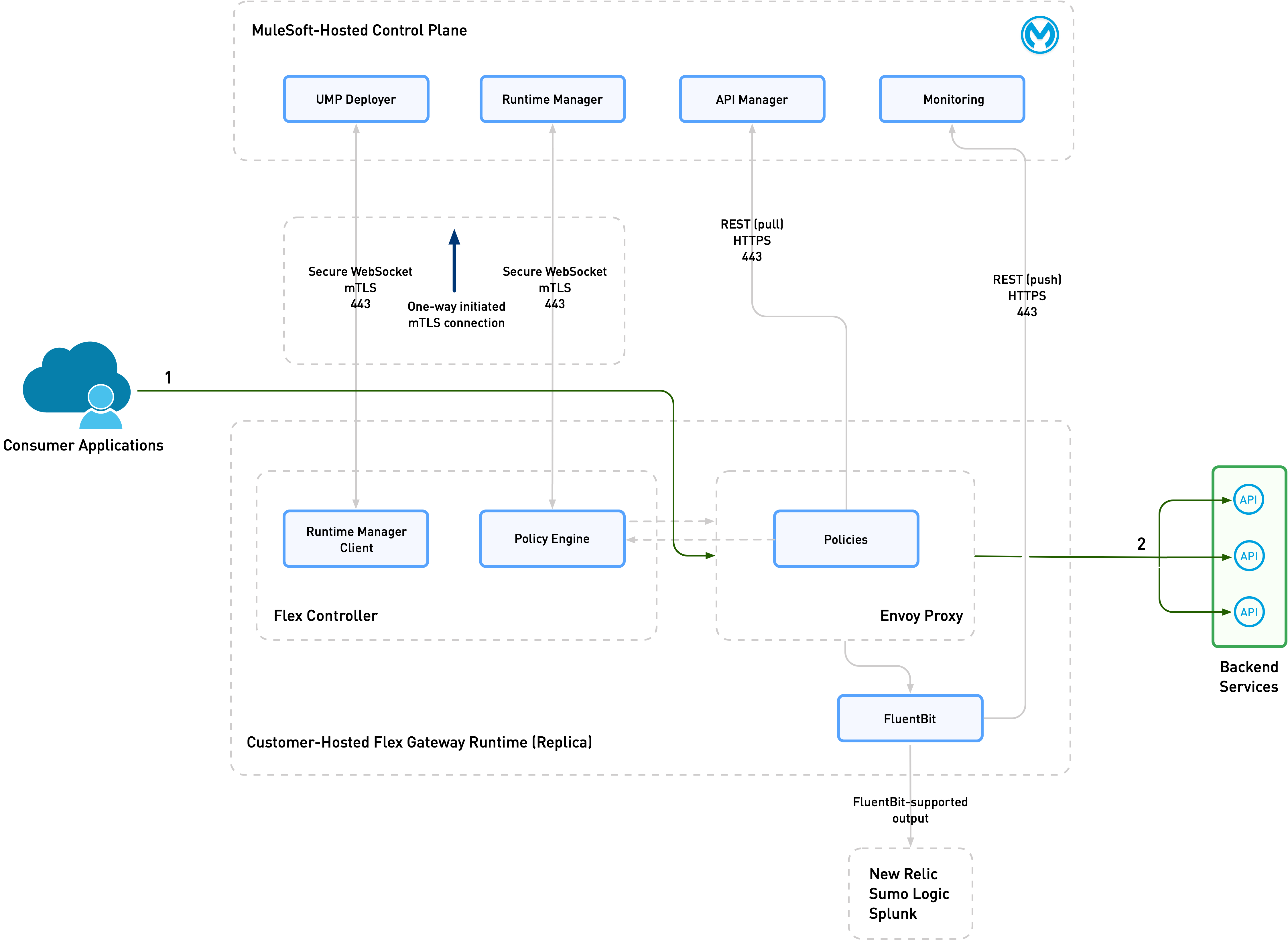
Omni Gateway comprises two components that work in tandem:
The following graphic diagrams the relationship between these components:
Scaling
A single Omni Gateway can support up to 1,000 backend APIs. For high availability, it is best to deploy multiple gateways running in parallel. Deploying multiple gateways increases gateway performance and robustness, and is recommended for high-performance applications that must scale.
Supported Protocols
Omni Gateway supports the following protocols:
-
HTTP
-
WebSocket
-
SOAP
-
gRPC
-
GraphQL
-
OAS3 REST API instances
-
Model Context Protocol (MCP)
-
Agent2Agent (A2A)
| WebSocket API instances don’t support SLA tiers. |
Deployment Types
You can deploy Omni Gateway as a Managed or Self-Managed Omni Gateway. Managed Omni Gateway provides a fully managed option on CloudHub 2.0 or Runtime Fabric, and Self-Managed Omni Gateway provides more options and control.
Managed Omni Gateway
Managed Omni Gateway is a fully hosted version of Omni Gateway on CloudHub 2.0 or Runtime Fabric, hosted and managed on the Anypoint Platform by MuleSoft. Managed Omni Gateway provides high availability, autoscaling, less operational overhead, and regular automatic patches and upgrades. It is designed to simplify API gateway operation through point-and-click setup, and monitoring, and MuleSoft handles the maintenance and infrastructure.
In Managed Omni Gateway, each runtime unit is called a gateway instance.
Self-Managed Omni Gateway
Self-Managed Omni Gateway is a distributed runtime entity that you can install in any cloud data center or, for testing purposes, on your local laptop. Self-Managed Omni Gateway requires you to manage the underlying infrastructure. Various installation options are available for the Self-Managed Omni Gateway, including Docker containers, as a sidecar to a backend application in a Docker container, as a Kubernetes Deployment, or on various Linux environments.
In Self-Managed Omni Gateway, each runtime unit is called a replica. For high availability, it is best to deploy Self-Managed Omni Gateway as a cluster with multiple replicas running in parallel. Using clusters increases gateway performance and robustness, and is recommended for high-performance applications that must scale.
Self-Managed Omni Gateway includes a Fluent Bit implementation, which enables log output to local files, or to aggregators such as New Relic, Sumo Logic, and Splunk. You can also configure external REDIS storage for use with distributed rate limiting and caching. Gateway replicas utilize this storage as a temporary workspace for rate limit coordination, which is pivotal in preserving customer service level agreements.
Self-Managed Omni Gateway can be installed in either of these two modes:
Self-Managed Omni Gateway in Connected Mode
In Connected Mode, the gateway is fully connected to the MuleSoft control plane. This connection allows for centralized management, observability, and security. Anypoint API Manager enables full API lifecycle management and policy configuration. Anypoint Runtime Manager enables you to deploy and configure your gateway.
Choose Connected Mode for a UI-based experience to deploy policies, and for managing and monitoring the gateway.
Self-Managed Omni Gateway in Local Mode
You can also configure and manage a standalone gateway that is mostly disconnected from the control plane. Choose Local Mode for this experience.
| Omni Gateway deployed in Local Mode only connects to the control plane for registration and logging usage metrics. |
In Local Mode, you manage all configuration and policy applications with locally stored declarative configuration files.
Use Local Mode to build CI/CD pipelines for application deployments.
Summary of Differences
The following table summarizes the differences between Connected Mode and Local Mode.
| Connected Mode | Local Mode | |
|---|---|---|
Use Case |
Centralize management, observability, and security. Omni Gateway connects to the control plane. |
Operate independently of the control plane in a mostly disconnected manner. Manage with locally stored declarative configuration files. Build CI/CD pipelines. |
Policy Application |
Via API Manager |
Via local declarative configuration files |
Air-Gapped? |
No. Omni Gateway is connected to the control plane. |
No. Omni Gateway is managed locally but only connected to the control plane for registration and usage metrics. |
Deployment and Installation Options
Managed Deployment Options
You can deploy Managed Omni Gateway on CloudHub 2.0 and Runtime Fabric using Runtime Manager. For details see Deploy a Managed Omni Gateway.
Self-Managed Installation Options
You can install Self-Managed Omni Gateway in a variety of ways:
-
A standalone runtime in a Docker container deployed on Heroku from Salesforce
To learn more, see Mastering API Integration: Salesforce, Heroku, and MuleSoft Omni Gateway.
-
A standalone runtime in a Docker container
-
A sidecar to a backend application in a Docker container, thereby protecting a single backend application
-
A Kubernetes
Deploymentfor high-availability, high-performance use cases -
An OpenShift on IBM Power
Deploymentfor high-availability, high-performance use cases -
A standalone single runtime or replica on various Linux environments, including:
-
Amazon Linux 2023
-
CentOS 8
-
Debian Bookworm
-
Red Hat Enterprise Linux (9)
-
Red Hat Enterprise Linux (9) on IBM Power (ppc64le)
-
Ubuntu Jammy
-
A standalone gateway is good for protecting a limited number of APIs with low transaction volume. However, for other scenarios, or if high availability and reliability are critical, consider using an Ingress controller in Kubernetes.
Version Retirement Dates
For information about Omni Gateway version retirement dates, refer to MuleSoft Product Versioning and Back Support Policy.
Shared Responsibility
The successful operation of Omni Gateway is a responsibility shared between you and MuleSoft.
MuleSoft Responsibility
MuleSoft is responsible for:
-
Providing and supporting Omni Gateway (including the agent, Envoy package, and Fluent Bit package)
-
Providing and supporting a base Helm chart for the installation of Omni Gateway in a Kubernetes cluster
-
Providing and supporting an online Docker image registry
-
Providing and supporting an online package repository for installation on Linux
Your Responsibility
When running on any target, you are responsible for:
-
Maintaining connectivity to the Anypoint Control Plane
-
Not running third-party software that interferes with normal Omni Gateway operation, such as antivirus, DPI, or application security systems
When running in Kubernetes, you are responsible for:
-
Adapting the base Helm chart for your specific needs
-
Managing the Kubernetes
Deployment, including:-
External load balancing
-
Customizations to
Ingressresources -
Log forwarding
-
Monitoring
-
Network ports, NAT gateways, and proxies
-
Container runtime and networking
-
Provisioning and management of the Kubernetes environment, which requires:
-
Your IT team to provision and manage the infrastructure
-
Your network team to configure allowed ports and proxy settings
-
Your security team to verify compliance and obtain security certificates
-
-
See Viewing Usage Reports for information about your monthly Omni Gateway usage.