
Create MCP Servers with MCP Bridge
Use MCP Bridge to create MCP servers from your APIs and SaaS systems so that agents can discover and call their operations as MCP tools.
MCP Bridge turns an existing API or SaaS system into an MCP server without custom code and without changing the underlying system. You select the sources to expose, choose which of their operations to publish as tools, and provide the credentials MCP Bridge uses to call the sources.
When you create an MCP server in Enhanced Experience, the server is added to Portfolio automatically.
During creation, you define:
-
Sources
The APIs and SaaS systems to expose as MCP tools.
-
Tools
The operations from each source that agents can discover and call.
-
Credentials
The credentials MCP Bridge uses to call the selected SaaS systems.
How MCP Bridge Works
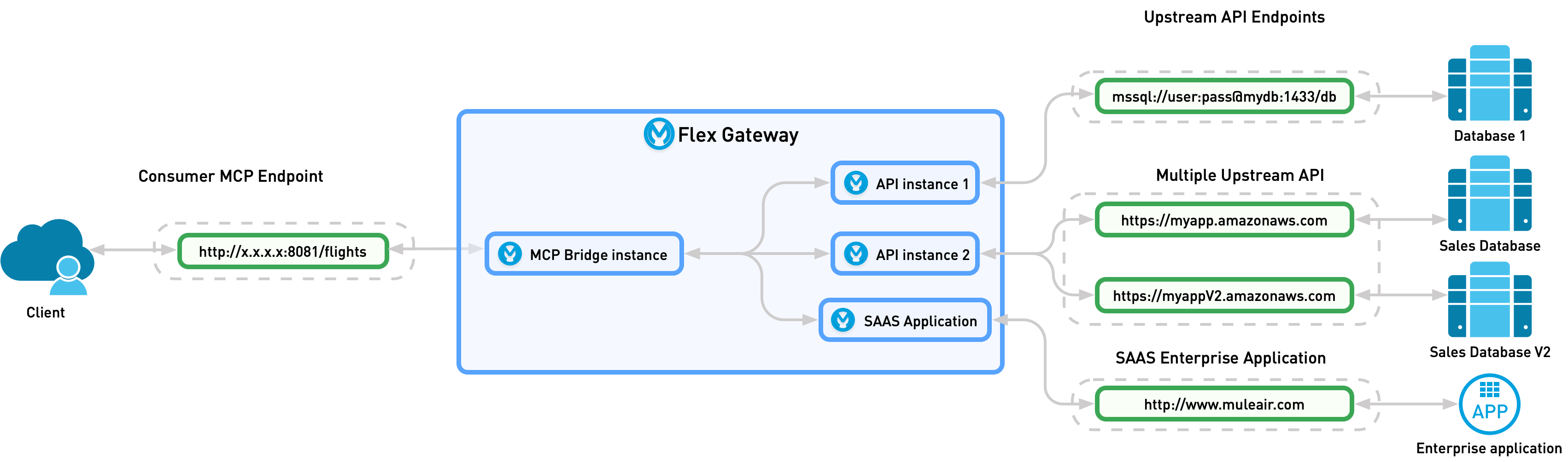
Each operation you select from a source becomes an MCP tool. When an agent requests the list of available tools (tools/list), the MCP server responds with each tool’s name, description, and input schema. When an agent calls a tool (tools/call), MCP Bridge maps the tool name and arguments to an HTTP request to the underlying API or SaaS system.
This diagram shows the relationship of the upstream and downstream configurations to your upstream service and agent client:
MCP Bridge generates each tool’s name and description from the source definition:
-
For SaaS systems, tool names use the format
<source>_<operation>, for example15five_getUsers. You can’t edit SaaS tools. -
For APIs, tool names use a prefix that identifies the API, followed by the HTTP method and path, for example
cmdb-sync_get_admin_dlq. You can edit API tools before you create the server.
Before You Begin
Before getting started, make sure you have:
-
An Anypoint Platform account.
-
One of these Exchange permissions:
-
Exchange: Exchange Contributor
-
Exchange: Exchange Administrator
-
Exchange: Exchange Creator
-
-
These permissions on the environment where you deploy the MCP server:
-
API Manager: Manage APIs Configuration
-
API Manager: Manage Policies
-
API Manager: Deploy API Proxies
-
Runtime Manager: Read Servers
Your administrator can assign these permissions and the Exchange role directly to your user, or through a team or role group in Access Management. For more information, see Enhanced Experience Permissions.
-
-
Credentials for each SaaS system you plan to expose.
Create an MCP Server
-
Open MCP Servers and select Add MCP Server > Create MCP Server.
-
In Select APIs and SaaS systems, select the sources to expose as MCP tools:
-
To narrow the list, search by name or select APIs or SaaS.
-
Select one or more sources. You can combine APIs and SaaS systems in the same MCP server. Each source shows the number of tools or operations it provides.
-
For an API, select the API version from the version list. The latest version is selected by default.
-
-
In Select Tools, choose which tools to expose from the selected sources.
Tools are grouped by source. For an API, the group shows the URL of the API instance that MCP Bridge calls. Each tool shows its HTTP method, description, path, and tool name. Hover over a description to see its full text.
-
For an API, to use a different API instance or create an unmanaged instance, click Change Instance. See Change the Instance for an API.
Each API must have an instance before you can continue. If an API doesn’t have an instance, click Change Instance and create an unmanaged instance.
-
To narrow the list, click Filter, select the methods and paths to show, and click Apply.
Filtering changes only which tools are shown, not which tools are selected. Tools hidden by the filter remain selected and are exposed by the MCP server. -
Clear the checkbox for each tool that agents must not call.
For example, to expose only read operations, filter to the POST, PUT, PATCH, and DELETE methods, clear the checkbox for each tool shown, and then reset the filter to confirm that only GET tools remain selected.
-
For an API tool, to edit the tool’s name, description, input schema, or HTTP mapping, click the Actions menu (⋮) for the tool. See Edit an API Tool.
-
To remove a source, click X in the source’s group.
-
Confirm the number of tools selected, and click Next.
-
-
In SaaS Credentials, provide the credentials MCP Bridge uses to call each selected SaaS system. If you selected only APIs, this step doesn’t appear, and you go directly to Review.
The required credential fields depend on the SaaS system, for example API Key or API Token.
-
If a warning icon appears next to a SaaS system, its upstream configuration is incomplete. Click Configure, enter a value for each variable, and click Save. You must complete the upstream configuration for each SaaS system before you can continue.
Some SaaS systems use variables in their upstream and token URLs, such as
https://{account}.api-us1.com. MCP Bridge substitutes the values you enter into the URLs before it calls the SaaS system. -
For each SaaS system, enter the required credentials. To show or hide a value, click the eye icon.
-
Optionally, click Test Credentials to confirm that MCP Bridge can authenticate to the SaaS system. Test Credentials is available after you enter the required credentials. If the test fails, an error such as
Authentication failed (403)appears. Testing isn’t required to continue. -
Click Next.
-
-
In Review, review the MCP server configuration:
-
In Advanced Server Configuration, review the server details that MCP Bridge generates:
-
Server Name and Version — The name and version of the MCP server.
-
Path — The base path of the MCP server on the gateway.
-
Environment and Gateway — Where the MCP server is deployed.
-
Inbound TLS and Outbound TLS — The TLS contexts for traffic from agents and to the sources.
-
URL — The endpoint that agents use to connect to the MCP server.
-
-
To change the server configuration, click Edit in Advanced Server Configuration, and then update the settings:
-
In Server Configuration, edit the following settings, and then click Save:
-
Server Name — Identifies the MCP server and becomes the subdomain of the server’s URL.
-
Version — The semantic version of the MCP server, for example
1.0.0orv2.1.3. -
Path — The base path on the gateway. By default, the path is derived from the server name.
-
Environment — The environment where the MCP server is deployed.
-
Gateway — The gateway that hosts the MCP server.
-
-
In TLS Configuration, optionally click Add TLS Context to encrypt communication from clients to the gateway (inbound) and from the gateway to your API instances (outbound).
-
-
Optionally, in Description, describe the business purpose of the MCP server.
-
In Sources, Instances & Tools, review each source, its API instance ID and URL, and the tools the MCP server exposes.
-
To change the sources, instances, or tools, click Edit in Sources, Instances & Tools. This returns you to Select APIs and SaaS systems, and you complete the remaining steps again.
-
Click Create & Deploy.
-
After you click Create & Deploy, the MCP server is deployed to the gateway and added to the MCP Servers catalog in Portfolio. Agents connect to the MCP server at the URL shown in Review.
Change the Instance for an API
For an API source, MCP Bridge calls the API through an API instance. You can select a different existing instance or create an unmanaged instance that points to an upstream URL.
-
In Select Tools, click Change Instance in the API’s group.
-
In Advanced settings, select a source:
-
To use an existing instance, select Select Instance, then:
-
Select the instance from the list. Each instance shows its label or ID, type, environment, and upstream URL.
-
Optionally, edit the Route label. By default, the route label is the API name.
-
-
To create an unmanaged instance, select Create new unmanaged instance, then:
-
In Name, enter a name for the instance.
-
In URL, enter the upstream endpoint the instance points to, including the
http://orhttps://scheme. For example,http://example.com/api/v1/. -
In Visibility, select Private or Public. The default is Private.
-
-
-
Click Save.
Edit an API Tool
MCP Bridge generates each API tool from the API specification. Before you create the MCP server, you can change how a tool is presented to agents and how its arguments map to the HTTP request.
-
In Select Tools, click the Actions menu (⋮) for the tool.
-
In Tool definition, review and edit the tool:
-
Enable as tool — Whether the MCP server exposes the tool to agents. This is the same setting as the tool’s checkbox in Select Tools.
-
Method and Resource — The HTTP method and API resource the tool calls.
-
AI tool name — The name agents use to call the tool. The prefix that identifies the API, such as
cmdb-sync_, can’t be changed. -
Description — The description agents use to decide when to call the tool. Write a description that states what the tool does and what it returns.
-
Schema (JSON) — The tool’s input schema, which defines the arguments the agent supplies when calling the tool. Editing the schema replaces the schema derived from the API specification.
-
-
Optionally, in HTTP mapping (optional), edit how the tool’s arguments map to the HTTP request. These values are populated from the API specification.
-
Query Parameter(s) — Click Add query parameter to map an argument to a query parameter.
-
URI Parameter(s) — The URI parameters in the resource path, if any.
-
Headers — Click Add header to map an argument to an HTTP header.
-
Body — A DataWeave expression that builds the request body. The default is
#[vars.params.body]. To test the expression, click Try the DataWeave expression in the playground.
-
-
Click Save.
Edit an MCP Server
After you create an MCP server, you can edit its sources, API versions, tools, credentials, and server configuration.
-
Open MCP Servers and select the MCP server you want to edit.
-
Click Actions > Edit.
The same steps you used to create the MCP server open with your current selections.
-
Update the settings as needed. For more information about each step, see Create an MCP Server.
-
In Review, click Save & Deploy.