
Creating and Managing Model Proxies
Model Proxy provides a unified access layer for multiple Large Language Model (LLM) providers. Model Proxies are deployed to Omni Gateway to enable governance, intelligent routing, and cost management for AI applications.
Model Proxy is supported on Managed Omni Gateway and Self-Managed Omni Gateway running in Connected Mode.
By creating a proxy, the user defines a singular LLM service that can receive requests for multiple LLM providers. This simplifies the developer experience. You can seamlessly add new models to the service without changing the endpoint.
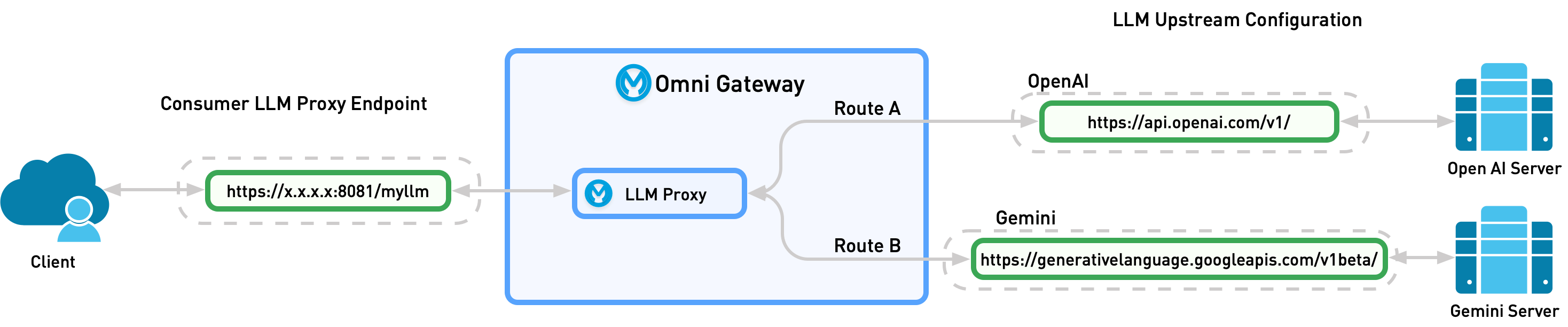
Supported Endpoint Formats
Model Proxy supports these endpoint formats that are selected when creating a Model Proxy and can’t be changed later:
-
OpenAI: The OpenAI API format works with all supported LLM providers and supports multi-routing and fallback mechanisms.
-
Gemini: The native Gemini API format for direct Google Gemini model requests. Supports model-based routing only.
-
Anthropic: The native Anthropic API format for direct Anthropic Claude model requests. Supports model-based routing only.
Depending on configuration, the proxy then sends the request to the model defined by the user or dynamically sends the request to the provider that best matches the request:
-
Model-Based Routing: Static routing. The user specifies what model the Model Proxy should send the request to.
-
Semantic Routing: Dynamic routing. The Model Proxy chooses which model to send the request to based on the request content.
Model-Based Routing
Model-based routing is static routing. In the request, the user specifies what model the Model Proxy should send the request to. By specifying a target model, Model Proxy can override the model version provided by the user.
Semantic Routing
Semantic routing is dynamic routing where the Model Proxy chooses which model to send the request to. For Sematic Routing, the user creates prompt topics for each route. When a request is sent to the Model Proxy, a semantic service compares the request to the define topic utterances and sends the request to the route that best matches it.
Semantic Caching
Semantic caching stores and reuses LLM responses based on semantic similarity. When an incoming request is semantically similar to a previous request, Model Proxy returns the cached response instead of calling the LLM provider again, which reduces latency and cost. To use semantic caching, configure a semantic caching service and enable it on the Model Proxy. Semantic caching supports Azure AI Search as the vector database only. For more information, see Configuring Semantic Caching Services.
Connections and Model Proxies
Model Proxy includes these types:
-
Proxy: A proxy configuration that can route requests to one or multiple LLM providers by using model-based routing and semantic routing strategies. The enhanced experience manages proxy configurations.
-
Connection: A connection configuration that stores credentials and metadata for connecting to a specific LLM provider. The enhanced experience displays connections as a single-route proxy. Connection configurations are managed by external projects, such as an Agent Network project.
Supported LLM Providers and Models
Model Proxy supports these LLM providers and models:
-
OpenAI
-
GPT 5.2
-
GPT 5.2 Pro
-
GPT 5 Mini
-
GPT 5.2 Codex
-
GPT 5 Nano
-
GPT 5
-
GPT 4.1
-
GPT 4o Mini
-
Chat Latest
-
ChatGPT-4o
-
codex-mini-latest
-
computer-use-preview
-
Daybreak Blue
-
Daybreak Red
-
GPT-3.5 Turbo
-
GPT-4
-
GPT-4 Turbo
-
GPT-4 Turbo Preview
-
GPT-4.1 Mini
-
GPT-4.1 nano
-
GPT-4.5 Preview
-
GPT-4o
-
GPT-4o Search Preview
-
GPT-4o Mini Search Preview
-
GPT-5 Chat
-
GPT-5 Pro
-
GPT-5-Codex
-
GPT-5.1
-
GPT-5.1 Chat
-
GPT-5.1-Codex
-
GPT-5.1-Codex Mini
-
GPT-5.1-Codex-Max
-
GPT-5.2 Chat
-
GPT-5.3 Chat
-
GPT-5.3-Codex
-
GPT-5.4
-
GPT-5.4 Mini
-
GPT-5.4 nano
-
GPT-5.4 Pro
-
GPT-5.5
-
GPT-5.5 Pro
-
GPT-5.6 Cyber
-
GPT-5.6 Luna
-
GPT-5.6 Sol
-
GPT-5.6 Terra
-
GPT-6 Astra
-
GPT-6 Sol
-
GPT-6 Luna
-
gpt-oss-120b
-
gpt-oss-20b
-
o1
-
o1 Preview
-
o1-mini
-
o1-pro
-
o3
-
o3-deep-research
-
o3-mini
-
o3-pro
-
o4-mini
-
o4-mini-deep-research
-
-
Azure OpenAI
-
GPT-6 Astra
-
GPT-6 Sol
-
GPT-6 Luna
-
GPT-5.6 Sol
-
GPT-5.6 Terra
-
GPT-5.6 Luna
-
GPT-5.5
-
GPT-5.4
-
GPT-5.4 Mini
-
GPT-5.4 Nano
-
GPT-5.4 Pro
-
GPT-5.3-Codex
-
GPT 5.2
-
GPT 5.2 Pro
-
GPT 5 Mini
-
GPT 5.2 Codex
-
GPT 5 Nano
-
GPT 5
-
GPT 4.1
-
GPT 4o Mini
-
-
Bedrock OpenAI
-
GPT-6 Astra (Bedrock)
-
GPT-6 Sol (Bedrock)
-
GPT-6 Luna (Bedrock)
-
GPT-5.6 Sol (Bedrock)
-
GPT-5.6 Terra (Bedrock)
-
GPT-5.6 Cyber (Bedrock)
-
GPT-5.6 Luna (Bedrock)
-
GPT-5.5 (Bedrock)
-
GPT-5.4 (Bedrock)
-
GPT-OSS 120B (Bedrock)
-
GPT-OSS 20B (Bedrock)
-
-
Gemini
-
Gemini 3 Flash Preview
-
Gemini 2.5 Flash
-
Gemini 2.5 Flash Preview 09-2025
-
Gemini 2.5 Flash Lite
-
Gemini 3 Flash
-
Gemini 3.1 Pro
-
Gemini 3.5
-
Gemini 3.8 Flash
-
Gemma 4 26B A4B
-
Gemma 4 31B
-
-
Anthropic
-
Claude Opus 5.5
-
Claude Opus 5
-
Claude Sonnet 5
-
Claude Fable 5.1
-
Claude Opus 4.8
-
Claude Opus 4.7
-
Claude Opus 4.6
-
Claude Sonnet 4.6
-
Claude Haiku 4.5
-
Claude Fable 5
-
-
Bedrock Anthropic
-
Claude Opus 5.5 (Bedrock)
-
Claude Opus 5 (Bedrock)
-
Claude Opus 4.8 (Bedrock)
-
Claude Opus 4.7 (Bedrock)
-
Claude Opus 4.6 (Bedrock)
-
Claude Sonnet 5 (Bedrock)
-
Claude Sonnet 4.6 (Bedrock)
-
Claude Haiku 4.5 (Bedrock)
-
Claude Fable 5.1 (Bedrock)
-
Claude Fable 5 (Bedrock)
-
Claude Sonnet 4.5 (Bedrock)
-
-
NVIDIA
-
Nemotron 3 Nano 30B A3B
-
Nemotron 3 Super 120B A12B
-
Llama Nemotron Ultra 253B
-
Nemotron 3 Ultra 550B A55B
-
Nemotron 3.5 Lightning 30B A3B
-
Llama Nemotron Super 49B
-
Llama Nemotron Super 49B v1.5
-
Llama Nemotron Nano 8B v1
-
Nemotron Nano 9B v2
-
Llama Nemotron 70B Instruct
-
-
xAI
-
Grok 4.6
-
Grok 4.5
-
Grok 4.3
-
Grok 4.20 (Reasoning)
-
Grok 4.20 (Non-Reasoning)
-
Grok 4.20 Multi-Agent Beta
-
Grok Build 0.1
-
-
Mistral
-
Mistral Large 3
-
Mistral Medium 3.5
-
Mistral Small
-
Magistral Medium
-
Magistral Small
-
Ministral 8B
-
Ministral 3B
-
Codestral
-
Devstral Medium
-
Devstral Small
-
Pixtral Large
-