
Google BigQuery Connector 1.3 Examples
The following examples show several Mule flows for Google BigQuery Connector:
Configure a Connection
To secure connections, you must specify the OAuth connection field values. To do this:
Create a Configuration File for a Connection
Create a configuration file that includes properties for a connection:
-
Create a file named
mule-app.propertiesin the/src/main/resources/folder. -
In the
mule-app.propertiesfile, create a set of properties for the connection, similar to the ones that follow, replacing the bracketed text (including the brackets) with the correct values for your configuration:config.consumerKey=<consumerkey> config.consumerSecret=<consumersecret>
This may vary depending on the selected connection configuration.
For more information about creating a properties file, refer to Configuring Property Placeholders.
Configure the Connection Global Elements
Configure global elements for connection:
-
Create a new Mule project.
-
In the Mule Palette view, click Search in Exchange and enter
google bigquery. -
Add Google BigQuery Connector to the Selected modules section and click Finish.
-
Click the Global Elements tab and click Create.
-
Select Connector Configuration > Google BigQuery Config and click OK.
-
In Connection, select JWT Connection, Oauth2 Connection, or Workload Identity Federation Connection. For the values to enter, see Configure a Global Element for the Connector.
-
Click the Test Connection button to ensure there is connectivity with the Google API. A successful message should pop up.
-
Click OK.
-
Open the HTTPS Listener config in Global Element Configuration.
-
Click the TLS tab and select TLS Configuration > Edit inline.
-
Specify the Key Store Configuration with the generated keystore details to enable HTTPS on this configuration.
-
Click OK.
Configure a Global Element for the Properties File
Configure a global element for the mule-app.properties file so that Mule knows
where to find it:
-
Click the Global Elements tab and click Create.
-
In the Choose Global Type dialog, select Configuration properties and click OK.
-
In the File field, enter
mule.app.properties. -
Click OK.
Get a Job
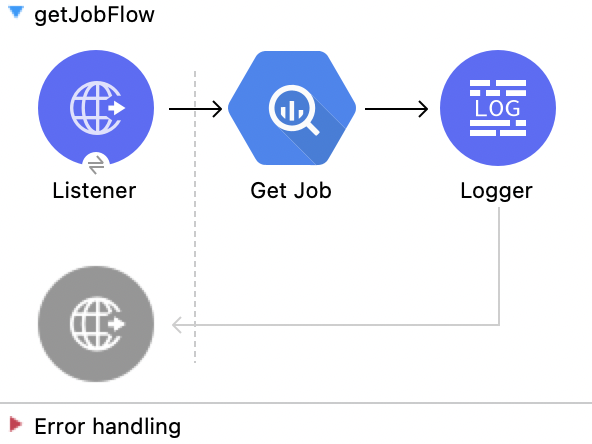
This Mule flow retrieves a job from the given job ID.
This example uses the following operations:
-
HTTP Listener
Accepts data from HTTP requests -
Get Job
Gets a jobEnter the following values:
Field Value Job Id
attributes.queryParams.jobId -
Logger
Shows the HTTP response from the Get Job operation
XML for This Example
Paste this code into the Studio XML editor to quickly load the flow for this example into your Mule app:
<?xml version="1.0" encoding="UTF-8"?>

<mule xmlns:ee="http://www.mulesoft.org/schema/mule/ee/core"
	  xmlns:os="http://www.mulesoft.org/schema/mule/os"
	  xmlns:http="http://www.mulesoft.org/schema/mule/http"
	  xmlns:bigquery="http://www.mulesoft.org/schema/mule/bigquery"
	  xmlns="http://www.mulesoft.org/schema/mule/core"
	  xmlns:doc="http://www.mulesoft.org/schema/mule/documentation"
	  xmlns:xsi="http://www.w3.org/2001/XMLSchema-instance"
	  xmlns:secure-properties="http://www.mulesoft.org/schema/mule/secure-properties"
	  xsi:schemaLocation="
http://www.mulesoft.org/schema/mule/ee/core http://www.mulesoft.org/schema/mule/ee/core/current/mule-ee.xsd http://www.mulesoft.org/schema/mule/core http://www.mulesoft.org/schema/mule/core/current/mule.xsd
http://www.mulesoft.org/schema/mule/bigquery http://www.mulesoft.org/schema/mule/bigquery/current/mule-bigquery.xsd
http://www.mulesoft.org/schema/mule/http http://www.mulesoft.org/schema/mule/http/current/mule-http.xsd
http://www.mulesoft.org/schema/mule/os http://www.mulesoft.org/schema/mule/os/current/mule-os.xsd
		http://www.mulesoft.org/schema/mule/secure-properties http://www.mulesoft.org/schema/mule/secure-properties/current/mule-secure-properties.xsd">
	<secure-properties:config name="Secure_Properties_Config_demo" doc:name="Secure Properties Config"  file="mule-artifact.properties" key="mulesoft" >
		<secure-properties:encrypt algorithm="Blowfish" />
	</secure-properties:config>

	<configuration-properties
			file="mule-artifact.properties" />
	<http:request-config
			name="HTTP_Request_configuration"
			doc:name="HTTP Request configuration"
			>
		<http:request-connection host="127.0.0.1"
								 port="8087"/>
	</http:request-config>
	<http:listener-config name="HTTP_Listener_config"
						  doc:name="HTTP Listener config"
						  >
		<http:listener-connection host="0.0.0.0"
								  port="8082" />
	</http:listener-config>
	<http:listener-config
			name="HTTP_Listener_config1_Test" doc:name="HTTP Listener config">
		<http:listener-connection host="127.0.0.1"
								  port="8087" usePersistentConnections="false"
								  connectionIdleTimeout="4000" />
	</http:listener-config>
	<bigquery:config name="BigQuery__Configuration"
					 doc:name="BigQuery  Configuration"
					 >
		<bigquery:oauth2-connection projectId="${config.projectId}">
			<bigquery:oauth-authorization-code
					consumerKey="${secure::config.consumerKey}"
					consumerSecret="${secure::config.consumerSecret}"
					resourceOwnerId="demo" />
			<bigquery:oauth-callback-config
					listenerConfig="HTTP_Listener_config1_Test" callbackPath="/callback"
					authorizePath="/authorize" />
		</bigquery:oauth2-connection>
	</bigquery:config>
	<flow name="getQueryFlow"
		  >
		<http:listener doc:name="Listener"

					   config-ref="HTTP_Listener_config" path="/get" />
		<bigquery:get-job doc:name="Get Job"

						  jobId="#[attributes.queryParams.jobId]"
						  config-ref="BigQuery__Configuration" />
		<logger level="INFO" doc:name="Logger"
				 />
	</flow>
</mule>Insert a Job
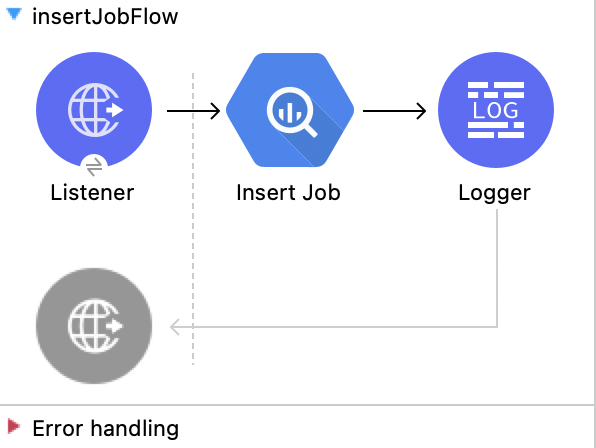
This Mule flow inserts a job using the input configuration.
This example uses the following operations:
-
HTTP Listener
Accepts data from HTTP requests -
Insert Job
Insert a jobEnter the following values:
Field Value Job values content
payload -
Logger
Shows the HTTP response from the Insert Job operation
XML for This Example
Paste this code into the Studio XML editor to quickly load the flow for this example into your Mule app:
<?xml version="1.0" encoding="UTF-8"?>

<mule xmlns:ee="http://www.mulesoft.org/schema/mule/ee/core"
	  xmlns:os="http://www.mulesoft.org/schema/mule/os"
	  xmlns:http="http://www.mulesoft.org/schema/mule/http"
	  xmlns:bigquery="http://www.mulesoft.org/schema/mule/bigquery"
	  xmlns="http://www.mulesoft.org/schema/mule/core"
	  xmlns:doc="http://www.mulesoft.org/schema/mule/documentation"
	  xmlns:xsi="http://www.w3.org/2001/XMLSchema-instance"
	  xmlns:secure-properties="http://www.mulesoft.org/schema/mule/secure-properties"
	  xsi:schemaLocation="
http://www.mulesoft.org/schema/mule/ee/core http://www.mulesoft.org/schema/mule/ee/core/current/mule-ee.xsd http://www.mulesoft.org/schema/mule/core http://www.mulesoft.org/schema/mule/core/current/mule.xsd
http://www.mulesoft.org/schema/mule/bigquery http://www.mulesoft.org/schema/mule/bigquery/current/mule-bigquery.xsd
http://www.mulesoft.org/schema/mule/http http://www.mulesoft.org/schema/mule/http/current/mule-http.xsd
http://www.mulesoft.org/schema/mule/os http://www.mulesoft.org/schema/mule/os/current/mule-os.xsd
		http://www.mulesoft.org/schema/mule/secure-properties http://www.mulesoft.org/schema/mule/secure-properties/current/mule-secure-properties.xsd">
	<secure-properties:config name="Secure_Properties_Config_demo" doc:name="Secure Properties Config"  file="mule-artifact.properties" key="mulesoft" >
		<secure-properties:encrypt algorithm="Blowfish" />
	</secure-properties:config>

	<configuration-properties
			file="mule-artifact.properties" />
	<http:request-config
			name="HTTP_Request_configuration"
			doc:name="HTTP Request configuration"
			>
		<http:request-connection host="127.0.0.1"
								 port="8087"/>
	</http:request-config>
	<http:listener-config name="HTTP_Listener_config"
						  doc:name="HTTP Listener config"
						  >
		<http:listener-connection host="0.0.0.0"
								  port="8082" />
	</http:listener-config>
	<http:listener-config
			name="HTTP_Listener_config1_Test" doc:name="HTTP Listener config">
		<http:listener-connection host="127.0.0.1"
								  port="8087" usePersistentConnections="false"
								  connectionIdleTimeout="4000" />
	</http:listener-config>
	<bigquery:config name="BigQuery__Configuration"
					 doc:name="BigQuery  Configuration"
					 >
		<bigquery:oauth2-connection projectId="${config.projectId}">
			<bigquery:oauth-authorization-code
					consumerKey="${secure::config.consumerKey}"
					consumerSecret="${secure::config.consumerSecret}"
					resourceOwnerId="demo" />
			<bigquery:oauth-callback-config
					listenerConfig="HTTP_Listener_config1_Test" callbackPath="/callback"
					authorizePath="/authorize" />
		</bigquery:oauth2-connection>
	</bigquery:config>
	<flow name="insertJobFlow"
		  >
		<http:listener doc:name="Listener"

					   config-ref="HTTP_Listener_config" path="/insert" />
		<bigquery:insert-job doc:name="Insert Job"

							 config-ref="BigQuery__Configuration">
			<bigquery:job-values-content><![CDATA[#[payload]]]></bigquery:job-values-content>
		</bigquery:insert-job>
		<logger level="INFO" doc:name="Logger"
				 />
	</flow>
</mule>Delete a Job
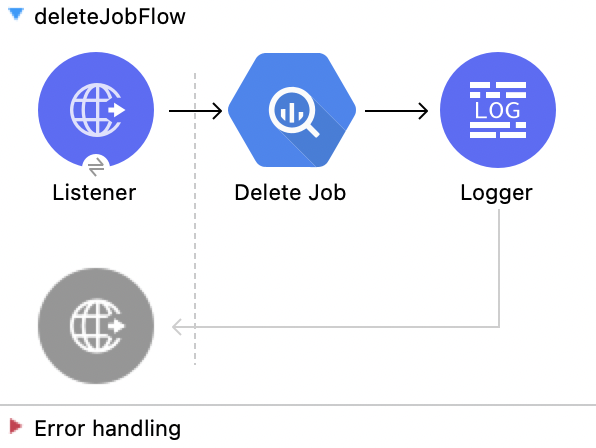
This Mule flow deletes a job from the given job ID.
This example uses the following operations:
-
HTTP Listener
Accepts data from HTTP requests -
Delete Job
Deletes a jobEnter the following values:
Field Value Job Id
attributes.queryParams.jobId -
Logger
Shows the HTTP response from the Delete Job operation
XML for This Example
Paste this code into the Studio XML editor to quickly load the flow for this example into your Mule app:
<?xml version="1.0" encoding="UTF-8"?>

<mule xmlns:ee="http://www.mulesoft.org/schema/mule/ee/core"
	  xmlns:os="http://www.mulesoft.org/schema/mule/os"
	  xmlns:http="http://www.mulesoft.org/schema/mule/http"
	  xmlns:bigquery="http://www.mulesoft.org/schema/mule/bigquery"
	  xmlns="http://www.mulesoft.org/schema/mule/core"
	  xmlns:doc="http://www.mulesoft.org/schema/mule/documentation"
	  xmlns:xsi="http://www.w3.org/2001/XMLSchema-instance"
	  xmlns:secure-properties="http://www.mulesoft.org/schema/mule/secure-properties"
	  xsi:schemaLocation="
http://www.mulesoft.org/schema/mule/ee/core http://www.mulesoft.org/schema/mule/ee/core/current/mule-ee.xsd http://www.mulesoft.org/schema/mule/core http://www.mulesoft.org/schema/mule/core/current/mule.xsd
http://www.mulesoft.org/schema/mule/bigquery http://www.mulesoft.org/schema/mule/bigquery/current/mule-bigquery.xsd
http://www.mulesoft.org/schema/mule/http http://www.mulesoft.org/schema/mule/http/current/mule-http.xsd
http://www.mulesoft.org/schema/mule/os http://www.mulesoft.org/schema/mule/os/current/mule-os.xsd
		http://www.mulesoft.org/schema/mule/secure-properties http://www.mulesoft.org/schema/mule/secure-properties/current/mule-secure-properties.xsd">
	<secure-properties:config name="Secure_Properties_Config_demo" doc:name="Secure Properties Config"  file="mule-artifact.properties" key="mulesoft" >
		<secure-properties:encrypt algorithm="Blowfish" />
	</secure-properties:config>

	<configuration-properties
			file="mule-artifact.properties" />
	<http:request-config
			name="HTTP_Request_configuration"
			doc:name="HTTP Request configuration"
			>
		<http:request-connection host="127.0.0.1"
								 port="8087"/>
	</http:request-config>
	<http:listener-config name="HTTP_Listener_config"
						  doc:name="HTTP Listener config"
						  >
		<http:listener-connection host="0.0.0.0"
								  port="8082" />
	</http:listener-config>
	<http:listener-config
			name="HTTP_Listener_config1_Test" doc:name="HTTP Listener config">
		<http:listener-connection host="127.0.0.1"
								  port="8087" usePersistentConnections="false"
								  connectionIdleTimeout="4000" />
	</http:listener-config>
	<bigquery:config name="BigQuery__Configuration"
					 doc:name="BigQuery  Configuration"
					 >
		<bigquery:oauth2-connection projectId="${config.projectId}">
			<bigquery:oauth-authorization-code
					consumerKey="${secure::config.consumerKey}"
					consumerSecret="${secure::config.consumerSecret}"
					resourceOwnerId="demo" />
			<bigquery:oauth-callback-config
					listenerConfig="HTTP_Listener_config1_Test" callbackPath="/callback"
					authorizePath="/authorize" />
		</bigquery:oauth2-connection>
	</bigquery:config>
	<flow name="deleteJobFlow">
		<http:listener doc:name="Listener"
					   config-ref="HTTP_Listener_config" path="/delete" />
		<bigquery:delete-job doc:name="Delete Job"
							 config-ref="BigQuery__Configuration"
							 jobId="#[attributes.queryParams.jobId]" />
		<logger level="INFO" doc:name="Logger" />
	</flow>
</mule>Get a Query Result
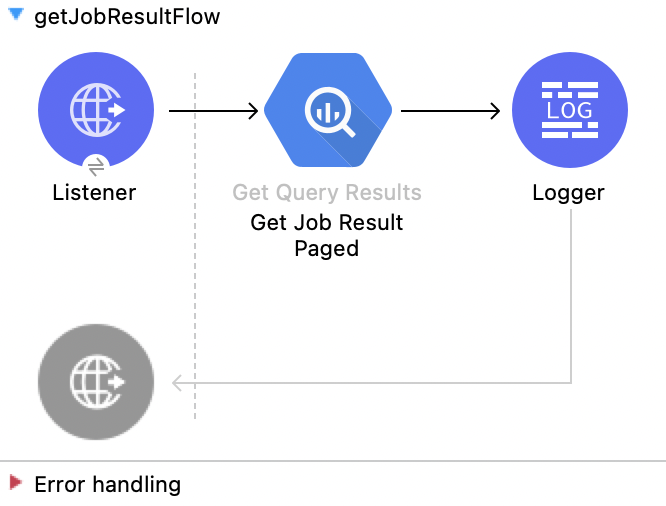
This Mule flow retrieves results of a query.
This example uses the following operations:
-
HTTP Listener
Accepts data from HTTP requests -
Get Query Results
Get results of a queryEnter the following values:
Field Value Job Id
attributes.queryParams.jobIdStart Index
0Max Results
25 -
Logger
Shows the HTTP response from the Get Query Results operation
XML for This Example
Paste this code into the Studio XML editor to quickly load the flow for this example into your Mule app:
<?xml version="1.0" encoding="UTF-8"?>

<mule xmlns:ee="http://www.mulesoft.org/schema/mule/ee/core"
	  xmlns:os="http://www.mulesoft.org/schema/mule/os"
	  xmlns:http="http://www.mulesoft.org/schema/mule/http"
	  xmlns:bigquery="http://www.mulesoft.org/schema/mule/bigquery"
	  xmlns="http://www.mulesoft.org/schema/mule/core"
	  xmlns:doc="http://www.mulesoft.org/schema/mule/documentation"
	  xmlns:xsi="http://www.w3.org/2001/XMLSchema-instance"
	  xmlns:secure-properties="http://www.mulesoft.org/schema/mule/secure-properties"
	  xsi:schemaLocation="
http://www.mulesoft.org/schema/mule/ee/core http://www.mulesoft.org/schema/mule/ee/core/current/mule-ee.xsd http://www.mulesoft.org/schema/mule/core http://www.mulesoft.org/schema/mule/core/current/mule.xsd
http://www.mulesoft.org/schema/mule/bigquery http://www.mulesoft.org/schema/mule/bigquery/current/mule-bigquery.xsd
http://www.mulesoft.org/schema/mule/http http://www.mulesoft.org/schema/mule/http/current/mule-http.xsd
http://www.mulesoft.org/schema/mule/os http://www.mulesoft.org/schema/mule/os/current/mule-os.xsd
		http://www.mulesoft.org/schema/mule/secure-properties http://www.mulesoft.org/schema/mule/secure-properties/current/mule-secure-properties.xsd">
	<secure-properties:config name="Secure_Properties_Config_demo" doc:name="Secure Properties Config"  file="mule-artifact.properties" key="mulesoft" >
		<secure-properties:encrypt algorithm="Blowfish" />
	</secure-properties:config>

	<configuration-properties
			file="mule-artifact.properties" />
	<http:request-config
			name="HTTP_Request_configuration"
			doc:name="HTTP Request configuration"
			>
		<http:request-connection host="127.0.0.1"
								 port="8087"/>
	</http:request-config>
	<http:listener-config name="HTTP_Listener_config"
						  doc:name="HTTP Listener config"
						  >
		<http:listener-connection host="0.0.0.0"
								  port="8082" />
	</http:listener-config>
	<http:listener-config
			name="HTTP_Listener_config1_Test" doc:name="HTTP Listener config">
		<http:listener-connection host="127.0.0.1"
								  port="8087" usePersistentConnections="false"
								  connectionIdleTimeout="4000" />
	</http:listener-config>
	<bigquery:config name="BigQuery__Configuration"
					 doc:name="BigQuery  Configuration"
					 >
		<bigquery:oauth2-connection projectId="${config.projectId}">
			<bigquery:oauth-authorization-code
					consumerKey="${secure::config.consumerKey}"
					consumerSecret="${secure::config.consumerSecret}"
					resourceOwnerId="demo" />
			<bigquery:oauth-callback-config
					listenerConfig="HTTP_Listener_config1_Test" callbackPath="/callback"
					authorizePath="/authorize" />
		</bigquery:oauth2-connection>
	</bigquery:config>
	<flow name="getQueryResultFlow">
		<http:listener doc:name="Listener"
					   config-ref="HTTP_Listener_config" path="/get/results" />
		<bigquery:get-query-results doc:name="Get Query Result Paged" config-ref="BigQuery__Configuration" maxResults="25" jobId="#[attributes.queryParams.jobId]">
			<ee:repeatable-file-store-iterable inMemoryObjects="1000" />
		</bigquery:get-query-results>
		<logger level="INFO" doc:name="Logger"
			 message="#[payload]" />
	</flow>
</mule>Cancel a Job
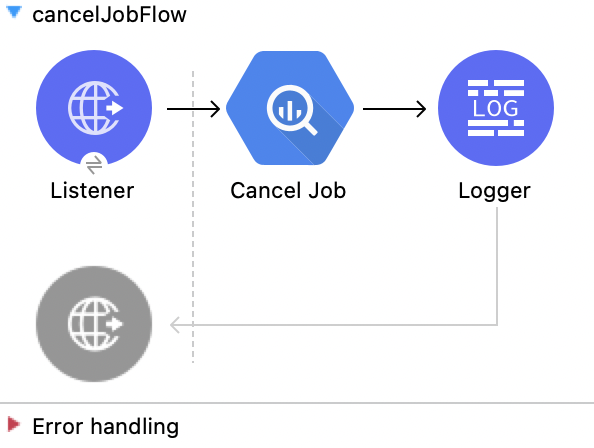
This Mule flow cancels a job from the given job ID.
This example uses the following operations:
-
HTTP Listener
Accepts data from HTTP requests -
Cancel Job
Cancels a jobEnter the following values:
Field Value Job Id
attributes.queryParams.jobIdContent Type
application/json -
Logger
Shows the HTTP response from the Cancel Job operation
XML for This Example
Paste this code into the Studio XML editor to quickly load the flow for this example into your Mule app:
<?xml version="1.0" encoding="UTF-8"?>

<mule xmlns:ee="http://www.mulesoft.org/schema/mule/ee/core"
	  xmlns:os="http://www.mulesoft.org/schema/mule/os"
	  xmlns:http="http://www.mulesoft.org/schema/mule/http"
	  xmlns:bigquery="http://www.mulesoft.org/schema/mule/bigquery"
	  xmlns="http://www.mulesoft.org/schema/mule/core"
	  xmlns:doc="http://www.mulesoft.org/schema/mule/documentation"
	  xmlns:xsi="http://www.w3.org/2001/XMLSchema-instance"
	  xmlns:secure-properties="http://www.mulesoft.org/schema/mule/secure-properties"
	  xsi:schemaLocation="
http://www.mulesoft.org/schema/mule/ee/core http://www.mulesoft.org/schema/mule/ee/core/current/mule-ee.xsd http://www.mulesoft.org/schema/mule/core http://www.mulesoft.org/schema/mule/core/current/mule.xsd
http://www.mulesoft.org/schema/mule/bigquery http://www.mulesoft.org/schema/mule/bigquery/current/mule-bigquery.xsd
http://www.mulesoft.org/schema/mule/http http://www.mulesoft.org/schema/mule/http/current/mule-http.xsd
http://www.mulesoft.org/schema/mule/os http://www.mulesoft.org/schema/mule/os/current/mule-os.xsd
		http://www.mulesoft.org/schema/mule/secure-properties http://www.mulesoft.org/schema/mule/secure-properties/current/mule-secure-properties.xsd">
	<secure-properties:config name="Secure_Properties_Config_demo" doc:name="Secure Properties Config"  file="mule-artifact.properties" key="mulesoft" >
		<secure-properties:encrypt algorithm="Blowfish" />
	</secure-properties:config>

	<configuration-properties
			file="mule-artifact.properties" />
	<http:request-config
			name="HTTP_Request_configuration"
			doc:name="HTTP Request configuration"
			>
		<http:request-connection host="127.0.0.1"
								 port="8087"/>
	</http:request-config>
	<http:listener-config name="HTTP_Listener_config"
						  doc:name="HTTP Listener config"
						  >
		<http:listener-connection host="0.0.0.0"
								  port="8082" />
	</http:listener-config>
	<http:listener-config
			name="HTTP_Listener_config1_Test" doc:name="HTTP Listener config">
		<http:listener-connection host="127.0.0.1"
								  port="8087" usePersistentConnections="false"
								  connectionIdleTimeout="4000" />
	</http:listener-config>
	<bigquery:config name="BigQuery__Configuration"
					 doc:name="BigQuery  Configuration"
					 >
		<bigquery:oauth2-connection projectId="${config.projectId}">
			<bigquery:oauth-authorization-code
					consumerKey="${secure::config.consumerKey}"
					consumerSecret="${secure::config.consumerSecret}"
					resourceOwnerId="demo" />
			<bigquery:oauth-callback-config
					listenerConfig="HTTP_Listener_config1_Test" callbackPath="/callback"
					authorizePath="/authorize" />
		</bigquery:oauth2-connection>
	</bigquery:config>
	<flow name="cancelJobFlow">
		<http:listener doc:name="Listener"
					   config-ref="HTTP_Listener_config" path="/cancel" />
		<bigquery:cancel-job doc:name="Cancel Job"
							 config-ref="BigQuery__Configuration"
							 jobId="#[attributes.queryParams.jobId]" />
		<logger level="INFO" doc:name="Logger" />
	</flow>
</mule>List Jobs
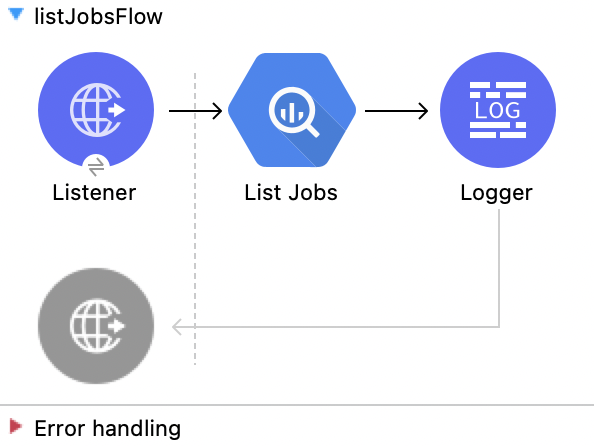
This Mule flow retrieves jobs from the project.
This example uses the following operations:
-
HTTP Listener
Accepts data from HTTP requests -
List Jobs
Lists jobsEnter the following values:
Field Value Content Type
application/jsonMax Results
30Pretty Print
False (Default) -
Logger
Shows the HTTP response from the List Jobs operation
XML for This Example
Paste this code into the Studio XML editor to quickly load the flow for this example into your Mule app:
<?xml version="1.0" encoding="UTF-8"?>

<mule xmlns:ee="http://www.mulesoft.org/schema/mule/ee/core"
	  xmlns:os="http://www.mulesoft.org/schema/mule/os"
	  xmlns:http="http://www.mulesoft.org/schema/mule/http"
	  xmlns:bigquery="http://www.mulesoft.org/schema/mule/bigquery"
	  xmlns="http://www.mulesoft.org/schema/mule/core"
	  xmlns:doc="http://www.mulesoft.org/schema/mule/documentation"
	  xmlns:xsi="http://www.w3.org/2001/XMLSchema-instance"
	  xmlns:secure-properties="http://www.mulesoft.org/schema/mule/secure-properties"
	  xsi:schemaLocation="
http://www.mulesoft.org/schema/mule/ee/core http://www.mulesoft.org/schema/mule/ee/core/current/mule-ee.xsd http://www.mulesoft.org/schema/mule/core http://www.mulesoft.org/schema/mule/core/current/mule.xsd
http://www.mulesoft.org/schema/mule/bigquery http://www.mulesoft.org/schema/mule/bigquery/current/mule-bigquery.xsd
http://www.mulesoft.org/schema/mule/http http://www.mulesoft.org/schema/mule/http/current/mule-http.xsd
http://www.mulesoft.org/schema/mule/os http://www.mulesoft.org/schema/mule/os/current/mule-os.xsd
		http://www.mulesoft.org/schema/mule/secure-properties http://www.mulesoft.org/schema/mule/secure-properties/current/mule-secure-properties.xsd">
	<secure-properties:config name="Secure_Properties_Config_demo" doc:name="Secure Properties Config"  file="mule-artifact.properties" key="mulesoft" >
		<secure-properties:encrypt algorithm="Blowfish" />
	</secure-properties:config>

	<configuration-properties
			file="mule-artifact.properties" />
	<http:request-config
			name="HTTP_Request_configuration"
			doc:name="HTTP Request configuration"
			>
		<http:request-connection host="127.0.0.1"
								 port="8087"/>
	</http:request-config>
	<http:listener-config name="HTTP_Listener_config"
						  doc:name="HTTP Listener config"
						  >
		<http:listener-connection host="0.0.0.0"
								  port="8082" />
	</http:listener-config>
	<http:listener-config
			name="HTTP_Listener_config1_Test" doc:name="HTTP Listener config">
		<http:listener-connection host="127.0.0.1"
								  port="8087" usePersistentConnections="false"
								  connectionIdleTimeout="4000" />
	</http:listener-config>
	<bigquery:config name="BigQuery__Configuration"
					 doc:name="BigQuery  Configuration"
					 >
		<bigquery:oauth2-connection projectId="${config.projectId}">
			<bigquery:oauth-authorization-code
					consumerKey="${secure::config.consumerKey}"
					consumerSecret="${secure::config.consumerSecret}"
					resourceOwnerId="demo" />
			<bigquery:oauth-callback-config
					listenerConfig="HTTP_Listener_config1_Test" callbackPath="/callback"
					authorizePath="/authorize" />
		</bigquery:oauth2-connection>
	</bigquery:config>
	<flow name="listJobsFlow">
		<http:listener doc:name="Listener"
					   config-ref="HTTP_Listener_config" path="/list" />
		<bigquery:list-jobs doc:name="List Jobs"
							config-ref="BigQuery__Configuration" />
		<logger level="INFO" doc:name="Logger" />
	</flow>
</mule>Query
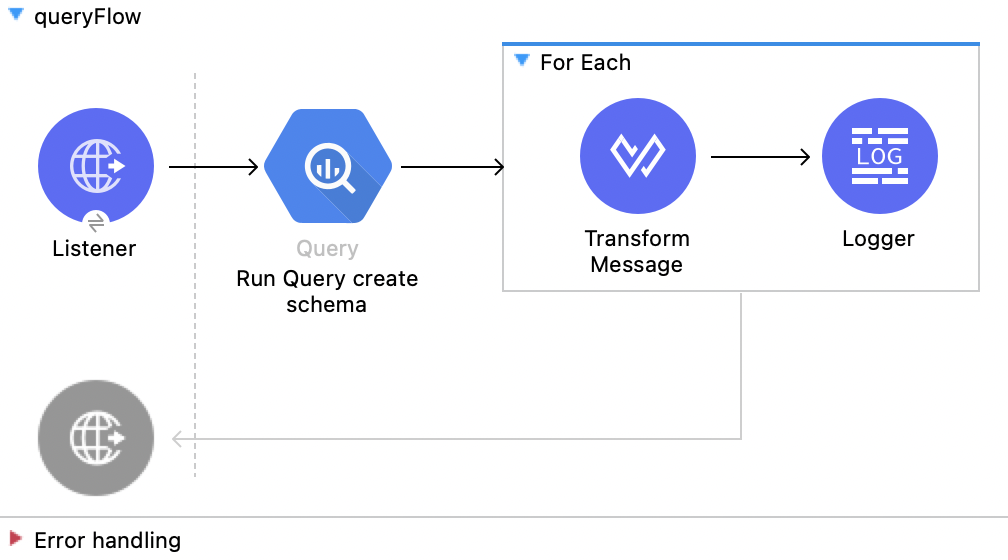
This Mule flow executes the query given in the query job values.
This example uses the following operations:
-
HTTP Listener
Accepts data from HTTP requests -
Query
Executes a queryEnter the following values:
Field Value Query values content
%dw 2.0 output application/json --- payload -
For Each
Iterates through multiple componentsEnter the following values:
Field Value Counter Variable Name
counterBatch Size
1Root Message Variable Name
rootMessage-
Transform Message
Outputs the results of the Query operation in JSON format%dw 2.0 output application/json var resultt = read(payload."output","application/json") --- ((resultt.f) map ((item, index) -> {(payload.attributes.tableSchema.fields[index].name as String) : item.v} )) reduce ((item, accumulator) -> accumulator ++ item) -
Logger
Shows the HTTP response from the Query operation
-
XML for This Example
Paste this code into the Studio XML editor to quickly load the flow for this example into your Mule app:
<?xml version="1.0" encoding="UTF-8"?>
<mule xmlns:google-drive="http://www.mulesoft.org/schema/mule/google-drive"
	  xmlns:ee="http://www.mulesoft.org/schema/mule/ee/core"
	  xmlns:os="http://www.mulesoft.org/schema/mule/os"
	  xmlns:http="http://www.mulesoft.org/schema/mule/http"
	  xmlns:bigquery="http://www.mulesoft.org/schema/mule/bigquery"
	  xmlns="http://www.mulesoft.org/schema/mule/core"
	  xmlns:doc="http://www.mulesoft.org/schema/mule/documentation"
	  xmlns:xsi="http://www.w3.org/2001/XMLSchema-instance"
	  xmlns:secure-properties="http://www.mulesoft.org/schema/mule/secure-properties" xsi:schemaLocation="
http://www.mulesoft.org/schema/mule/ee/core http://www.mulesoft.org/schema/mule/ee/core/current/mule-ee.xsd http://www.mulesoft.org/schema/mule/core http://www.mulesoft.org/schema/mule/core/current/mule.xsd
http://www.mulesoft.org/schema/mule/bigquery http://www.mulesoft.org/schema/mule/bigquery/current/mule-bigquery.xsd
http://www.mulesoft.org/schema/mule/http http://www.mulesoft.org/schema/mule/http/current/mule-http.xsd
http://www.mulesoft.org/schema/mule/os http://www.mulesoft.org/schema/mule/os/current/mule-os.xsd
		http://www.mulesoft.org/schema/mule/secure-properties http://www.mulesoft.org/schema/mule/secure-properties/current/mule-secure-properties.xsd
http://www.mulesoft.org/schema/mule/google-drive http://www.mulesoft.org/schema/mule/google-drive/current/mule-google-drive.xsd">
	<secure-properties:config name="Secure_Properties_Config_demo" doc:name="Secure Properties Config"  file="mule-artifact.properties" key="mulesoft" >
		<secure-properties:encrypt algorithm="Blowfish" />
	</secure-properties:config>
	<configuration-properties
			file="mule-artifact.properties" />
	<http:request-config
			name="HTTP_Request_configuration"
			doc:name="HTTP Request configuration"
			>
		<http:request-connection host="127.0.0.1"
								 port="8087"/>
	</http:request-config>
	<http:listener-config name="HTTP_Listener_config"
						  doc:name="HTTP Listener config"
						  >
		<http:listener-connection host="0.0.0.0"
								  port="8082" />
	</http:listener-config>
	<http:listener-config
			name="HTTP_Listener_config1_Test" doc:name="HTTP Listener config">
		<http:listener-connection host="127.0.0.1"
								  port="8087" usePersistentConnections="false"
								  connectionIdleTimeout="4000" />
	</http:listener-config>
	<bigquery:config name="BigQuery__Configuration"
					 doc:name="BigQuery  Configuration"
					 >
		<bigquery:oauth2-connection projectId="${config.projectId}">
			<bigquery:oauth-authorization-code
					consumerKey="${secure::config.consumerKey}"
					consumerSecret="${secure::config.consumerSecret}"
					resourceOwnerId="demo" />
			<bigquery:oauth-callback-config
					listenerConfig="HTTP_Listener_config1_Test" callbackPath="/callback"
					authorizePath="/authorize" />
		</bigquery:oauth2-connection>
	</bigquery:config>
	<flow name="queryFlow">
		<http:listener doc:name="Listener"
					   config-ref="HTTP_Listener_config" path="/query" />
		<bigquery:query doc:name="Run Query create schema" config-ref="BigQuery__Configuration" responseTimeout="300" responseTimeoutUnit="SECONDS" >
			<bigquery:query-values-content ><![CDATA[#[%dw 2.0
output application/json
---
payload]]]></bigquery:query-values-content>
		</bigquery:query>
		<foreach doc:name="For Each" >
			<ee:transform doc:name="Transform Message">
				<ee:message>
					<ee:set-payload><![CDATA[%dw 2.0
output application/json
var resultt = read(payload."output","application/json")
---
((resultt.f) map ((item, index) ->
        {(payload.attributes.tableSchema.fields[index].name as String) : item.v}
    ))
    reduce ((item, accumulator) -> accumulator ++ item)
]]></ee:set-payload>
				</ee:message>
			</ee:transform>
			<logger level="INFO" doc:name="Logger" message="#[payload]"/>
		</foreach>
	</flow>
</mule>Use On Table Row
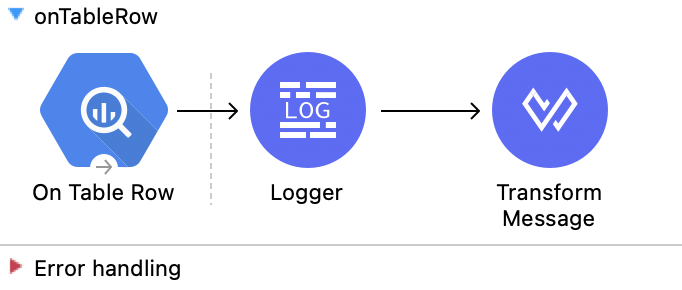
This Mule flow uses the On Table Row source.
This example uses the following operations:
-
On Table Row
Returns all rows of a table based on a watermarkEnter the following values:
Field Value Scheduling Strategy
Fixed FrequencyFrequency
1000Start delay
0Time unit
MILLISECONDS (Default)Dataset name
test124Table name
table_dataWatermark column
idSince
1Column id
id -
Logger
Shows the HTTP response from the On Table Row source -
Transform Message
Outputs the results of the On Table Row source in JSON format%dw 2.0 output application/json --- payload
XML for This Example
Paste this code into the Studio XML editor to quickly load the flow for this example into your Mule app:
<?xml version="1.0" encoding="UTF-8"?>

<mule xmlns:ee="http://www.mulesoft.org/schema/mule/ee/core"
	  xmlns:os="http://www.mulesoft.org/schema/mule/os"
	  xmlns:http="http://www.mulesoft.org/schema/mule/http"
	  xmlns:bigquery="http://www.mulesoft.org/schema/mule/bigquery"
	  xmlns="http://www.mulesoft.org/schema/mule/core"
	  xmlns:doc="http://www.mulesoft.org/schema/mule/documentation"
	  xmlns:xsi="http://www.w3.org/2001/XMLSchema-instance"
	  xmlns:secure-properties="http://www.mulesoft.org/schema/mule/secure-properties"
	  xsi:schemaLocation="
http://www.mulesoft.org/schema/mule/ee/core http://www.mulesoft.org/schema/mule/ee/core/current/mule-ee.xsd http://www.mulesoft.org/schema/mule/core http://www.mulesoft.org/schema/mule/core/current/mule.xsd
http://www.mulesoft.org/schema/mule/bigquery http://www.mulesoft.org/schema/mule/bigquery/current/mule-bigquery.xsd
http://www.mulesoft.org/schema/mule/http http://www.mulesoft.org/schema/mule/http/current/mule-http.xsd
http://www.mulesoft.org/schema/mule/os http://www.mulesoft.org/schema/mule/os/current/mule-os.xsd
		http://www.mulesoft.org/schema/mule/secure-properties http://www.mulesoft.org/schema/mule/secure-properties/current/mule-secure-properties.xsd">
	<secure-properties:config name="Secure_Properties_Config_demo" doc:name="Secure Properties Config"  file="mule-artifact.properties" key="mulesoft" >
		<secure-properties:encrypt algorithm="Blowfish" />
	</secure-properties:config>

	<configuration-properties
			file="mule-artifact.properties" />
	<http:request-config
			name="HTTP_Request_configuration"
			doc:name="HTTP Request configuration"
			>
		<http:request-connection host="127.0.0.1"
								 port="8087"/>
	</http:request-config>
	<http:listener-config name="HTTP_Listener_config"
						  doc:name="HTTP Listener config"
						  >
		<http:listener-connection host="0.0.0.0"
								  port="8082" />
	</http:listener-config>
	<http:listener-config
			name="HTTP_Listener_config1_Test" doc:name="HTTP Listener config">
		<http:listener-connection host="127.0.0.1"
								  port="8087" usePersistentConnections="false"
								  connectionIdleTimeout="4000" />
	</http:listener-config>
	<bigquery:config name="BigQuery__Configuration"
					 doc:name="BigQuery  Configuration"
					 >
		<bigquery:oauth2-connection projectId="${config.projectId}">
			<bigquery:oauth-authorization-code
					consumerKey="${secure::config.consumerKey}"
					consumerSecret="${secure::config.consumerSecret}"
					resourceOwnerId="demo" />
			<bigquery:oauth-callback-config
					listenerConfig="HTTP_Listener_config1_Test" callbackPath="/callback"
					authorizePath="/authorize" />
		</bigquery:oauth2-connection>
	</bigquery:config>
	<flow name="onTableRow">
		<bigquery:on-table-row doc:name="On Table Row"
							   config-ref="BigQuery__Configuration" datasetName="test124"
							   tableName="table_data" watermarkColumn="id" since="'1'"
							   columnId="id">
			<scheduling-strategy>
				<fixed-frequency />
			</scheduling-strategy>
		</bigquery:on-table-row>
		<logger level="INFO" doc:name="Logger" />
		<ee:transform doc:name="Transform Message">
			<ee:message>
				<ee:set-payload><![CDATA[%dw 2.0
output application/json
---
payload]]></ee:set-payload>
			</ee:message>
		</ee:transform>
	</flow>
</mule>Authorize
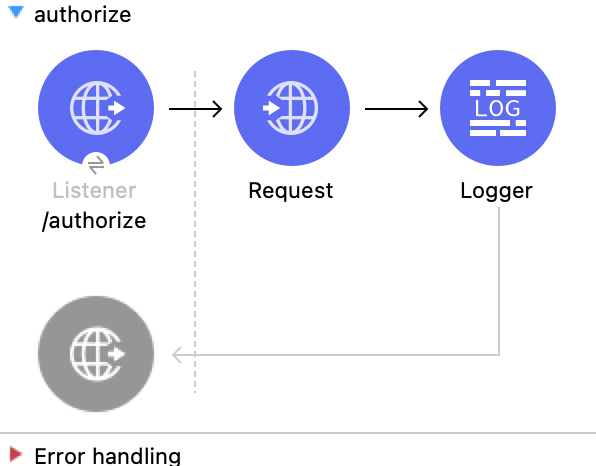
This Mule flow authorizes the connection.
This example uses the following operations:
-
HTTP Listener
Accepts data from HTTP requests -
Request
Consumes an HTTP serviceEnter the following values:
Field Value Method
GET (Default)Path
/authorize?resourceOwnerId=demoBody
payload -
Logger
Shows the HTTP response from the Request operation
XML for This Example
Paste this code into the Studio XML editor to quickly load the flow for this example into your Mule app:
<?xml version="1.0" encoding="UTF-8"?>

<mule xmlns:ee="http://www.mulesoft.org/schema/mule/ee/core"
	  xmlns:os="http://www.mulesoft.org/schema/mule/os"
	  xmlns:http="http://www.mulesoft.org/schema/mule/http"
	  xmlns:bigquery="http://www.mulesoft.org/schema/mule/bigquery"
	  xmlns="http://www.mulesoft.org/schema/mule/core"
	  xmlns:doc="http://www.mulesoft.org/schema/mule/documentation"
	  xmlns:xsi="http://www.w3.org/2001/XMLSchema-instance"
	  xmlns:secure-properties="http://www.mulesoft.org/schema/mule/secure-properties"
	  xsi:schemaLocation="
http://www.mulesoft.org/schema/mule/ee/core http://www.mulesoft.org/schema/mule/ee/core/current/mule-ee.xsd http://www.mulesoft.org/schema/mule/core http://www.mulesoft.org/schema/mule/core/current/mule.xsd
http://www.mulesoft.org/schema/mule/bigquery http://www.mulesoft.org/schema/mule/bigquery/current/mule-bigquery.xsd
http://www.mulesoft.org/schema/mule/http http://www.mulesoft.org/schema/mule/http/current/mule-http.xsd
http://www.mulesoft.org/schema/mule/os http://www.mulesoft.org/schema/mule/os/current/mule-os.xsd
		http://www.mulesoft.org/schema/mule/secure-properties http://www.mulesoft.org/schema/mule/secure-properties/current/mule-secure-properties.xsd">
	<secure-properties:config name="Secure_Properties_Config_demo" doc:name="Secure Properties Config"  file="mule-artifact.properties" key="mulesoft" >
		<secure-properties:encrypt algorithm="Blowfish" />
	</secure-properties:config>

	<configuration-properties
			file="mule-artifact.properties" />
	<http:request-config
			name="HTTP_Request_configuration"
			doc:name="HTTP Request configuration"
			>
		<http:request-connection host="127.0.0.1"
								 port="8087"/>
	</http:request-config>
	<http:listener-config name="HTTP_Listener_config"
						  doc:name="HTTP Listener config"
						  >
		<http:listener-connection host="0.0.0.0"
								  port="8082" />
	</http:listener-config>
	<http:listener-config
			name="HTTP_Listener_config1_Test" doc:name="HTTP Listener config">
		<http:listener-connection host="127.0.0.1"
								  port="8087" usePersistentConnections="false"
								  connectionIdleTimeout="4000" />
	</http:listener-config>
	<bigquery:config name="BigQuery__Configuration"
					 doc:name="BigQuery  Configuration"
					 >
		<bigquery:oauth2-connection projectId="${config.projectId}">
			<bigquery:oauth-authorization-code
					consumerKey="${secure::config.consumerKey}"
					consumerSecret="${secure::config.consumerSecret}"
					resourceOwnerId="demo" />
			<bigquery:oauth-callback-config
					listenerConfig="HTTP_Listener_config1_Test" callbackPath="/callback"
					authorizePath="/authorize" />
		</bigquery:oauth2-connection>
	</bigquery:config>
	<flow name="authorize">
		<http:listener doc:name="/authorize"
					   config-ref="HTTP_Listener_config" path="/authorize">
			<http:response>
				<http:headers><![CDATA[#[{'content-type' : 'text/html'}]]]></http:headers>
			</http:response>
		</http:listener>
		<http:request method="GET" doc:name="Request"
					  config-ref="HTTP_Request_configuration"
					  path="/authorize?resourceOwnerId=demo">
		</http:request>
		<logger level="INFO" doc:name="Logger"
			 message="#[payload]" />
	</flow>
</mule>Render an HTML Form
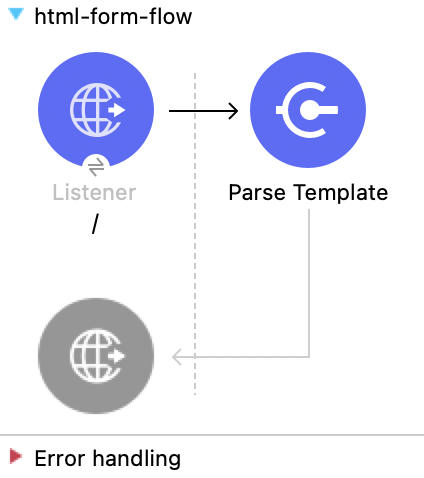
This Mule flow renders the HTML form.
This example uses the following operations:
-
HTTP Listener
Accepts data from HTTP requests -
Parse Template
Processes a templateEnter the following values:
Field Value Location
index.html
XML for This Example
Paste this code into the Studio XML editor to quickly load the flow for this example into your Mule app:
<?xml version="1.0" encoding="UTF-8"?>

<mule xmlns:ee="http://www.mulesoft.org/schema/mule/ee/core"
	  xmlns:os="http://www.mulesoft.org/schema/mule/os"
	  xmlns:http="http://www.mulesoft.org/schema/mule/http"
	  xmlns:bigquery="http://www.mulesoft.org/schema/mule/bigquery"
	  xmlns="http://www.mulesoft.org/schema/mule/core"
	  xmlns:doc="http://www.mulesoft.org/schema/mule/documentation"
	  xmlns:xsi="http://www.w3.org/2001/XMLSchema-instance"
	  xmlns:secure-properties="http://www.mulesoft.org/schema/mule/secure-properties"
	  xsi:schemaLocation="
http://www.mulesoft.org/schema/mule/ee/core http://www.mulesoft.org/schema/mule/ee/core/current/mule-ee.xsd http://www.mulesoft.org/schema/mule/core http://www.mulesoft.org/schema/mule/core/current/mule.xsd
http://www.mulesoft.org/schema/mule/bigquery http://www.mulesoft.org/schema/mule/bigquery/current/mule-bigquery.xsd
http://www.mulesoft.org/schema/mule/http http://www.mulesoft.org/schema/mule/http/current/mule-http.xsd
http://www.mulesoft.org/schema/mule/os http://www.mulesoft.org/schema/mule/os/current/mule-os.xsd
		http://www.mulesoft.org/schema/mule/secure-properties http://www.mulesoft.org/schema/mule/secure-properties/current/mule-secure-properties.xsd">
	<secure-properties:config name="Secure_Properties_Config_demo" doc:name="Secure Properties Config"  file="mule-artifact.properties" key="mulesoft" >
		<secure-properties:encrypt algorithm="Blowfish" />
	</secure-properties:config>

	<configuration-properties
			file="mule-artifact.properties" />
	<http:request-config
			name="HTTP_Request_configuration"
			doc:name="HTTP Request configuration"
			>
		<http:request-connection host="127.0.0.1"
								 port="8087"/>
	</http:request-config>
	<http:listener-config name="HTTP_Listener_config"
						  doc:name="HTTP Listener config"
						  >
		<http:listener-connection host="0.0.0.0"
								  port="8082" />
	</http:listener-config>
	<http:listener-config
			name="HTTP_Listener_config1_Test" doc:name="HTTP Listener config">
		<http:listener-connection host="127.0.0.1"
								  port="8087" usePersistentConnections="false"
								  connectionIdleTimeout="4000" />
	</http:listener-config>
	<bigquery:config name="BigQuery__Configuration"
					 doc:name="BigQuery  Configuration"
					 >
		<bigquery:oauth2-connection projectId="${config.projectId}">
			<bigquery:oauth-authorization-code
					consumerKey="${secure::config.consumerKey}"
					consumerSecret="${secure::config.consumerSecret}"
					resourceOwnerId="demo" />
			<bigquery:oauth-callback-config
					listenerConfig="HTTP_Listener_config1_Test" callbackPath="/callback"
					authorizePath="/authorize" />
		</bigquery:oauth2-connection>
	</bigquery:config>
	<flow name="html-form-flow">
		<http:listener doc:name="/"
					   config-ref="HTTP_Listener_config" path="/">
			<http:response>
				<http:headers><![CDATA[#[{'content-type' : 'text/html'}]]]></http:headers>
			</http:response>
		</http:listener>
		<parse-template doc:name="Parse Template"
						location="index.html" />
	</flow>
</mule>