
gRPC Connector 1.0
Anypoint Connector for gRPC (gRPC Connector) enables you to connect to the gRPC API. gRPC Connector enables Mule applications to communicate with gRPC services, providing both client and server capabilities for high-performance, cross-platform RPC communication.
For information about compatibility and fixed issues, refer to the gRPC Connector Release Notes.
Before You Begin
To use this connector, you must be familiar with:
-
The gRPC Connector’s API
-
Anypoint Connectors
-
Mule runtime engine (Mule)
-
Elements and global elements in a Mule flow
-
How to create a Mule app using Anypoint Code Builder or Anypoint Studio
Before creating an app, you must have:
-
Credentials to access the gRPC target resource
-
Anypoint Platform
-
The latest versions of Anypoint Code Builder or Anypoint Studio
Supported gRPC Patterns
This connector supports all four gRPC communication patterns.
| Pattern | Description |
|---|---|
Unary |
Single request, single response |
Server Streaming |
Single request, multiple responses streamed from server |
Client Streaming |
Multiple requests from client, single response |
Bidirectional Streaming |
Multiple requests and responses streamed in both directions |
Key Capabilities
-
Protocol Buffer Support
Native support for protobuf descriptor files (
.desc) -
Dynamic Metadata Resolution
Automatic type resolution based on IDL definitions
-
Connection Management
Managed channels with connection pooling and validation
-
Conversation Management
Support for stateful streaming conversations
-
Async Operations
Non-blocking asynchronous operation execution
-
TLS Support
Configurable TLS/SSL for secure connections
-
Custom Headers
Support for default headers on connections
-
Custom Status Codes
Server sources can return a specific gRPC status code and description to the client
Architecture
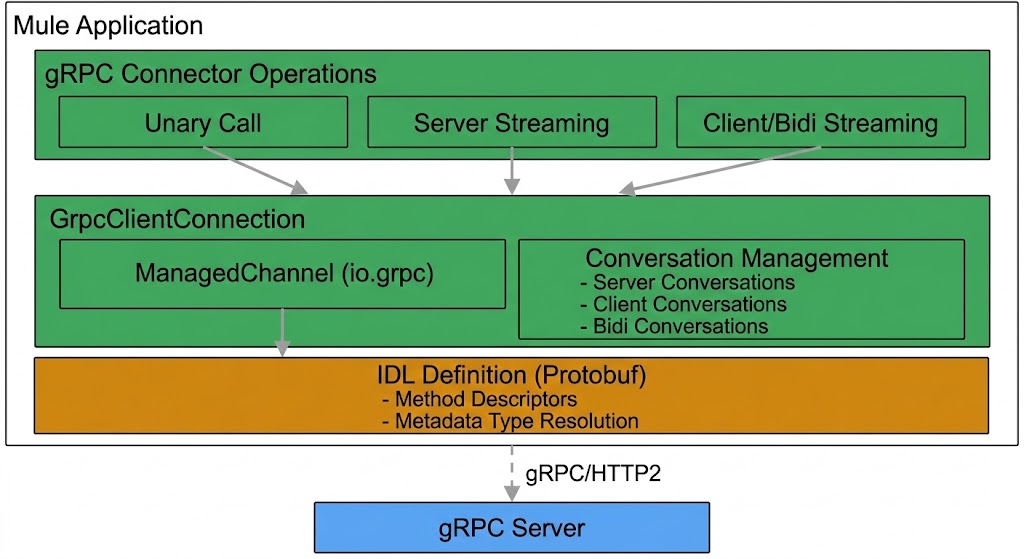
Conversation Management
The connector maintains stateful conversations for streaming operations:
-
Server Conversations
Maps
conversationIdtoServerConversationcontaining shared FrameWrapperQueue for multiple streaming requests -
Client Conversations
Maps conversationId to ClientConversation with request observer and response future
-
Bidirectional Conversations
Maps
conversationIdtoBidiConversationfor bidirectional streaming with request or response observers
Next Step
After you complete the prerequisites, you’re ready to create an app and configure the connector using Anypoint Studio or Anypoint Code Builder.