
Azure Service Bus Management 1.0 の例
このセクションの例は、Azure Service Bus キューに関する情報を取得する方法、および Azure Service Bus トピックを作成する方法を示しています。 これらの例では、一部の項目値に変数を使用しています。次のいずれかを実行できます。
-
コード内の変数をその値に置き換える
-
プロパティファイルで各変数の値を指定し、コネクタ設定からそのファイルを参照する
プロパティファイルの使い方が分からない場合は、「プロパティプレースホルダーの設定」を参照してください。
始める前に
以下があることを確認します。
-
Java 8、11、または 17
-
Anypoint Studio 7.5 以降
-
Mule Runtime Engine (Mule) 4.3.0 以降
-
DataWeave
キュー情報の取得の例
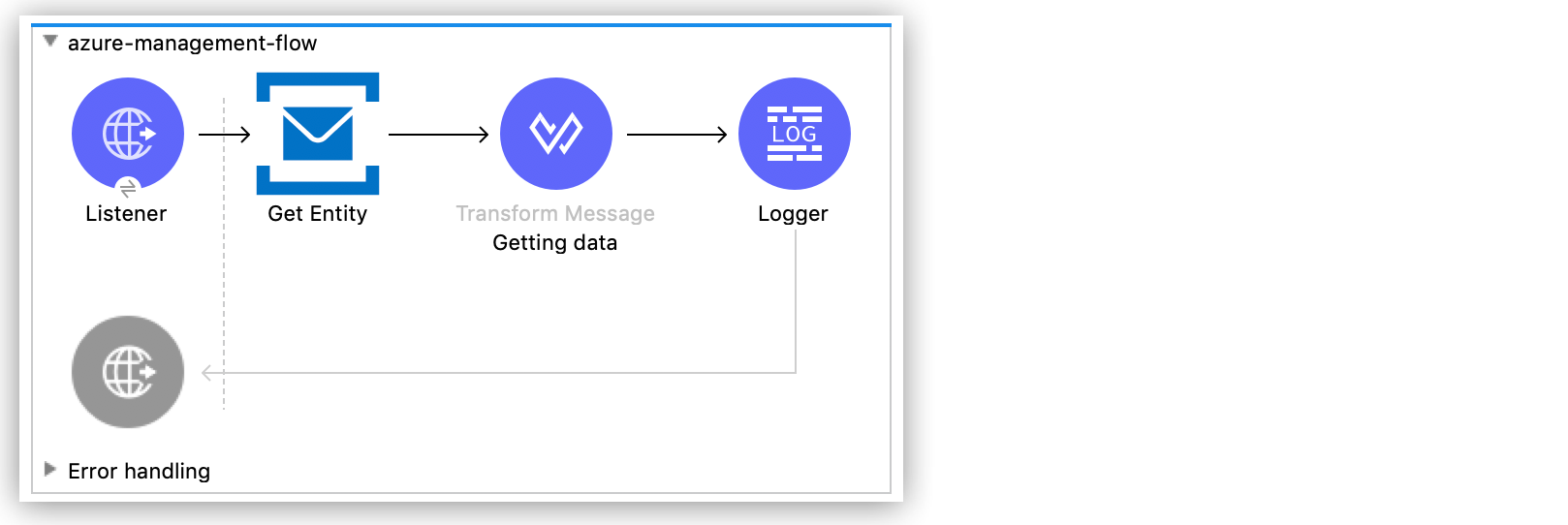
次の例は、Azure Service Bus インスタンスの特定のキューに関する情報を取得する方法を示しています。次のスクリーンショットは、この例の Anypoint Studio アプリケーションフローを示しています。
-
Studio で新しい Mule プロジェクトを作成します。
-
[Mule Palette (Mule パレット)] ビューで「
http」を検索し、[Listener] 操作を選択します。 -
[Listener] 操作を Studio キャンバスにドラッグします。
-
[Listener] 設定で、[Connector configuration (コネクタ設定)] 項目の横にある [+] をクリックしてグローバル要素を追加します。
-
デフォルトを受け入れます。
-
[Path (パス)] 項目を
/queue に設定します。
Get Entity 操作の追加および設定の例
Get Entity 操作を追加し、設定情報やメタデータに関する情報など、指定されたキューに関する情報を表示します。
-
[Mule Palette (Mule パレット)] ビューで「
azure」を検索し、Azure Service Bus Management Connector の [Get Entity] 操作を選択します。 -
[Get Entity] コンポーネントを Studio キャンバスの [Listener] の右にドラッグします。
-
[Get Entity] 設定で、[Connector configuration (コネクタ設定)] 項目の横にある [+] をクリックしてグローバル要素を追加します。
-
[SMS Namespace (SMS 名前空間)]、[Shared Access Key Name (共有アクセスキー名)]、[Shared Access Key (共有アクセスキー)] 項目に値を入力します。
-
[Test Connection (接続をテスト)] をクリックして、Mule が Azure Service Bus インスタンスに接続できることを確認します。
-
正常に接続できた場合は、[OK] をクリックして設定を保存します。
-
そうでない場合は、見直して、誤ったパラメーターを修正してからもう一度テストします。
-
-
[Entity(Queue or Topic) (エンティティ (キューまたはトピック))] 項目で、情報が必要なキューの名前を入力します。
Transform Message コンポーネントの追加
データの形式を設定し、Get Entity 操作の出力でメタデータが表示される方法を示す Transform Message コンポーネントを追加します。
-
[Mule Palette (Mule パレット)] ビューで、「
transform」を検索します。 -
[Transform Message] コンポーネントをキャンバスの [Get Entity] コンポーネントの右にドラッグします。
-
[Transform Message] 設定で、表示名を「
Getting Data」に変更します。 -
[Output (出力)] セクションの括弧を次の XML で上書きします。
%dw 2.0
output application/json
ns ns0 http://www.w3.org/2005/Atom
ns ns01 http://schemas.microsoft.com/netservices/2010/10/servicebus/connect
---
{
"title": payload.ns0#entry.ns0#title,
"publishedAt": payload.ns0#entry.ns0#published,
"lockDuration": payload.ns0#entry.ns0#content.ns01#QueueDescription.ns01#LockDuration,
"maxSize": payload.ns0#entry.ns0#content.ns01#QueueDescription.ns01#MaxSizeInMegabytes,
"requiresDuplicate": payload.ns0#entry.ns0#content.ns01#QueueDescription.ns01#RequiresDuplicateDetection,
"requiresSession": payload.ns0#entry.ns0#content.ns01#QueueDescription.ns01#RequiresSession,
"deadLettering": payload.ns0#entry.ns0#content.ns01#QueueDescription.ns01#DeadLetteringOnMessageExpiration,
"enabledBatched": payload.ns0#entry.ns0#content.ns01#QueueDescription.ns01#EnableBatchedOperations,
"defaultMTTL": payload.ns0#entry.ns0#content.ns01#QueueDescription.ns01#DefaultMessageTimeToLive,
"duplicateDetection": payload.ns0#entry.ns0#content.ns01#QueueDescription.ns01#DuplicateDetectionHistoryTimeWindow,
}
Logger コンポーネントの追加
Mule コンソールに応答を表示する Logger コンポーネントを追加します。
-
[Mule Palette (Mule パレット)] ビューで「
logger」を検索し、[Logger (Core)] コンポーネントを選択します。 -
[Logger (Core)] コンポーネントを Studio キャンバスの [Transform Message] コンポーネントの右にドラッグします。
-
[Logger] 設定の [Message (メッセージ)] 項目に「
#[payload]」とします。 -
プロジェクトを保存します。
-
GET 要求を
http://127.0.0.1:8081/queue に送信して、アプリケーションをテストします。
キューの取得の例の XML コード
<?xml version="1.0" encoding="UTF-8"?>
<mule xmlns:ee="http://www.mulesoft.org/schema/mule/ee/core" xmlns:http="http://www.mulesoft.org/schema/mule/http"
xmlns:azure-service-bus-management="http://www.mulesoft.org/schema/mule/azure-service-bus-management"
xmlns="http://www.mulesoft.org/schema/mule/core" xmlns:doc="http://www.mulesoft.org/schema/mule/documentation" xmlns:xsi="http://www.w3.org/2001/XMLSchema-instance" xsi:schemaLocation="http://www.mulesoft.org/schema/mule/core http://www.mulesoft.org/schema/mule/core/current/mule.xsd
http://www.mulesoft.org/schema/mule/azure-service-bus-management http://www.mulesoft.org/schema/mule/azure-service-bus-management/current/mule-azure-service-bus-management.xsd
http://www.mulesoft.org/schema/mule/http http://www.mulesoft.org/schema/mule/http/current/mule-http.xsd
http://www.mulesoft.org/schema/mule/ee/core http://www.mulesoft.org/schema/mule/ee/core/current/mule-ee.xsd">
<azure-service-bus-management:config name="Azure_Service_Bus_Management_Connector_Config" doc:name="Azure Service Bus Management Connector Config"  >
<azure-service-bus-management:shared-access-signature-connection namespace="azure-management-testing" sharedAccessKeyName="RootManageSharedAccessKey" sharedAccessKey="FgBRI++kphTGJcr2OL8G3BLLAdAn3p7newgQ2Ixf7hk="/>
</azure-service-bus-management:config>
<http:listener-config name="HTTP_Listener_config" doc:name="HTTP Listener config" >
<http:listener-connection host="0.0.0.0" port="8081" />
</http:listener-config>
<flow name="azure-management-flow"  >
<http:listener doc:name="Listener" config-ref="HTTP_Listener_config" path="queue"/>
<azure-service-bus-management:get-by-entity doc:name="Get Entity" config-ref="Azure_Service_Bus_Management_Connector_Config" entity="your-queue"/>
<ee:transform doc:name="Getting data"  >
<ee:message >
<ee:set-payload ><![CDATA[%dw 2.0
output application/json
ns ns0 http://www.w3.org/2005/Atom
ns ns01 http://schemas.microsoft.com/netservices/2010/10/servicebus/connect
---
{
"title": payload.ns0#entry.ns0#title,
"publishedAt": payload.ns0#entry.ns0#published,
"lockDuration": payload.ns0#entry.ns0#content.ns01#QueueDescription.ns01#LockDuration,
"maxSize": payload.ns0#entry.ns0#content.ns01#QueueDescription.ns01#MaxSizeInMegabytes,
"requiresDuplicate": payload.ns0#entry.ns0#content.ns01#QueueDescription.ns01#RequiresDuplicateDetection,
"requiresSession": payload.ns0#entry.ns0#content.ns01#QueueDescription.ns01#RequiresSession,
"deadLettering": payload.ns0#entry.ns0#content.ns01#QueueDescription.ns01#DeadLetteringOnMessageExpiration,
"enabledBatched": payload.ns0#entry.ns0#content.ns01#QueueDescription.ns01#EnableBatchedOperations,
"defaultMTTL": payload.ns0#entry.ns0#content.ns01#QueueDescription.ns01#DefaultMessageTimeToLive,
"duplicateDetection": payload.ns0#entry.ns0#content.ns01#QueueDescription.ns01#DuplicateDetectionHistoryTimeWindow,
}]]></ee:set-payload>
</ee:message>
</ee:transform>
<logger level="INFO" doc:name="Logger"  message="#[payload]"/>
</flow>
</mule>
トピックの作成の例
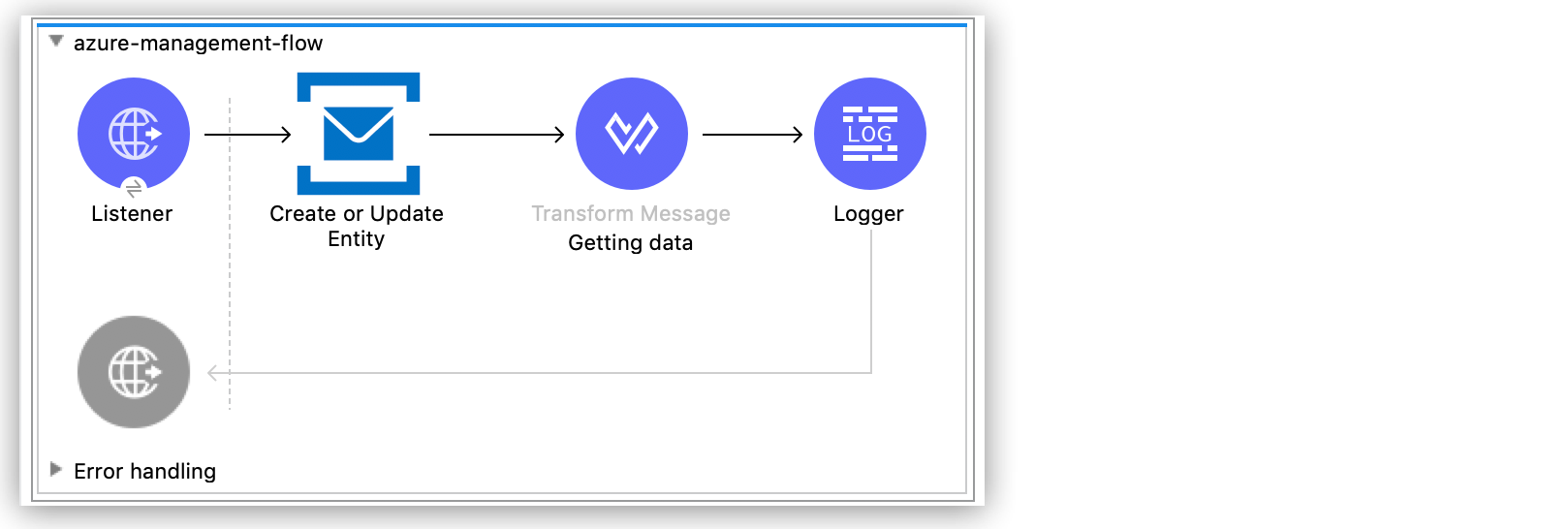
次の例は、Azure Service Bus インスタンスの新しいトピックを作成する方法を示しています。次のスクリーンショットは、この例の Anypoint Studio フローを示しています。
-
Studio で新しい Mule プロジェクトを作成します。
-
[Mule Palette (Mule パレット)] ビューで「
http」を検索し、[Listener] 操作を選択します。 -
Listener 操作をキャンバスにドラッグします。
-
[Listener] 設定で、[Connector configuration (コネクタ設定)] 項目の横にある [+] をクリックしてグローバル要素を追加します。
-
[Host (ホスト)] 項目を「0.0.0.0」、[Port (ポート)] 項目を「
808」に設定し、[Save (保存)] をクリックします。 -
[Path (パス)] 項目を
/topic に設定します。
Create or Update Entity 操作の追加および設定
Create or Update Entity 操作を使用して、トピックを作成できます。
-
[Mule Palette (Mule パレット)] ビューで「
azure service bus management」を検索し、[Create or Update Entity] 操作を選択します。 -
[Create or Update Entity] 操作をキャンバスの [Listener] の右にドラッグします。
-
[Create or Update Entity] 設定で、[Connector configuration (コネクタ設定)] 項目の横にある [+] をクリックしてグローバル要素を追加します。
-
[SMS Namespace (SMS 名前空間)]、[Shared Access Key Name (共有アクセスキー名)]、[Shared Access Key (共有アクセスキー)] 項目に値を入力します。
-
[Test Connection (接続をテスト)] をクリックして、Mule が Azure Service Bus インスタンスに接続できることを確認します。
-
正常に接続できた場合は、[OK] をクリックして設定を保存します。
-
そうでない場合は、見直して、誤ったパラメーターを修正してからもう一度テストします。
-
-
[Entity(Queue or Topic) (エンティティ (キューまたはトピック))] 項目で、情報が必要なキューの名前を入力します。
Transform Message コンポーネントの追加
データの形式を設定し、Create or Update Entity 操作の出力でメタデータが表示される方法を示す Transform Message コンポーネントを追加します。
-
[Mule Palette (Mule パレット)] ビューで、「
transform」を検索します。 -
[Transform Message] コンポーネントをキャンバスの [Create or Update Entity] コンポーネントの右にドラッグします。
-
[Transform Message] 設定で、表示名を「
Getting Data」に変更します。 -
[Output (出力)] セクションの括弧を次の XML で上書きします。
%dw 2.0
output application/json
ns ns0 http://www.w3.org/2005/Atom
ns ns01 http://schemas.microsoft.com/netservices/2010/10/servicebus/connect
---
{
title: payload.ns0#entry.ns0#title,
publishedAt: payload.ns0#entry.ns0#published,
maxSize: payload.ns0#entry.ns0#content.ns01#TopicDescription.ns01#MaxSizeInMegabytes,
requiresDuplicate: payload.ns0#entry.ns0#content.ns01#TopicDescription.ns01#RequiresDuplicateDetection,
enableBatched: payload.ns0#entry.ns0#content.ns01#TopicDescription.ns01#EnableBatchedOperations,
defaultMTTL: payload.ns0#entry.ns0#content.ns01#TopicDescription.ns01#DefaultMessageTimeToLive,
duplicateDetection: payload.ns0#entry.ns0#content.ns01#TopicDescription.ns01#DuplicateDetectionHistoryTimeWindow,
}
Logger コンポーネントの追加
Mule コンソールに新しいトピックを表示する Logger コンポーネントを追加します。
-
[Mule Palette (Mule パレット)] ビューで「
logger」を検索し、[Logger (Core)] コンポーネントを選択します。 -
[Logger (Core)] コンポーネントを Studio キャンバスの [Transform Message] コンポーネントの右にドラッグします。
-
[Logger] 設定の [Message (メッセージ)] 項目に「
#[payload]」とします。 -
プロジェクトを保存します。
-
GET 要求を
http://127.0.0.1:8081/topic に送信して、アプリケーションをテストします。
トピックの作成の例の XML
<?xml version="1.0" encoding="UTF-8"?>
<mule xmlns:ee="http://www.mulesoft.org/schema/mule/ee/core" xmlns:http="http://www.mulesoft.org/schema/mule/http"
xmlns:azure-service-bus-management="http://www.mulesoft.org/schema/mule/azure-service-bus-management"
xmlns="http://www.mulesoft.org/schema/mule/core" xmlns:doc="http://www.mulesoft.org/schema/mule/documentation" xmlns:xsi="http://www.w3.org/2001/XMLSchema-instance" xsi:schemaLocation="http://www.mulesoft.org/schema/mule/core http://www.mulesoft.org/schema/mule/core/current/mule.xsd
http://www.mulesoft.org/schema/mule/azure-service-bus-management http://www.mulesoft.org/schema/mule/azure-service-bus-management/current/mule-azure-service-bus-management.xsd
http://www.mulesoft.org/schema/mule/http http://www.mulesoft.org/schema/mule/http/current/mule-http.xsd
http://www.mulesoft.org/schema/mule/ee/core http://www.mulesoft.org/schema/mule/ee/core/current/mule-ee.xsd">
<azure-service-bus-management:config name="Azure_Service_Bus_Management_Connector_Config" doc:name="Azure Service Bus Management Connector Config" doc:id="a59bdeee-75d3-4708-b3e1-923189366fcf" >
<azure-service-bus-management:shared-access-signature-connection namespace="azure-management-
ing" sharedAccessKeyName="RootManageSharedAccessKey" sharedAccessKey="FgBRI++kphTGJcr2OL8G3BLLAdAn3p7newgQ2Ixf7hk="/>
</azure-service-bus-management:config>
<http:listener-config name="HTTP_Listener_config" doc:name="HTTP Listener config" doc:id="d3ad3e78-e927-47fd-9aa9-997c5d3cb5ff" >
<http:listener-connection host="0.0.0.0" port="8081" />
</http:listener-config>
<flow name="azure-management-flow" doc:id="2ca28772-b9ce-44ec-a0d3-68568789cb8e" >
<http:listener doc:name="Listener" doc:id="60a97736-63e4-42bb-8487-e656cad985d6" config-ref="HTTP_Listener_config" path="topic"/>
<azure-service-bus-management:update-by-entity doc:name="Create or Update Entity" doc:id="b7bda909-831f-4e05-b4da-810adb8b541d" config-ref="Azure_Service_Bus_Management_Connector_Config" entity="topicName">
<azure-service-bus-management:content ><![CDATA[#['<?xml version="1.0" encoding="UTF-8"?>
<entry xmlns="http://www.w3.org/2005/Atom">
<content type="application/xml">
<TopicDescription xmlns="http://schemas.microsoft.com/netservices/2010/10/servicebus/connect">
<MaxSizeInMegabytes>1024</MaxSizeInMegabytes>
<RequiresDuplicateDetection>false</RequiresDuplicateDetection>
<EnableBatchedOperations>false</EnableBatchedOperations>
<DefaultMessageTimeToLive>PT256204778H48M5S</DefaultMessageTimeToLive>
<DuplicateDetectionHistoryTimeWindow>PT10M</DuplicateDetectionHistoryTimeWindow>
</TopicDescription>
</content>
</entry>']]]></azure-service-bus-management:content>
</azure-service-bus-management:update-by-entity>
<ee:transform doc:name="Getting data" doc:id="67b79a1a-2eec-4ed5-a160-c44b14da829b" >
<ee:message >
<ee:set-payload ><![CDATA[%dw 2.0
output application/json
ns ns0 http://www.w3.org/2005/Atom
ns ns01 http://schemas.microsoft.com/netservices/2010/10/servicebus/connect
---
{
title: payload.ns0#entry.ns0#title,
publishedAt: payload.ns0#entry.ns0#published,
maxSize: payload.ns0#entry.ns0#content.ns01#TopicDescription.ns01#MaxSizeInMegabytes,
requiresDuplicate: payload.ns0#entry.ns0#content.ns01#TopicDescription.ns01#RequiresDuplicateDetection,
enableBatched: payload.ns0#entry.ns0#content.ns01#TopicDescription.ns01#EnableBatchedOperations,
defaultMTTL: payload.ns0#entry.ns0#content.ns01#TopicDescription.ns01#DefaultMessageTimeToLive,
duplicateDetection: payload.ns0#entry.ns0#content.ns01#TopicDescription.ns01#DuplicateDetectionHistoryTimeWindow,
}]]></ee:set-payload>
</ee:message>
</ee:transform>
<logger level="INFO" doc:name="Logger" doc:id="577d2989-1b0b-4c95-a16b-3cce4b4ccaca" message="#[payload]"/>
</flow>
</mule>