
Accelerator Setup Guide
This page provides guidance on configuring the various systems and products required to implement the use cases provided by this solution.
Salesforce Manufacturing Cloud
The following provides guidance on the custom fields that need to be created for the customer, product, and sales order sync use cases in order to function end-to-end.
Custom Fields
The following fields must be created in the corresponding objects.
| Salesforce Object | Field Name | Data Type | Length | Unique | ExternalId | Description |
|---|---|---|---|---|---|---|
Account |
Global_Customer_Id__c |
Text |
36 |
Y |
Y |
|
Order |
Global_SalesOrder_Id__c |
Text |
36 |
Y |
Y |
|
Order |
Total_Tax__c |
Currency |
10,2 |
Y |
Y |
|
Order |
OrderTotalAmount__c |
Formula (Currency) |
10,2 |
Y |
Y |
Order Total Amount is sum of Shippingc, Total_Taxc, and TotalAmount |
Product2 |
Global_Product_Id__c |
Text |
36 |
Y |
Y |
Anypoint MQ Configuration
The Anypoint-MQ-Queues-Exchanges Postman collection in the MFG Common Resources project will pre-create all MQ destinations required by the accelerator components.
The collection requires the dev environment template to be imported into your Postman workspace and assigned proper values first. The following MQ destinations will be created upon successful execution.
| Queue Name | Bound to Exchange | Dead Letter Queue Name |
|---|---|---|
mfg-customer-update-queue |
accelerator-customer-update-exchange |
mfg-customer-update-queue-dlq |
mfg-product-update-queue |
accelerator-product-update-exchange |
mfg-product-update-queue-dlq |
mfg-order-update-queue |
accelerator-order-update-exchange |
mfg-order-update-queue-dlq |
mfg-rebatepayout-create-queue |
mfg-rebatepayout-create-exchange |
mfg-rebatepayout-create-dl-queue |
Configurations in S/4HANA
Below are all the configuration arrangements that are required for this use case:
| Communication Arrangement | Service Name |
|---|---|
SAP_COM_0008 |
Business Partner - Replicate from SAP S/4HANA Cloud to Client |
SAP_COM_0009 |
Product Catalog - Replicate from SAP S/4HANA Cloud to Client |
SAP_COM_0287 |
Sales Order Bulk Replication Integration |
Configure Communication Arrangement
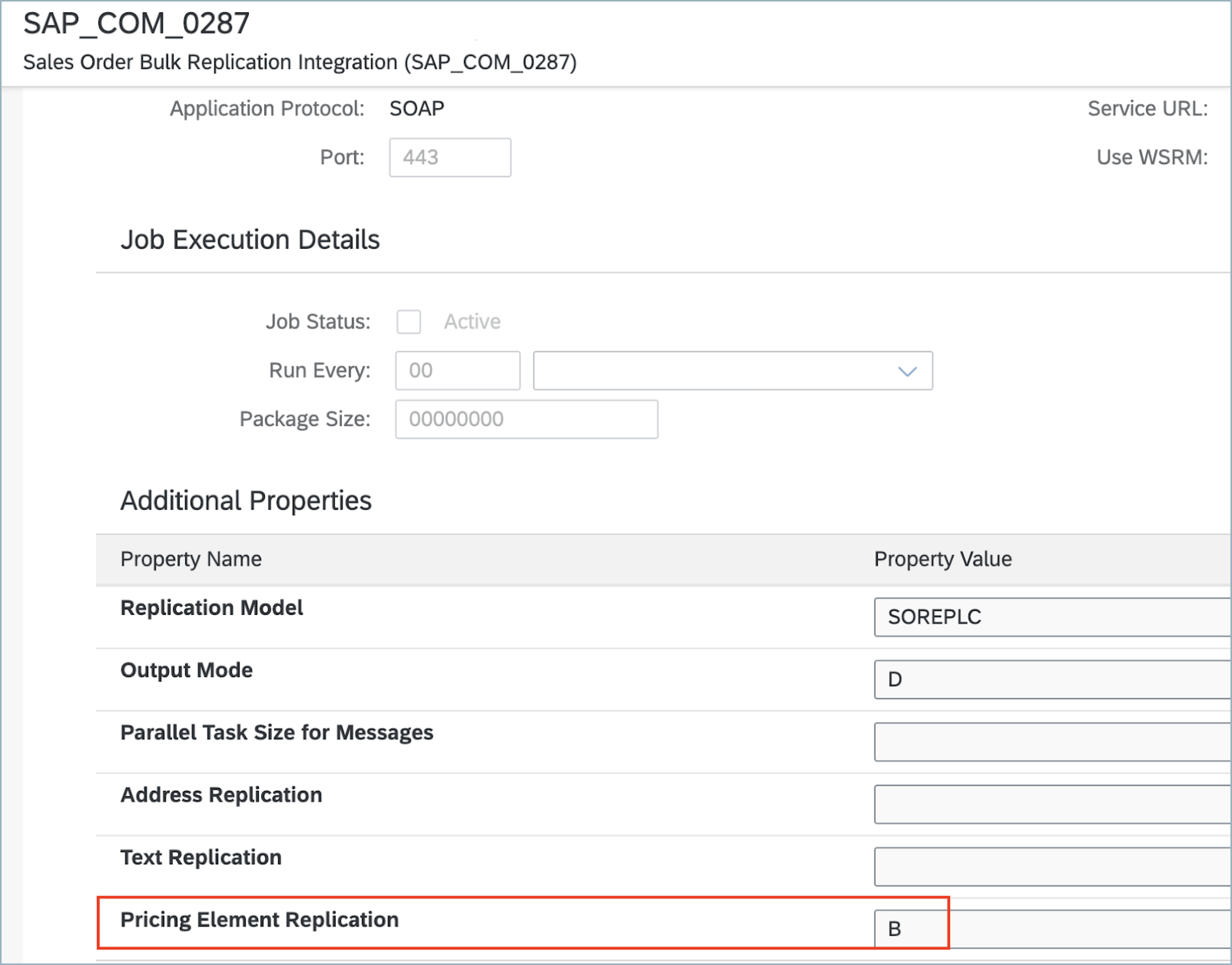
For communication arrangement SAP_COM_0287 to replicate the sales orders pricing elements, the following configuration is required.
-
Enter the Communication arrangement app to edit or create the arrangement.
-
At outbound services sections, complete with the following:
Custom Fields
Create the following fields in the corresponding objects for the use case:
| Salesforce Object | Field Name | Data Type | Length | Unique | ExternalId |
|---|---|---|---|---|---|
BusinessPartner |
YY1_SME_MPARTYROLEID_M_bus |
Text |
40 |
Y |
Y |
SalesOrder |
YY1_SME_MORDERID_MFG_SDH |
Text |
40 |
Y |
Y |
Product |
YY1_SME_UnvProductId_M_PRD |
Text |
40 |
Y |
Y |
Custom CDS View
-
Name: YY1_JournalEntryItem_Info
-
Representative Key: AccountingDocument
-
Scenario: External API
-
Data Source: I_JournalEntryItem
-
Elements:
| Alias | Path | Type | Key |
|---|---|---|---|
SourceLedger |
I_JournalEntryItem.SourceLedger |
CHAR (2) |
Yes |
CompanyCode |
I_JournalEntryItem.CompanyCode |
CHAR (4) |
Yes |
FiscalYear |
I_JournalEntryItem.FiscalYear |
NUMC (4) |
Yes |
AccountingDocument |
I_JournalEntryItem.AccountingDocument |
CHAR (10) |
Yes |
LedgerGLLineItem |
I_JournalEntryItem.LedgerGLLineItem |
CHAR(6) |
Yes |
Ledger |
I_JournalEntryItem.Ledger |
CHAR(2) |
Yes |
AccountingDocumentType |
I_JournalEntryItem.AccountingDocumentType |
CHAR(2) |
No |
Customer |
I_JournalEntryItem.Customer |
CHAR(10) |
No |
YY1_SME_ExtPaymID_MFG_JEI |
I_JournalEntryItem.YY1_SME_ExtPaymID_MFG_JEI |
CHAR(20) |
No |
CreationDate |
I_JournalEntryItem._JournalEntry.AccountingDocumentCreationDate |
DATS (8) |
No |
LastChangeDate |
I_JournalEntryItem._JournalEntry.LastChangeDate |
DATS (8) |
No |
IsReversed |
I_JournalEntryItem._JournalEntry.IsReversed |
CHAR(1) |
No |
ReversalReason |
I_JournalEntryItem._JournalEntry.ReversalReason |
CHAR(2) |
No |
ReverseDocument |
I_JournalEntryItem._JournalEntry.ReverseDocument |
CHAR(10) |
No |
ClearingDate |
I_JournalEntryItem.ClearingDate |
DATS (8) |
No |
ClearingAccountingDocument |
I_JournalEntryItem.ClearingAccountingDocument |
CHAR(10) |
No |
ClearingDocumentLastChangeDate |
I_JournalEntryItem._ClearingAccountingDocument.LastChangeDate |
DATS (8) |
No |
ClearingDocumentCreationDate |
I_JournalEntryItem._ClearingAccountingDocument.AccountingDocumentCreationDate |
DATS (8) |
No |
ClearingDocumentCreationTime |
I_JournalEntryItem._ClearingAccountingDocument.CreationTime |
TIMS (6) |
No |
AmountInCompanyCodeCurrency |
I_JournalEntryItem._ClearingAccountingDocument._OperationalAcctgDocItem.AmountInCompanyCodeCurrency |
CURR (23,2) |
No |
AmountInTransactionCurrency |
I_JournalEntryItem._ClearingAccountingDocument._OperationalAcctgDocItem.AmountInTransactionCurrency |
CURR (23,2) |
No |
TransactionCurrency |
I_JournalEntryItem._ClearingAccountingDocument._OperationalAcctgDocItem.TransactionCurrency |
CUKY (5) |
No |
CompanyCodeCurrency |
I_JournalEntryItem._ClearingAccountingDocument._OperationalAcctgDocItem.CompanyCodeCurrency |
CUKY (5) |
No |
A custom communication scenario has to be created adding this CDS view as an inbound service. Once published, create a communication arrangement using that custom communication scenario. That arrangement will have the service URL to retrieve the Journal Entry Item information.