
SFTP Setup Guide
This setup guide enables customers to upload existing customer, product, and order data to Manufacturing Cloud via SFTP. Data can be exported in csv` or xlsx format for loading into Salesforce.
High-level Architecture
Load data to Manufacturing Cloud
Functional Considerations
-
Customer, product and order data needs to be in csv or xlsx format.
-
Customer and product data needs be loaded into Manufacturing Cloud before loading order data so that orders can be attached existing customers and products.
Technical Considerations
This section lists the technical considerations and constraints on the solution design.
-
The csv and xlsx files need to be in the format specified below
-
MDM implementation is required in order to reference customer and product data in orders
Systems Involved
-
Salesforce Manufacturing Cloud
-
SFTP Server
-
PIM Database
-
Anypoint MQ
-
Global Data Management
Processing Logic
-
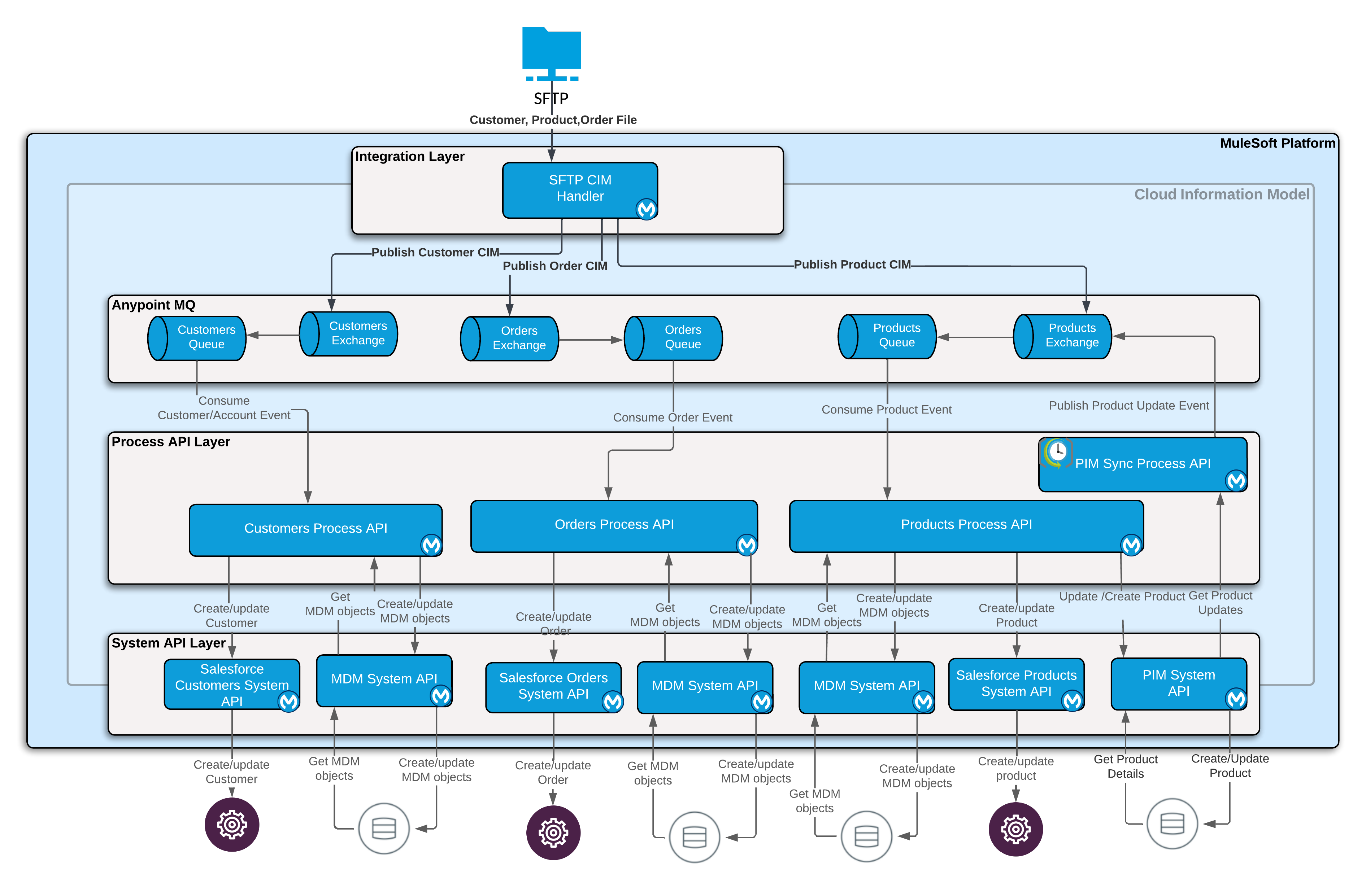
SFTP CIM handler reads the files from sftp location and converts the records to respective CIM structures and publishes the records to the customers, products and orders exchanges for the related objects.
-
The corresponding process APIs process the messages in CIM format and insert the data into Manufacturing Cloud via the corresponding system APIs.
SFTP Setup
In your SFTP server create inbox, archive and error folders for customers, products and orders.
File Configuration
-
The sftp integrations can only read comma separated text file with *.csv extension or Microsoft Excel file with *.xlsx extension
-
For excel files, make sure all the data is in one tab and the tab names must be following: CustomerInfo, OrderInfo and ProductInfo respectively
File Formats
Customer File Format
| Field Name | Field Description | Comments |
|---|---|---|
ExternalId |
Customer ID in external system |
Required field |
FirstName |
The first name of the Party |
Required for individual |
MiddleName |
The middle initial of the Party |
Optional field for individual |
LastName |
The last name of the Party |
Required for individual |
OrgAccountName |
Organization name |
Required for an organization |
EmailAddress |
Email address |
Optional |
EmailType |
Email type (examples: Home, Work) |
Optional |
PhoneNumber |
Phone number |
Optional |
InternationalCode |
Phone country code |
Optional the default is "001" |
PhoneType |
Phone Type |
Optional the default is "Home" |
PhoneExt |
Phone extension |
Optional |
AddressLine1 |
Address Line |
Optional |
AddressLine2 |
Address Line |
Optional |
City |
City name |
Optional |
State |
State or province name |
Optional |
Country |
Country name |
Optional the default is "USA" |
PostalCode |
Postal code |
Required |
AddressType |
Address type (examples: Home, Work) |
Optional the default is "Home" |
Order File Format
| Field Name | Field Description | Comments |
|---|---|---|
Id |
Order ID |
Optional |
Name |
Order name |
Required |
OrderNumber |
Order number |
Required |
Description |
Order description |
Optional |
TotalPriceAmount |
Total order cost |
Required |
AccountId |
Account id |
Required |
TotalDeliveryFeeAmount |
Shipping fee |
Optional |
EffectiveDate |
Order date |
Required |
ExternalId |
Order id in external system |
Optional |
ProductCode |
Product sku code of the ordered item |
Required |
ProductDescription |
Product description of the ordered item |
Optional |
OrderedQuantity |
Quantity ordered |
Required |
UnitPriceAmount |
Unit price of the product |
Required |
TotalPriceAmount |
Total cost of all items |
Required |
OrderProductNumber |
Total amount including tax |
Required |
TotalTaxAmount |
Total sales tax |
Required |
Product File Format
| Field Name | Field Description | Comments |
|---|---|---|
Id |
Product ID |
Optional |
Name |
Product name |
Required |
ProductCode |
Product sku code |
Required |
ProductCategory |
Product category |
Optional |
Description |
Product description |
Required |
ShortDescription |
Product short description |
|
LongDescription |
Product long description |
|
Status |
Product status (example: Active) |
Required |
ExternalId |
Product id in the external system |
Required |
Type |
Product type |
Required |
UnitListPrice |
Product unit price |
Required |