
Handling Errors During Batch Job
Handle record-level failures in Mule batch jobs while balancing logging detail and performance. Learn how batch steps log errors, how failed records propagate through a job, and how to inspect errors by using DataWeave functions.
Batch jobs capture record-level failures during batch step execution. For details about the error representation and how to access error fields, see Batch Errors.
Mule batch processing is designed to handle large data sets and to perform almost real-time data integration that recovers from crashes and continues processing a job from a point of failure. However, verbose logs for issues that occur in large data sets can become enormous and severely impact performance.
To limit this impact, Mule uses INFO-level logging by default, as described in Logs of Failing Records Inside a Batch Step. For cases in which you require more verbose log messages, you can change the mode to DEBUG. This mode is helpful for debugging and is feasible for some cases that involve smaller data sets.
Set the logging mode with this property:
<AsyncLogger name="com.mulesoft.mule.runtime.module.batch" level="DEBUG" />If you’re using CloudHub or Runtime Manager, you can add this package to the Logs tab in DEBUG level:
com.mulesoft.mule.runtime.module.batchAvoid using the DEBUG mode in a production environment when processing large data sets.
|
Starting with Mule 4.11, batch error handling relies on |
Logs of Failing Records Inside a Batch Step
When processing a batch job instance, a processor inside a batch step can fail or raise an error, for example, because of corrupted or incomplete record data. By default, Mule uses the INFO log level to log stack traces according to this logic when issues occur:
-
Mule gets the exception’s full stack trace.
-
Mule strips the stack trace from error messages in the log.
Even if all records raise the same error, the messages being processed would probably contain specific information related to those records. For example, if you push leads to a Salesforce account and one record fails because the lead was uploaded, another repeated lead would have different record information, but the error is the same.
-
Mule verifies if the stack trace was already logged in the current step.
The first time the runtime encounters this error, Mule logs the error and produces a message like this one:
com.mulesoft.mule.runtime.module.batch.internal.DefaultBatchStep:
Found error processing record on step 'batchStep1'
for job instance 'Batch Job Example' of job 'CreateLeadsBatch'.

This is the first record to show this error on this step
for this job instance. Subsequent records with the same failures
will not be logged for performance and log readability reasons:
Mule logs on a "by step" basis. If another step also raises the same error, the runtime logs it again for that step.
-
When the batch job reaches the On Complete phase, Mule displays an error summary with every error type and the number of occurrences in each batch step.
The error summary for a batch job with two batch steps that raised anAPP:FAILUREerror:******************************************************************************* * - - + Error Type + - - * - - + Step + - - * - - + Count + - - * ******************************************************************************* * APP:FAILURE * batchStep1 * 10 * * APP:FAILURE * batchStep2 * 9 * *******************************************************************************Here, the first step failed ten times and the second failed nine.
Mule logs batch errors using this behavior as its default configuration, which only logs INFO level messages to get a balanced trade-off between logging efficiency for large chunks of data.
However, your motivation to use batch processing might not be its ability to handle large datasets, but its capacity to recover from a crash and keep processing a batch job from where it was left off when performing "near real-time" data integration. Or you may need more verbose log levels for debugging.
DataWeave Functions for Error Handling
Mule 4.x includes a set of DataWeave functions that you can use in the context of a batch step.
| DataWeave Function | Description |
|---|---|
|
A boolean function that returns true if the current record hasn’t presented errors in any prior step. |
|
A boolean function that returns true if the current record has presented errors in any prior step. |
|
Receives the name of a step as a String argument. If the current record presented an error on that step, it returns the |
|
Returns a |
|
Returns the |
|
Returns the |
There are also bindings to work with the old batch error handling mechanism, which relied on exceptions rather than BatchError objects.
| DataWeave Function | Description |
|---|---|
|
Receives the name of a step as a String argument. If the current record throws an exception on that step, it returns the Exception object. Otherwise, returns |
|
Returns a Java |
|
Returns the Exception for the first step in which the current record has failed. If the record hasn’t failed in any step, returns |
|
Returns the Exception for the last step in which the current record has failed. If the record hasn’t failed in any step, returns |
Example
Consider a batch job that polls files containing contact information:
-
In the first step, the batch job aggregates the contact information and transforms it using the Transform Message component, then pushes the data to Salesforce.
-
In the second step, the job transforms the same contacts again to match the data structure of another third-party contacts application (such as Google Contacts) and pushes them to this service using an HTTP request.
-
In the third step, you write into a JMS dead-letter queue for each record that has failed. The message content is the error itself. Each record could have failed in both steps, meaning the same record translates into two JMS messages.
Such an application would look like this:

Since the goal is to gather failures, it makes sense to configure the Failures step with an ONLY_FAILURES filter (see Configuring Batch Components for more details about batch filters).
The set-payload processor in this step can be configured to use the Batch::getStepErrors() function.
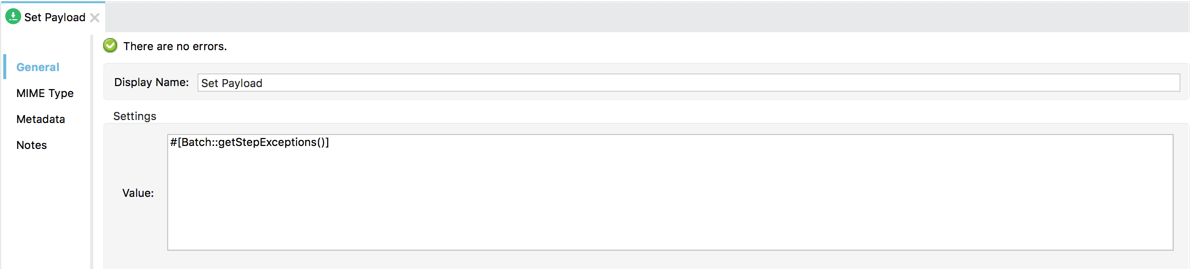
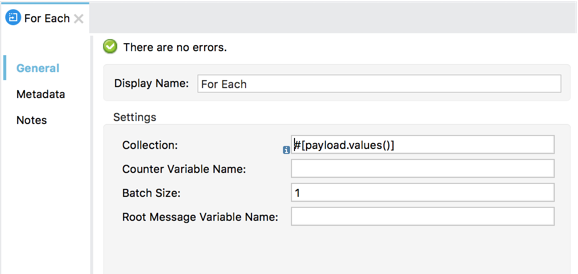
This function returns a map with all errors found in all steps. To send the errors through JMS, use a For Each scope to iterate over the map’s values (the errors) and send them through a JMS outbound endpoint:
Batch Processing Strategies for Error Handling
Mule has three options for handling a record-level error:
-
Finish processing Stop the execution of the current job instance. Finish the execution of the records currently in-flight, but do not pull any more records from the queues and set the job instance into a
FAILUREstate. The On Complete phase is invoked. -
Continue processing the batch regardless of any failed records, using the
acceptExpressionandacceptPolicyattributes to instruct subsequent batch steps how to handle failed records. -
Continue processing the batch regardless of any failed records (using the
acceptExpressionandacceptPolicyattributes to instruct subsequent batch steps how to handle failed records), until the batch job accumulates a maximum number of failed records at which point the execution will halt just like in option 1.
By default, Mule batch jobs follow the first error handling strategy, which halts the batch instance execution. This behavior is controlled through the maxFailedRecords attribute.
| Failed Record Handling Option | Batch Job Attribute | Value |
|---|---|---|
Stops processing when a failed record is found |
|
|
Continues processing indefinitely, regardless of the number of failed records |
|
|
Continues processing until reaching the maximum number of failed records |
|
|
<batch:job jobName="Batch1" maxFailedRecords="0">Crossing the Max Failed Threshold
When a batch job accumulates enough failed records to cross the maxFailedRecords threshold, Mule aborts processing for any remaining batch steps, skipping directly to the On Complete phase.
For example, if you set the value of maxFailedRecords to "10" and a batch job accumulates ten failed records in the first of three batch steps, Mule does not attempt to process the batch through the remaining two batch steps. Instead, it aborts further processing and skips directly to On Complete to report on the batch job failure.
If a batch job does not accumulate enough failed records to cross the maxFailedRecords threshold, all records – successes and failures – continue to flow from batch step to batch step; use filters to control which records each batch step processes.