
Scatter-Gather Router
The Scatter-Gather component is a routing event processor that processes a Mule event through parallel processing routes that contain different event processors. Each route receives a reference to the Mule event and executes a sequence of one or more event processors. Each route uses a separate thread to execute its event processors. The resulting Mule event is either the same Mule event without modifications or a new Mule event with its own payload, attributes, and variables. After every route completes successfully, the Scatter-Gather component combines the Mule events that each route returns into a new Mule event and passes the new event to the next event processor.
The Scatter-Gather component executes each route in parallel, not sequentially. Parallel execution can increase the efficiency of your Mule application and can provide more information than sequential processing.
The Scatter-Gather component works with repeatable streams. It doesn’t process nonrepeatable streams, which can be read only once before they’re lost. By default, all streams in Mule are repeatable unless you configure a component’s streaming strategy as nonrepeatable.
This diagram shows the behavior of the Scatter-Gather component:
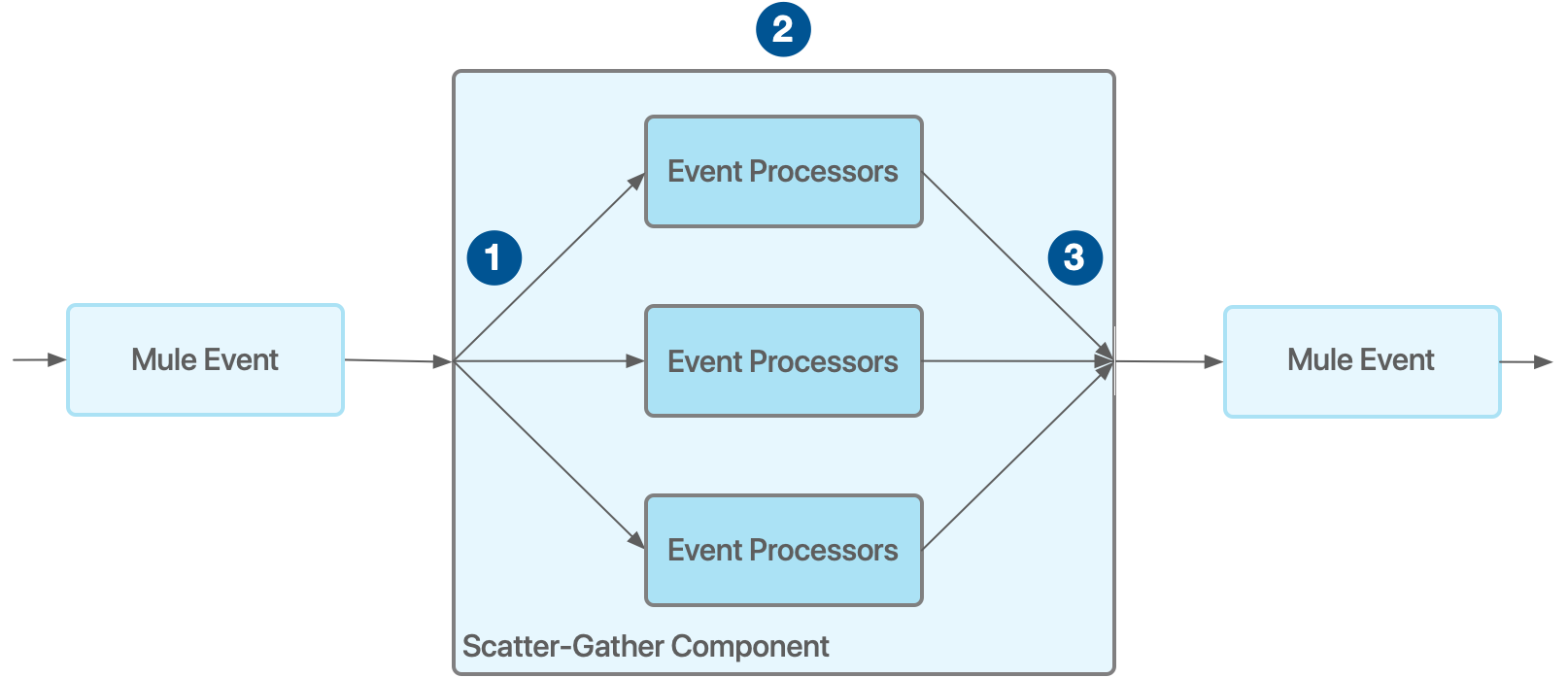
| 1 | The Scatter-Gather component receives a Mule event and sends a reference to this Mule event to each processing route. |
| 2 | All processing routes start executing in parallel. After all processors inside a route finish processing, the route returns a Mule event. This Mule event is either the same Mule event without modifications or a new Mule event that the processors in the route create. |
| 3 | After all processing routes finish, the Scatter-Gather component creates a new Mule event that combines the resulting Mule events from each route. Then the Scatter-Gather component passes the new Mule event to the next component in the flow. |
| Configure your Scatter-Gather component with at least two routes. Otherwise, your Mule application throws an exception and doesn’t start. |
Result
After all routes complete, the component outputs the results in this format:
{0: messageFromRoute0, 1: messageFromRoute1, …}
To extract all resulting payloads to an array, use a DataWeave script, such as this one:
flatten(valuesOf(payload) map ((item, index) -> item.*payload))Variable Propagation
Every route starts with the same initial variable values. Changes to a variable in one route don’t affect other routes. If one route adds or modifies a variable, the value after aggregation is the value that route defines. If multiple routes add or modify the same variable, the value after aggregation is a list of all the values that the routes define for that variable. For example:
<set-variable variableName="var1" value="var1"/>
<set-variable variableName="var2" value="var2"/>
<scatter-gather doc:name="Scatter-Gather" doc:id="abc665e0-6119-4ecb-9f8b-52dbcbb1d488" >
	<route >
		<set-variable variableName="var2" value="newValue"/>
        <set-variable variableName="var3" value="appleVal"/>
	</route>
	<route >
		<set-variable variableName="var3" value="bananaVal"/>
	</route>
	<route >
		<set-variable variableName="var3" value="otherVal"/>
        <set-variable variableName="var4" value="val4"/>
	</route>
</scatter-gather>
After aggregation, the variables are:
{var1: "var1", var2: "newValue", var3: ["appleVal, bananaVal, otherVal"], var4: "val4"}
Error Handling Inside Scatter-Gather Routes
To handle errors that a route’s event processors generate, use a Try scope in each route of the Scatter-Gather component. After all routes execute, if any route fails with an error, the Scatter-Gather component throws an error of type MULE:COMPOSITE_ROUTING. Event processing doesn’t continue past the Scatter-Gather component in the flow. Instead, the flow branches to your error-handling event processors.
The MULE:COMPOSITE_ROUTING error object gathers the errors from the routes that failed and the Mule events from the routes that completed successfully. Your error-handling event processors can then process the Mule events from the completed routes. For the full list of fields available in the error, see MULE:COMPOSITE_ROUTING Error Fields.
These two cases show how error handling works in a Scatter-Gather component:
-
Each route in a Scatter-Gather component contains a Try scope.
One route generates an error. Theon-error-continueerror handler in that route’s Try scope handles the error, so the route completes successfully. The Scatter-Gather component consolidates the Mule events from all routes into a new Mule event and passes the consolidated event to the next event processor. -
One route in a Scatter-Gather component has no Try scope, has a Try scope with an error handler that can’t handle the error type, or has an
on-error-propagateerror handler.
An error occurs in this route and causes the route to fail. As a result, the Scatter-Gather component throws aMULE:COMPOSITE_ROUTINGerror. The flow branches to your error-handling event processors, which can process the Mule events from the completed routes.
This example shows how to handle these errors:
<flow name="errorHandler">
    <scatter-gather>
        <route>
            <raise-error type="APP:MYERROR" description="Details on what caused this application error"/>
        </route>
        <route>
            <set-payload value="apple"/>
        </route>
    </scatter-gather>
    <error-handler>
        <on-error-continue type="MULE:COMPOSITE_ROUTING">
            <!-- Returns the error thrown by the first route -->
            <logger level="WARN" message="#[error.errorMessage.payload.failures['0']]"/>
            <!-- Returns APP:MYERROR, the type set in the raise-error component -->
            <logger level="WARN" message="#[error.errorMessage.payload.failures['0'].errorType]"/>
            <!-- Returns "Details on what caused this application error", the description set in the raise-error component -->
            <logger level="WARN" message="#[error.errorMessage.payload.failures['0'].description]"/>
            <!-- Returns null -->
            <logger level="WARN" message="#[error.errorMessage.payload.failures['1']]"/>

            <!-- Returns null -->
            <logger level="WARN" message="#[error.errorMessage.payload.results['0']]"/>
            <!-- Returns the result of the second route, which completed successfully -->
            <logger level="WARN" message="#[error.errorMessage.payload.results['1']]"/>
            <!-- Returns "apple", the payload set in the second route -->
            <logger level="WARN" message="#[error.errorMessage.payload.results['1'].payload]"/>
        </on-error-continue>
    </error-handler>
</flow>
MULE:COMPOSITE_ROUTING Error Fields
When the Scatter-Gather component throws a MULE:COMPOSITE_ROUTING error, the error message payload (error.errorMessage.payload) contains the outcome of every route. Both failures and results use the route index as the key. The route index is a string that matches the order of the routes in the XML configuration, starting at '0'. Each route appears in only one of the two collections, so looking up its index in the other collection returns null.
| Field | Description |
|---|---|
|
Errors from the routes that failed, keyed by route index. For example, |
|
Type of the error that the route threw. The component that raised the error defines this type. In the example, this value is |
|
Description of the error. The component that raised the error defines this description. In the example, this value is |
|
Description of the error that’s the same as or more extensive than |
|
Optional Mule message that the failing component associates with the error, such as the response of a failed HTTP request. If the component doesn’t provide a message, as with the |
|
Underlying Java |
|
Mule messages from the routes that completed successfully, keyed by route index. For example, |
|
Payload of the message that a successful route returns. In the example, |
|
Attributes of the message that a successful route returns. |
|
Collection of the errors that the failed routes threw. |
Each failure provides the same fields as any other Mule error. For more information, see Selector Expressions for Mule Errors.
Handle Timeout Errors in a Scatter-Gather Component
If you configure a timeout for a Scatter-Gather component and a route doesn’t complete processing before the timeout expires, the route throws a MULE:TIMEOUT error. The Scatter-Gather component handles this error the same way as any other error from a route. After each route completes, either successfully or by throwing a MULE:TIMEOUT error, the Scatter-Gather component collects the successful results and the errors in the MULE:COMPOSITE_ROUTING error. Your configured error handler then processes this error.
Example Project
To learn more about how to use the Scatter-Gather component, download and open the example project Scatter-Gather Flow Control from Anypoint Exchange in Anypoint Studio. This example shows how to use the Scatter-Gather component to aggregate data in parallel and return the result in JSON.
The example uses prepared data as input for two resources to aggregate. The data represents information about two contacts and has this structure:
Resource |
|
|
|
|
contacts-1.csv |
John |
Doe |
096548763 |
|
contacts-2.csv |
Jane |
Doe |
091558780 |
A DataWeave script aggregates the contact information into a JSON structure that represents the data from both resources.
To download and open this example project in Anypoint Studio, click the Exchange icon in the upper-left corner. In the window that opens, log in to Anypoint Exchange and search for the project name.
Scatter-Gather XML Reference
| Element | Description |
|---|---|
|
Sends a request message to multiple targets concurrently. It collects the responses from all routes and aggregates them into a single message. |
Attributes |
|
|
Sets the timeout for responses from sent messages, in milliseconds. A value of 0 or lower thatn 0 means no timeout. |
|
Determines the maximum number of concurrent routes to process. If you set this value to 1, the Scatter-Gather component processes the routes sequentially. |
|
Name of the target variable. |
|
Value of the data to store in the target variable.
|
| Child Element | Description |
|---|---|
|
A route in the Scatter-Gather router. |