
Troubleshoot SDK Components and Operations - Mule 4
The following troubleshooting features are available starting from Mule SDK 1.4.
To troubleshoot Java SDK, learn how to enable logging (including verbose logging) and how to interpret common error messages.
Logging
Use logging to troubleshoot the following SDK components:
| Component Name | Logging Capabilities |
|---|---|
Logs information about the source lifecycle, such as when the lifecycle starts and ends. In case of error and reconnection, the log provides the full stack trace associated with the raised exception. For cluster environments, the log provides source status information, which indicates whether it is the primary source or not. |
|
Logs information about items accepted and rejected by the source. In the case of rejection, the log contains information about the cause of the rejection. |
|
Logs information about watermarking handling on polling sources. Because this process uses low-level logic, enable trace logging only when debugging or troubleshooting is necessary. |
|
Logs information about connection management for pooling connection providers. This log provides connection pool status information as well as connection handling, which indicates when the pool retrieves and returns connections. |
Verbose Logging
Use verbose logging to troubleshoot SDK components to get information regarding their status or behavior. Because of the high impact to application performance, limit verbose logging to testing and troubleshooting operations.
Enable verbose logging in Anypoint Studio, or Anypoint Runtime Manager if using CloudHub APIs. In both cases, the application’s log file logs the information.
Enable Verbose Logging in Anypoint Studio
The following steps describe how to enable verbose logging using Anypoint Studio:
-
Access Anypoint Studio and navigate to the Package Explorer view.
-
Open your application’s project name.
-
Open the
src/main/resourcespath folder. -
Open the
log4j2.xmlfile inside the folder.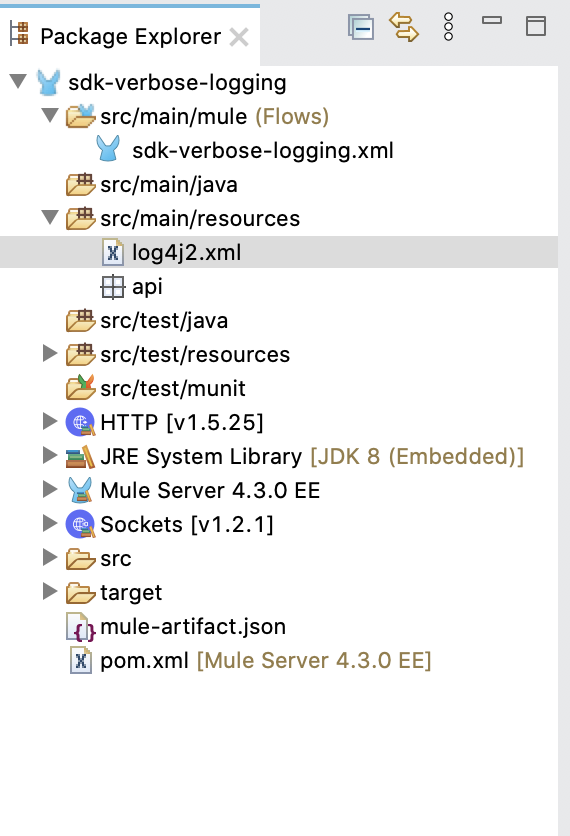
-
Add an
<AsyncLogger>tag inside the<Loggers>tag:<Loggers> ... <AsyncLogger name="<component's fully qualified name>" level="<logging level>"/> ... </Loggers>Use the following table as a reference for specifying the component’s fully qualified name:
Name Fully Qualified Name Log Level Source
org.mule.runtime.module.extension.internal.runtime.source.ExtensionMessageSourceDEBUGPolling Source
org.mule.runtime.module.extension.internal.runtime.source.poll.PollingSourceWrapperDEBUGPolling Source Watermarking
org.mule.runtime.module.extension.internal.runtime.source.poll.PollingSourceWrapperTRACEPooling Connection Provider
org.mule.runtime.core.internal.connection.PoolingConnectionHandlerorg.mule.runtime.core.internal.connection.PoolingConnectionManagementStrategyDEBUGThe following example shows how to add a fully qualified name to the
log4j2.xmlfile to enable verbose logging for Source:<Loggers> ... <!-- Mule logger --> <AsyncLogger name="org.mule.runtime.core.internal.processor.LoggerMessageProcessor" level="INFO"/> <AsyncLogger name="org.mule.runtime.module.extension.internal.runtime.source.ExtensionMessageSource" level="DEBUG"/> <AsyncRoot level="INFO"> <AppenderRef ref="file" /> </AsyncRoot> </Loggers>
Enable Verbose Logging in Anypoint Runtime Manager
The following steps describe how to enable verbose logging using Anypoint Runtime Manager:
-
Access Anypoint Runtime Manager.
-
Select the desired application.
-
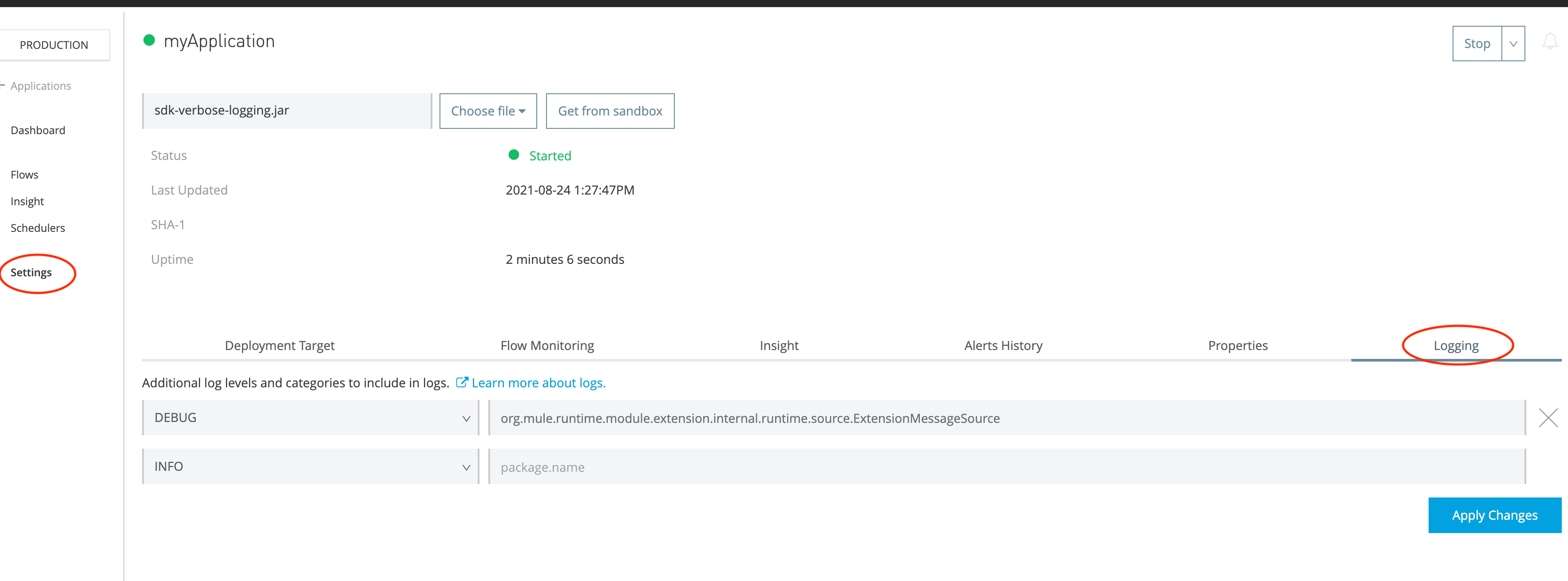
Go to Settings on the left pane.
-
Go to the Logging tab.
-
Add the component’s fully qualified name and the logging level (DEBUG or TRACE). Refer to the table that shows how to specify the component’s fully qualified name.
-
Click Apply Changes.
Logging Examples
The following examples show expected logs for SDK components:
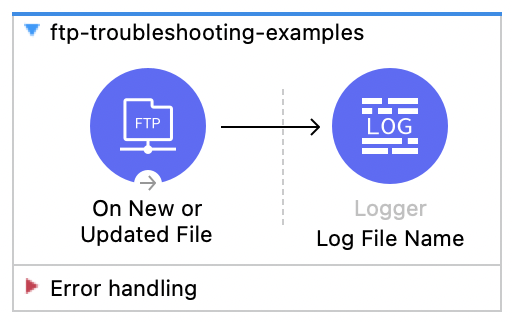
The logs in these examples are from a Mule application that consists of an FTP Connector source that lists files in an FTP server and a logger that logs the name of the file it processes.
Source Logging Example
The following example shows logs for Source:
org.mule.runtime.module.extension.internal.runtime.source.ExtensionMessageSource: Message source 'listener' on flow 'ftp-troubleshooting-examples' threw exception. Attempting to reconnect...
org.mule.runtime.module.extension.internal.runtime.source.ExtensionMessageSource: Message source 'listener' on flow 'ftp-troubleshooting-examples' successfully reconnected
org.mule.runtime.module.extension.internal.runtime.source.ExtensionMessageSource: Message source 'listener' on flow 'ftp-troubleshooting-examples' could not be reconnected. Will be shutdown.
org.mule.runtime.module.extension.internal.runtime.source.ExtensionMessageSource: Message source 'listener' on flow 'ftp-troubleshooting-examples' is stopping
Polling Source Logging Example
The following example shows logs for Polling Source:
org.mule.runtime.module.extension.internal.runtime.source.poll.PollingSourceWrapper: Item with id:[/ftp-example.json] is accepted
org.mule.runtime.module.extension.internal.runtime.source.poll.PollingSourceWrapper: Item with id:[/ftp-example.json] is rejected with status:[FILTERED_BY_WATERMARK]
Polling Source Watermarking Logging Example
The following example shows logs for Polling Source Watermarking:
org.mule.runtime.module.extension.internal.runtime.source.poll.PollingSourceWrapper: A new watermark maximum has been found when processing item with id /ftp-example.json for source in flow ftp-troubleshooting-examplesPooling Connection Provider Logging Example
The following example shows logs for Pooling Connection Provider:
org.mule.runtime.core.internal.connection.PoolingConnectionManagementStrategy: Acquiring connection org.mule.extension.ftp.internal.connection.FtpFileSystem@1a0c776f from the pool FTP_Config-5e20b7d9-417d-4307-ab4c-9ef3e7ae4d9b
org.mule.runtime.core.internal.connection.PoolingConnectionManagementStrategy: Status for pool FTP_Config-5e20b7d9-417d-4307-ab4c-9ef3e7ae4d9b: 1 connections are active out of 5 max active limit, 0 connections are idle out of 5 max idle limit
Error: Cannot Find org.mule.sdk.api Classes
Java SDK throws errors such as Cannot access XYZ class file: XYZ not found or Cannot find symbol: method someMethod() location: variable someVar of type XYZ, in which XYZ is a class from the org.mule.sdk.api package.
For example:
[ERROR] Failed to execute goal org.apache.maven.plugins:maven-compiler-plugin:3.8.1:compile (default-compile) on project : Compilation failure:

cannot access org.mule.sdk.api.runtime.streaming.StreamingHelper
[ERROR] class file for org.mule.sdk.api.runtime.streaming.StreamingHelper not found

cannot find symbol
[ERROR]   symbol:   method resolveCursors(java.util.HashMap<java.lang.String,java.lang.Object>,boolean)
[ERROR]   location: variable streamingHelper of type org.mule.runtime.extension.api.runtime.streaming.StreamingHelper
The org.mule.sdk.api package is not supported when using mule-modules-parent version 1.4.0 or earlier, or when targeting a Minimum Mule Version of 4.4.0 or earlier.
To fix this error, either:
-
Upgrade to
mule-java-extension-parentversion 1.11.0 or later and use Forward Compatibility to properly configure your module’s Minimum Mule Version -
If you must support older Mule versions without forward compatibility, use the equivalent classes from the
org.mule.runtime.extension.apipackage instead