
XML SDK
The XML SDK is an alternative to the more advanced Java-based Mule SDK. XML SDK is for creating custom modules, similar to the way you create a Mule app. In fact, you can use existing Mule components in the module. The framework simply adds a few syntactic idioms as XML elements that enclose the main parts of module, such as <module>, <operation>, and <parameter> elements. For example, this snippet defines a single operation in the Hello XML SDK:
<?xml version="1.0" encoding="UTF-8"?>
<module name="Hello XML SDK"  ...>
  <operation name="say-hello" doc:description="Greets you!">
    <body>
      <mule:set-payload value="Hello World!"/>
    </body>
    <output type="string"/>
  </operation>
</module>
You use a Mule SDK component in a Mule flow the same way that you use any other component. In this example, execution of the flow "random-flow" sets the payload to "Hello World!", as defined in the operation <hello-smart-connector:say-hello>.
<flow name="random-flow">
  <hello-smart-connector:say-hello>
</flow>
Note that the XML SDK is strongly typed, so the data type of defined parameters for every operation is statically set for both the input and output.
Install the Required Software
Install and verify that the following tools are working in your local environment:
-
Java Development Kit 17 (JDK 17) or earlier to compile and build your custom Java code.
-
For preexisting connectors, JDK 8 might be needed.
-
-
Apache Maven 3.9.8 or later to manage your project’s build.
XML SDK Basics
An XML SDK component is composed of key elements that delineate both its behavior and the way the runtime interacts with it:
-
Operations
-
Properties
-
The enclosing Module
Operations
An <operation> element defines a set of input parameters and a single output. Like a function, it has input parameters, performs actions (described in the body), and has a single output. Unlike a function, the behavior of an operation can vary if it stores values or references external sources.
-
Input parameters (
<parameter>): Declares a type to be entered when calling the operation.Keep in mind that these parameters are the only data that the message processors in the
<body>scope can access. -
Body (
<body>): Defines a chain of components to be executed, similar to a flow. -
Output (
<output>): Declares the output type of your XML SDK module. This is the type of the payload after it is processed by the<body>. -
Errors: Declares the error types the XML SDK can raise (or map) within the
<body>.
The following XML SDK module takes two numbers as parameters and has a single operation that sums them together:
<module name="Math XML SDK"...>
  ...
  <operation name="sum" doc:description="Takes two numbers and returns the sum of them">
    <parameters>
      <parameter name="numberA" type="number"/>
      <parameter name="numberB" type="number"/>
    </parameters>
    <body>
      <mule:set-payload value="#[vars.numberA + vars.numberB]"/>
    </body>
    <output type="number"/>
  </operation>
</module>
To use an XML SDK module in a Mule app, you simply add it to a Mule flow, for example:
<flow name="mule-flow">
  <math-smart-connector:sum numberA="10" numberB="5"/>
  <!-- payload here is 15 -->
</flow>| Name | Use | Default Value | Description |
|---|---|---|---|
|
required |
NA |
Name of the |
|
optional |
NA |
The |
|
required |
|
Possible values:
|
|
required |
NA |
Defines the data type of the |
|
optional |
|
Marks the |
|
required |
|
Set of defined roles for a given parameter that modifies the generated XSD for the current
See more info on roles. |
|
optional |
NA |
Adds a small tooltip to the |
|
optional |
NA |
Adds a short example of the data type for this parameter. |
|
optional |
NA |
Provides a UI label. When there is no |
|
optional |
NA |
Defines an order in which to render each element in the UI. |
|
optional |
NA |
Defines the group (or tab) to which the |
|
optional |
|
Available since version 1.2 Marks an operation’s visibility to either |
|
optional |
NA |
Documentation for the |
| Name | Use | Default Value | Description |
|---|---|---|---|
|
optional |
The data type of the output payload. Note that you can set it to |
Attribute type definitions are supported by <operation> elements when you use the <output-attributes> element.
| Name | Use | Default Value | Description |
|---|---|---|---|
|
optional |
The data type of the output attribute. Note that you can set it to |
Both outputs (<output> and <output-attributes>) become part of the MuleMessage that is created when the control returns to the invoker.
| Name | Use | Default Value | Description |
|---|---|---|---|
|
required |
The type of error code to throw (or remap) in the |
Properties
A <property> is for a field defined by an end user of the XML SDK component. It serves as a global configuration for the entire Mule project in which it is used.
Properties are similar to the parameters exposed by operations, but they act at a level that affects all instances of the XML SDK component in the project, instead of a specific operation. Like parameters in operations, properties are usually simple types that have default values.
| To avoid confusing end users of the XML SDK module, only expose the properties that they might need to edit. For example, do not expose internal values that they cannot or should not change. |
The following XML SDK module sends requests to GitHub API V3 to retrieve an authenticated user:
<module name="Github"  ...>
  <property name="username" type="string" doc:description="Username credential."/>
  <property name="password" type="string" password="true" doc:description="Password credential"/>

  <http:request-config name="github-httpreq-config" basePath="/">
    <http:request-connection host="api.github.com" protocol="HTTPS" port="443">
      <http:authentication>
        <http:basic-authentication username="#[vars.username]" password="#[vars.password]"/>
      </http:authentication>
    </http:request-connection>
  </http:request-config>

  <operation name="get-user" doc:description="Lists public and private profile information when authenticated.">
    <body>
      <http:request config-ref="github-httpreq-config" path="#['user/' ++ vars.username]" method="GET"/>
    </body>
    <output type="string" doc:description="User information if logged properly."/>
  </operation>
</module>
The example references a <property> that is defined in the module:
-
In a global element as the value for a
request-config. -
In an operation as the value to a
config-refattribute in anhttp-request.
The following Mule app uses XML SDK module. Note that the github prefix (for example, github:get-user) is derived from the name of the module.
<mule ...>
  <github:config name="lautaro-github-config" username="fernandezlautaro" password="****"/>
  <flow name="test-github-flow">
    <github:get-user config-ref="lautaro-github-config"/>
  </flow>
</mule>
Every execution of the "test-github-flow" returns the GitHub information of the authenticated user:
{
  "login": "fernandezlautaro",
  "id": 4719511,
  "avatar_url": "https://avatars1.githubusercontent.com/u/4719511?v=3",
  "gravatar_id": "",
  "url": "https://api.github.com/users/fernandezlautaro",
  ...
}
Note that incorrect credentials return this error response from GitHub:
{
  "message": "Requires authentication",
  "documentation_url": "https://developer.github.com/v3"
}| Name | Use | Default Value | Description |
|---|---|---|---|
|
required |
NA |
Name of the |
|
optional |
NA |
The |
|
required |
|
Possible values:
|
|
required |
NA |
Defines the data type of the |
|
optional |
|
Hides the value of the property value in the UI when typing it (using |
|
optional |
NA |
Adds a small tooltip to the |
|
|
NA |
Adds a short example of the data type for this property. |
|
optional |
NA |
Provides a UI label. When there is no |
|
optional |
NA |
Defines an order in which to render each element in the UI. |
|
optional |
NA |
Defines the group (or tab) to which the |
|
optional |
NA |
Documentation for the |
| Extensions made with XML SDK do not support implicit configurations, which means even though all properties defined in the extension are optional, all operations must have a configuration. You can create a configuration without specifying the values of its parameters so you can use the default values. |
Module
The <module> element is the root of an XML SDK module. It contains all properties and operations that belong to the module.
| Name | Use | Default Value | Description |
|---|---|---|---|
|
required |
NA |
Name of the |
|
optional |
|
Vendor of the XML SDK module. |
|
optional |
NA |
The prefix of the module used when generating schemas. If empty, the module uses a hyphenated version of the |
|
optional |
NA |
Namespace to use for the module during schema generation. Otherwise, the default is |
|
optional |
NA |
Documentation for the |
You import an XML SDK schema into a Mule app by using the namespace attribute. The XML schemas are generated dynamically. The next table shows how namespace, prefix, and name attributes work together.
| Provided Values | Generated Values |
|---|---|
|
|
|
|
|
|
The generated schema location:
http://www.mulesoft.org/schema/a/different/path/mule/hello/current/mule-hello-prefix.xsd
| Provided Values | Generated Values |
|---|---|
|
|
|
|
NA |
|
Generated schema location: http://www.mulesoft.org/schema/mule/hello-prefix/current/mule-hello-prefix.xsd
| provided values | generated values |
|---|---|
|
|
NA |
|
NA |
|
Generated schema location is http://www.mulesoft.org/schema/mule/hello-with-spaces/current/mule-hello-with-spaces.xsd
Prefix Attribute
The prefix attribute is the prefix of the module used when generating schemas.
If empty, the module uses a hyphenated version of the XML SDK name attribute.
The value of the prefix attribute correlates with the name of the
folder containing the resource files. Thus, setting or not setting this value
affects the name of the resource folder. When setting a prefix with a custom
name, you must rename the resource folder to match the custom prefix name.
The following module only has a name attribute name="hello with spaces". This means that its prefix is dynamically generated as hello-with-spaces, and its namespace is dynamically generated as http://www.mulesoft.org/schema/mule/hello-with-spaces/current/mule-hello-with-spaces.xsd. It also means that the Mule app must have a schema location (schemaLocation) that points to a reference that matches that value.
<module name="hello with spaces"
      xmlns:xsi="http://www.w3.org/2001/XMLSchema-instance"
      xsi:schemaLocation=" ... ">
  <operation name="an-operation" />
</module>
This hello with spaces module above can be used in a Mule app, for example:
<mule xmlns="http://www.mulesoft.org/schema/mule/core"
      xmlns:xsi="http://www.w3.org/2001/XMLSchema-instance"
      xmlns:hello-with-spaces="http://www.mulesoft.org/schema/mule/hello-with-spaces"
      xsi:schemaLocation="
      http://www.mulesoft.org/schema/mule/core http://www.mulesoft.org/schema/mule/core/current/mule.xsd
      http://www.mulesoft.org/schema/mule/hello-with-spaces http://www.mulesoft.org/schema/mule/hello-with-spaces/current/mule-hello-with-spaces.xsd">

    <flow name="some-flow">
        <hello-with-spaces:an-operation/>
    </flow>
</mule>
Create and test an XML SDK Project
To create an XML SDK module:
-
Add the MuleSoft repository to your Maven (
mvn) settings file:<profiles> <profile> <id>Mule</id> <activation> <activeByDefault>true</activeByDefault> </activation> <repositories> <repository> <id>mulesoft-releases</id> <name>MuleSoft Repository</name> <url>http://repository.mulesoft.org/releases/</url> <layout>default</layout> </repository> </repositories> </profile> </profiles> -
Use Maven (
mvn) from to execute the following command:mvn archetype:generate \ -DarchetypeGroupId=org.mule.extensions \ -DarchetypeArtifactId=mule-extensions-xml-archetype \ -DarchetypeVersion=1.2.0 \ -DgroupId=org.mule.extension \ -DartifactId=hello-mule-extension \ -DmuleConnectorName=HelloSince the connector name above is Hello, the namespace for the module will be automatically set tomodule-hello, as configured in theprefixattribute. -
When prompted to indicate whether the values are correct, press
enterto continue.The Maven archetype creates a stub project with a minimal amount of code for the XML SDK module and a functional test to run it. The structure of that project looks something like this:
➜  hello-mule-extension tree .
.
├── pom.xml
└── src
    ├── main
    │   └── resources
    │       └── org
    │           └── mule
    │               └── yourdomain
    │                   └── module-Hello.xml (1)
    └── test
        └── munit
            └── assertion-munit-test.xml (2)

8 directories, 3 files
(1)
hello-mule-extension/src/main/resources/org/mule/yourdomain/module-Hello.xml: Defines the XML SDK root element.(2)
hello-mule-extension/src/test/munit/assertion-munit-test.xml: An assertion operation that calls the XML SDK operation. -
Run
mvn clean installin the/hello-mule-extensionto create the plugin for theHello XML SDKmodule.This command installs a parent project as well as its child projects. It also runs the suite through MUnit for the operation defined in the module.
➜  hello-mule-extension mvn clean install
 ...
 ..
 .
==================================================================================
Number of tests run: 2 - Failed: 0 - Errors: 0 - Skipped: 0 - Time elapsed: 2246ms
==================================================================================
[INFO] ====================================================================================
[INFO] MUnit Run Summary - Product: MULE, Version: 4.1.1
[INFO] ====================================================================================
[INFO]  >> assertion-munit-test.xml test result: Tests: 2, Errors: 0, Failures: 0, Skipped: 0
[INFO]
[INFO] ====================================================================================
[INFO]  > Tests:   	2
[INFO]  > Errors:  	0
[INFO]  > Failures:	0
[INFO]  > Skipped: 	0
[INFO] ====================================================================================
....
...
..
[INFO] ------------------------------------------------------------------------
[INFO] BUILD SUCCESS
[INFO] ------------------------------------------------------------------------
[INFO] Total time: 39.166 s
[INFO] Finished at: 2017-06-14T22:07:42-03:00
[INFO] Final Memory: 61M/928M
[INFO] ------------------------------------------------------------------------
➜  hello-smart-connector
(3) When you want to add this connector to a project from your local Maven repository for testing, add the following dependency:
<dependency>
       <groupId>org.mule.extension</groupId>
       <artifactId>hello-mule-extension</artifactId>
       <version>1.0.0-SNAPSHOT</version>
       <classifier>mule-plugin</classifier>
</dependency>
+ You can now use this connector from your Studio palette.
+
Add a Custom Icon to Your Connector
Connector icons are files in the .svg format. To customize the icon of a connector, add an icon.svg file that contains the custom icon under the icon folder in the root of the connector tree.
The following image shows an example of the folder structure for the icon:
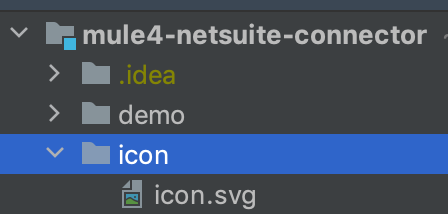
After you add the custom icon to your connector, the icon appears in Anypoint Exchange and in Anypoint Studio.
Consuming a Mule Plugin from an XML SDK Module
To consume a Mule plugin from within an XML SDK module:
-
Add the dependency into the POM file for the XML SDK module.
For example, for an XML SDK module to use the HTTP connector and the OAuth module, the POM needs to include the following dependencies:
<dependencies> <dependency> <groupId>org.mule.connectors</groupId> <artifactId>mule-http-connector</artifactId> <version>1.2.1</version> <classifier>mule-plugin</classifier> <scope>compile</scope> </dependency> <dependency> <groupId>org.mule.modules</groupId> <artifactId>mule-oauth-module</artifactId> <version>1.1.2</version> <classifier>mule-plugin</classifier> <scope>compile</scope> </dependency> </dependencies> -
Add the schema location to the
<module>root element, for example:<module name="Hello XML SDK" prefix="module-hello" ... xmlns:httpn="http://www.mulesoft.org/schema/mule/http" xmlns:oauth="http://www.mulesoft.org/schema/mule/oauth" xsi:schemaLocation=" ... http://www.mulesoft.org/schema/mule/http http://www.mulesoft.org/schema/mule/http/current/mule-http.xsd http://www.mulesoft.org/schema/mule/oauth http://www.mulesoft.org/schema/mule/oauth/current/mule-oauth.xsd"> ... <!-- use of the HTTP and OAuth connector --> </module>
Reuse Operations
In some cases, operations have repeated message processors, on which we can rely if they are encapsulated in a new operation and called from other places.
Each <operation> defined in a <module> can be reused in the same <module> if the operation does not have cyclic dependencies.
For example, assume that a <module> validates input parameters before performing inserts and updates. Notice that validations in the next example are repeated in the operations validate-and-insert and validate-and-update.
<?xml version="1.0" encoding="UTF-8"?>
<module name="module-calling-operations-within-module"
        xmlns="http://www.mulesoft.org/schema/mule/module"
        xmlns:mule="http://www.mulesoft.org/schema/mule/core"
        xmlns:xsi="http://www.w3.org/2001/XMLSchema-instance"
        xsi:schemaLocation="
           http://www.mulesoft.org/schema/mule/module http://www.mulesoft.org/schema/mule/module/current/mule-module.xsd
           http://www.mulesoft.org/schema/mule/core http://www.mulesoft.org/schema/mule/core/current/mule.xsd">

    <operation name="validate-and-insert">
        <parameters>
            <parameter name="name" type="string"/>
        </parameters>
        <body>
            <!-- validate the 'name' != null -->
            <!-- validate the 'name' wasn't already added -->
            <!-- validate the 'name' matches some criteria -->
            <!-- validate the 'name' ... and so on -->
            <db:insert config-ref="dbConfig..">
                <db:sql>INSERT INTO PLANET(NAME) VALUES (:name)</db:sql>
                <db:input-parameters>#[{ 'name' : vars.name }]</db:input-parameters>
            </db:insert>
        </body>
    </operation>

    <operation name="validate-and-update">
        <parameters>
            <parameter name="originalName" type="string"/>
            <parameter name="newName" type="string"/>
        </parameters>
        <body>
            <!-- validate the 'newName' and 'originalName' != null -->
            <!-- validate the 'newName' and 'originalName' wasn't already added -->
            <!-- validate the 'newName' and 'originalName' matches some criteria -->
            <!-- validate the 'newName' and 'originalName' ... and so on -->
            <db:update config-ref="dbConfig..">
                <db:sql>update PLANET set NAME= :newName where NAME=':originalName'</db:sql>
                <db:input-parameters>#[{'originalName' : vars.originalName, 'newName' : vars.newName}]</db:input-parameters>
            </db:update>
        </body>
    </operation>
</module>
To simplify this process in the previous example, you can add a validate operation that you call from the other operations, for example:
    <operation name="validate">
        <parameters>
            <parameter name="aParameter" type="string"/>
        </parameters>
        <body>
            <!-- validate the 'aParameter' != null -->
            <!-- validate the 'aParameter' wasn't already added -->
            <!-- validate the 'aParameter' matches some criteria -->
            <!-- validate the 'aParameter' ... and so on -->
        </body>
    </operation>
To consume the other operations from within a <module>:
-
Add an XML namespace
xmlns:tnsattribute and a new value toschemaLocationto the<module>.Note that the value must map the target namespace of the current module.
-
Call the operations by using the
tnsprefix followed by the name of the operation.The complete module looks something like this:<?xml version="1.0" encoding="UTF-8"?> <module name="module-calling-operations-within-module" xmlns="http://www.mulesoft.org/schema/mule/module" xmlns:mule="http://www.mulesoft.org/schema/mule/core" xmlns:tns="http://www.mulesoft.org/schema/mule/module-calling-operations-within-module" xmlns:xsi="http://www.w3.org/2001/XMLSchema-instance" xsi:schemaLocation=" http://www.mulesoft.org/schema/mule/module http://www.mulesoft.org/schema/mule/module/current/mule-module.xsd http://www.mulesoft.org/schema/mule/core http://www.mulesoft.org/schema/mule/core/current/mule.xsd http://www.mulesoft.org/schema/mule/module-calling-operations-within-module http://www.mulesoft.org/schema/mule/module-calling-operations-within-module/current/mule-module-calling-operations-within-module.xsd"> <operation name="validate-and-insert"> <parameters> <parameter name="name" type="string"/> </parameters> <body> <tns:validate aParameter="#[vars.name]"/> <db:insert config-ref="dbConfig.."> <db:sql>INSERT INTO PLANET(NAME) VALUES (:name)</db:sql> <db:input-parameters>#[{ 'name' : vars.name }]</db:input-parameters> </db:insert> </body> </operation> <operation name="validate-and-update"> <parameters> <parameter name="originalName" type="string"/> <parameter name="newName" type="string"/> </parameters> <body> <tns:validate aParameter="#[vars.originalName]"/> <tns:validate aParameter="#[vars.newName]"/> <db:update config-ref="dbConfig.."> <db:sql>update PLANET set NAME= :newName where NAME=':originalName'</db:sql> <db:input-parameters>#[{'originalName' : vars.originalName, 'newName' : vars.newName}]</db:input-parameters> </db:update> </body> </operation> <operation name="validate"> <parameters> <parameter name="aParameter" type="string"/> </parameters> <body> <!-- validate the 'aParameter' != null --> <!-- validate the 'aParameter' wasn't already added --> <!-- validate the 'aParameter' matches some criteria --> <!-- validate the 'aParameter' ... and so on --> </body> </operation> </module>
Note that the config-ref is not included because this is a reference to the same module, which implies all global instances are shared among operations.
Reuse Operations Within Operations
To reuse an operation within another operation with a use=CONTENT content parameter,
reference the use=CONTENT parameter in the inner tag name.
Suppose there is a shared-operation operation that defines its requiredParameter parameter with use=CONTENT.
Another operation, sample-operation, reuses shared-operation within its own definition, for example:
<operation name="shared-operation" doc:description="A shared operation">
  <parameters>
    <parameter name="requiredParameter" type="ExampleType" role="CONTENT" doc:description="A required parameter" />
  </parameters>
  <body>
    <mule:set-payload value='#[output application/json --- {"parameterValue": vars.requiredParameter}]' doc:name="Set Payload" />
  </body>
</operation>

<operation name="sample-operation" doc:description="A sample operation">
    <parameters>
      <parameter name="requiredParameter" type="ExampleType" role="CONTENT" doc:description="A required parameter" />
    </parameters>
    <body>
      <tns:shared-operation>
        <tns:required-parameter>
          #[vars.required-Parameter]
        </tns:required-parameter>
      </tns:shared-operation>
      <mule:logger level="INFO" message="#[output application/json --- {payload: payload}]" category="${app.name}"/>
    </body>
    <output type="ExampleType"/>
</operation>| Notice that the parameter, requiredParameter, uses the camel case naming convention, but the reference, vars.required-Parameter, uses the kebab case naming convention. When you name a parameter or an operation, use the kebab case naming convention to ensure consistency within your project. Refer to XML SDK Limitations. |
The requiredParameter value must be referenced as an inner tag of sample-operation.
Otherwise, the project throws a build error, such as, Attribute 'required-parameter' is not allowed to appear in element 'tns:shared-operation'.
The XML definition of the connector generates parameters set with use=CONTENT as inner
tags. Refer to File Connector, in which the parameter
named content is set with use=CONTENT as the inner tag <file:content>.
Providing a Test Connection
At design time, it is helpful to provide feedback when the attributes of a global element are fed with wrong values, such as wrong username or password, bad URLs, and so on. To provide such feedback, your module needs to incorporate a global element that supports connection testing.
For example, the XML SDK module <module name="module-using-file"> might use the connection testing functionality from the File connector by incorporating the file:connection element into the module. By default, the module picks up and supports the connection testing feature from the File configuration.
<?xml version="1.0" encoding="UTF-8"?>
<module name="module-using-file"  xmlns:xsi="http://www.w3.org/2001/XMLSchema-instance"
        xmlns="http://www.mulesoft.org/schema/mule/module"
        xmlns:file="http://www.mulesoft.org/schema/mule/file"
        xsi:schemaLocation="
           http://www.mulesoft.org/schema/mule/module http://www.mulesoft.org/schema/mule/module/current/mule-module.xsd
           http://www.mulesoft.org/schema/mule/file http://www.mulesoft.org/schema/mule/file/current/mule-file.xsd">

    <property name="workingDir" type="string"/>
    <file:config name="fileConfig">
        <file:connection workingDir="#[vars.workingDir]"/>
    </file:config>
</module>
From the UI, connection testing is delegated to the global element encapsulated by fileConfig.
If a module contains two or more global elements that provide a test connection, an error occurs when you build the module unless you mark the global element that you want to use with the xmlns:connection="true" attribute, for example:
<?xml version="1.0" encoding="UTF-8"?>
<module name="module-using-file"  xmlns:xsi="http://www.w3.org/2001/XMLSchema-instance"
        xmlns="http://www.mulesoft.org/schema/mule/module"
        xmlns:file="http://www.mulesoft.org/schema/mule/file"
        xsi:schemaLocation="
           http://www.mulesoft.org/schema/mule/module http://www.mulesoft.org/schema/mule/module/current/mule-module.xsd
           http://www.mulesoft.org/schema/mule/file http://www.mulesoft.org/schema/mule/file/current/mule-file.xsd">

    <property name="workingDir" type="string"/>

    <!-- notice how the following global element is marked for test connection -->
    <file:config name="fileConfig" xmlns:connection="true">
        <file:connection workingDir="#[vars.workingDir]"/>
    </file:config>

    <file:config name="anotherFileConfig">
        <file:connection workingDir="#[vars.workingDir]"/>
    </file:config>
</module>
Marking multiple global elements with xmlns:connection="true" makes the compilation fail, as there can be only one.
|
Handling Errors
In some cases, operations within the <body> throw error codes that should not be propagated as-is. In this case, you need to remap the codes to something more meaningful to the end user. In other cases, the issues might pertain to conditions within the <operation>.
The XML SDK relies on error mappings for the former. For the latter, the raise error component is used.
This example performs error mapping in an operation that divides two numbers:
<module name="Math XML SDK"...>
  ...
  <operation name="div" doc:description="Takes two numbers and returns the division of them">
    <parameters>
      <parameter name="numberA" type="number"/>
      <parameter name="numberB" type="number"/>
    </parameters>
    <body>
      <mule:set-payload value="#[vars.numberA / vars.numberB]"/>
    </body>
    <output type="number"/>
  </operation>
</module>
If the divisor numberB is zero, the div operation results in the MULE:EXPRESSION runtime error, which does not describe the error specifically enough.
To create a more specific error, you can use error mapping to make the div operation produce the MATH-XML-SDK:DIVISION_BY_ZERO error. You must include the namespace in the custom error to avoid unexpected behavior. For example:
<module name="Math XML SDK"...>
  ...
  <operation name="div" doc:description="Takes two numbers and returns the division of them">
    <parameters>
      <parameter name="numberA" type="number"/>
      <parameter name="numberB" type="number"/>
    </parameters>
    <body>
      <mule:set-payload value="#[vars.numberA / vars.numberB]">
        <mule:error-mapping targetType="MATH-XML-SDK:DIVISION_BY_ZERO" sourceType="MULE:EXPRESSION"/>
      </mule:set-payload>
    </body>
    <output type="number"/>
      <errors>
        <error type="DIVISION_BY_ZERO"/>
      </errors>
  </operation>
</module>
You can produce the same error by executing a validation before the evaluation of the expression #[vars.numberA / vars.numberB]. If the expression fails, the MATH-XML-SDK:DIVISION_BY_ZERO error results, for example:
<module name="Math XML SDK"...>
  ...
  <operation name="div" doc:description="Takes two numbers and returns the division of them">
    <parameters>
      <parameter name="numberA" type="number"/>
      <parameter name="numberB" type="number"/>
    </parameters>
    <body>
      <mule:choice>
        <mule:when expression="#[vars.customError]">
          <mule:raise-error type="MATH-XML-SDK:DIVISION_BY_ZERO" description="Division by zero"/>
        </mule:when>
      </mule:choice>
      <mule:set-payload value="#[vars.numberA / vars.numberB]" />
    </body>
    <output type="number"/>
    <errors>
      <error type="DIVISION_BY_ZERO"/>
    </errors>
  </operation>
</module>
XML SDK Catalog
The standard data types for <property> and <parameter> are primitive types: string, boolean, number, date, datetime, localdatetime, time, localtime, timezone, binary, any, regex.
To define types that with more complex structures than the primitive types, you can create a catalog of data types that you inject into the module. This example creates a catalog file (hello-smart-connector/smart-connector/src/main/resources/module-Hello-catalog.xml) with the following content:
<?xml version="1.0" encoding="UTF-8"?>
<catalogs xmlns="http://www.mulesoft.org/schema/mule/types" >
    <catalog name="PersonXsdType" format="application/xml">
        <schema format="application/xml+schema" location="./person-schema.xsd" />
    </catalog>
    <catalog name="PersonJsonType" format="application/json">
        <schema format="application/json+schema" location="./person-schema.json" />
    </catalog>
</catalogs>
The catalog file references XSD and JSON schema files:
-
person-schema.xsd, which contains the following content:<xs:schema targetNamespace="http://uri" attributeFormDefault="unqualified" elementFormDefault="qualified" xmlns:xs="http://www.w3.org/2001/XMLSchema"> <xs:element name="Person"> <xs:complexType> <xs:sequence> <xs:element type="xs:string" name="name"/> <xs:element type="xs:string" name="lastName"/> <xs:element type="xs:integer" name="age"/> </xs:sequence> </xs:complexType> </xs:element> </xs:schema> -
person-schema.json, which contains the following content:{ "type": "object", "properties": { "age": { "type": "integer" }, "name": { "type": "string" }, "lastname": { "type": "string" } }, "additionalProperties": false }
So, the structure of the tree hello-smart-connector/smart-connector folder looks like this:
➜  ~ tree hello-smart-connector/smart-connector
hello-smart-connector/smart-connector
├── pom.xml
└── src
    └── main
        └── resources
            ├── module-Hello-catalog.xml
            ├── module-Hello.xml
            ├── person-schema.json
            └── person-schema.xsd
Once the schemas are ready, you use types they define by referencing the associated catalogs (PersonXsdType and PersonJsonType), for example:
<module name="Hello XML SDK" prefix="module-hello" ... >
  ...
  <operation name="person-xml-to-json" doc:description="Takes a Person in XML format and translates it to JSON">
    <parameters>
      <parameter name="content" type="PersonXsdType::{http://uri}Person"/>
    </parameters>
    <body>
      <ee:transform>
        <ee:set-payload><![CDATA[
          %dw 2.0
          %output application/json encoding='UTF-8'
          ---
          {
            "name" : vars.content.person.name,
            "lastname" : vars.content.person.lastName,
            "age" : vars.content.person.age as Number
          }
          ]]></ee:set-payload>
      </ee:transform>
    </body>
    <output type="PersonJsonType"/>
  </operation>
  <operation name="person-json-to-xml" doc:description="Takes a Person in JSON format and translates it to XML">
    <parameters>
      <parameter name="content" type="PersonJsonType"/>
    </parameters>
    <body>
      <ee:transform>
        <ee:set-payload><![CDATA[
          %dw 2.0
          %output application/xml
          ---
          person : vars.content
          ]]></ee:set-payload>
      </ee:transform>
    </body>
    <output type="PersonXsdType::{http://uri}Person"/>
  </operation>
<module/>
Notice that the value of the type attribute for the JSON schema is the name of the catalog that contains that schema (PersonJsonType). However, for the XML schema, the value of the type attribute appends two colons :: and the qname (qualified name) reference to the Person element: PersonXsdType::{http://uri}Person.
To perform the DataWeave transformation from JSON to XML (shown within <ee:transform/>), it is necessary to add the following dependency to the POM file so that the module can find the required schema (mule-ee.xsd):
<dependency>
    <groupId>com.mulesoft.mule.runtime.modules</groupId>
    <artifactId>mule-module-spring-config-ee</artifactId>
    <version>${mule.version}</version>
    <scope>provided</scope>
</dependency>
To use the operations from the example above in a Mule app, it is necessary to feed values to them, for example:
<mule ...>
  <flow name="person-xml-2-json-flow">
    <!-- create an XML Person and store it in the payload -->
    <ee:transform>
      <ee:set-payload><![CDATA[
        %dw 2.0
        %output application/xml
        ---
        person : {
          name : "Lautaro",
          lastName: "Fernandez",
          age : 54
        }
        ]]></ee:set-payload>
    </ee:transform>
    <!-- call the operation -->
    <module-hello:person-xml-to-json content="#[payload]"/>
    <!-- at this point, the payload is a JSON Person -->
  </flow>

  <flow name="person-json-2-xml-flow">
    <!-- create a JSON Person and store it in the payload -->
    <ee:transform>
      <ee:set-payload><![CDATA[
        %dw 2.0
        %output application/json
        ---
        {
          name : "Lautaro",
          lastName: "Fernandez",
          age : 54
        }
        ]]></ee:set-payload>
    </ee:transform>
    <!-- call the operation -->
    <module-hello:person-json-to-xml content="#[payload]"/>
    <!-- at this point, the payload is an XML Person -->
  </flow>
</mule>
When parameterizing values that are not primitive types, the defined <operation> can declare them as role="CONTENT" so that it is not mandatory to use an additional processor in the <flow> to call the operation. The person-xml-to-json operation in this example adds this attribute to the content parameter:
<module name="Hello XML SDK" prefix="module-hello" ... >
  ...
  <operation name="person-xml-to-json" doc:description="Takes a Person in XML format and translates it to JSON">
    <parameters>
      <parameter name="content" type="PersonXsdType::{http://uri}Person" role="CONTENT"/>
    </parameters>
    <body>
      <ee:transform>
        <ee:set-payload><![CDATA[
          %dw 2.0
          %output application/json encoding='UTF-8'
          ---
          {
            "name" : vars.content.person.name,
            "lastname" : vars.content.person.lastName,
            "age" : vars.content.person.age as Number
          }
          ]]></ee:set-payload>
      </ee:transform>
    </body>
    <output type="PersonJsonType"/>
  </operation>
  ...
<module/>
To use the operations from the example above in a Mule app, it is necessary to feed values to them, for example:
<mule ...>
  <flow name="person-xml-2-json-using-content-flow">
    <!-- call the operation -->
    <module-hello:person-xml-to-json>
      </module-hello:content><![CDATA[
        %dw 2.0
        %output application/xml
        ---
        person : {
          name : "Lautaro",
          lastName: "Fernandez",
          age : 54
        }]]>
      </module-hello:content>
    </module-hello:person-xml-to-json>
    <!-- at this point, the payload is a JSON Person -->
  </flow>
  ..
</mule>
TLS Support
Starting with Mule 4.6, XML SDK supports Transport Layer Security (TLS). Use TLS to enhance security for your app. XML SDK connectors can support the <tls:context> parameter in their configuration parameters.
Parameter Declaration
Use the xmlns:tlsEnabled=true annotation to specify that the component supports TLS. The annotated element does not necessarily have to be a top-level element. In the following example, the annotated element is <http:request-connection> which is a child of the <http:request-config> top-level element:
<http:request-config
name="concur-httpreq-config" xmlns:connection="true"
basePath ....>
  <http:request-connection xmlns:tlsEnabled="true"
  host=...>
You can specify the <tls:context> parameter in only one component. Using it on more than one component results in an error.
XML SDK adds a <tls:context> parameter in the configuration of the generated extension. This parameter is optional unless the <tls:context> parameter in the target element is required and doesn’t have a default value.
In the generated extension, the supplied <tls:context> parameter is mapped to the config element with this annotation.
You can declare the <tls:context> parameter inline or by-reference:
-
Inline declaration
<concur:config name="inline"> <tls:context> <tls:key-store keyPassword="changeit" password="changeit" path="ssltest-keystore.jks"/> </tls:context> </concur:config> -
By-reference declaration
<tls:context name="myTlsContext">
  <tls:key-store keyPassword="changeit"
    password="changeit"
    path="ssltest-keystore.jks"/>
</tls:context>
<concur:config name="byRef" tlsContext="myTlsContext" />
Parameter Default Value
The target element can already provide a value for the <tls:context> parameter, for example:
<http:request-config
name="concur-httpreq-config" xmlns:connection="true"
basePath ....>
  <http:request-connection xmlns:tlsEnabled="true"
  host=...>
	  <tls:context>
      <tls:trust-store path="ssltest-cacerts.jks" password="changeit2"/>
    </tls:context>
  </http:request-connection>
In this case, the value that comes from the module definition is used as the default. The synthetic parameter is also added to the module config, which, if provided, is used as an override. For both inline and by-reference declarations, providing a default value at the target element makes the synthetic parameter optional even if the parameter at the target element is required.
Working Examples of XML SDK Modules
https://github.com/mulesoft-labs/smart-connectors-integration-tests contains the following directories:
-
apps-using-smart-connectors: Mule apps that use XML SDK modules -
smart-connectors: XML SDK modules that incorporate DataWeave, HTTP connector, File connector, Validation module, and so on.
The following subsections describe some of these examples.
Example: Using Core Components
This example incorporates core components, such as Set Payload (mule:set-payload).
GitHub Location: smart-connectors/smart-connector-using-core
<?xml version="1.0" encoding="UTF-8"?>
<module name="module-using-core"
        doc:description="This module relies entirely in runtime provided components (no other Plugin dependencies)"

        xmlns="http://www.mulesoft.org/schema/mule/module"
        xmlns:mule="http://www.mulesoft.org/schema/mule/core"
        xmlns:doc="http://www.mulesoft.org/schema/mule/documentation"
        xmlns:tns="http://www.mulesoft.org/schema/mule/module-using-core"
        xmlns:xsi="http://www.w3.org/2001/XMLSchema-instance"
        xsi:schemaLocation="
           http://www.mulesoft.org/schema/mule/module http://www.mulesoft.org/schema/mule/module/current/mule-module.xsd
           http://www.mulesoft.org/schema/mule/core http://www.mulesoft.org/schema/mule/core/current/mule.xsd
           http://www.mulesoft.org/schema/mule/module-using-core http://www.mulesoft.org/schema/mule/module-using-core/current/mule-module-using-core.xsd">

    <operation name="set-payload-hardcoded" doc:description="Sets the payload to the String value 'Wubba Lubba Dub Dub'">
        <body>
            <tns:private-set-payload-hardcoded/>
        </body>
        <output type="string" doc:description="Payload's output"/>
    </operation>

    <operation name="set-payload-hardcoded-two-times" doc:description="Sets the payload to the String value 'Wubba Lubba Dub Dub Dub Dub' (uses references to local operation)">
        <body>
            <tns:set-payload-hardcoded/>
            <mule:set-payload value="#[payload ++ ' Dub Dub']"/>
        </body>
        <output type="string" doc:description="Payload's output"/>
    </operation>

    <operation name="fail-raise-error">
        <parameters>
            <parameter name="customError" type="boolean" defaultValue="true"/>
        </parameters>
        <body>
            <mule:choice>
                <mule:when expression="#[vars.customError]">
                    <mule:raise-error type="MODULE-USING-CORE:XML_SDK_CUSTOM_ERROR" description="A custom error occurred in the module."/>
                </mule:when>
                <mule:otherwise>
                    <mule:raise-error type="CONNECTIVITY" description="#['A module error ' ++ 'occurred.']"/>
                </mule:otherwise>
            </mule:choice>
        </body>
        <output type="string"/>
        <errors>
            <error type="XML_SDK_CUSTOM_ERROR"/>
        </errors>
    </operation>

    <operation name="fail-raise-error-with-mapping">
        <parameters>
            <parameter name="customErrorMapping" type="boolean" defaultValue="true"/>
        </parameters>
        <body>
            <tns:fail-raise-error customError="#[vars.customErrorMapping]">
                <mule:error-mapping targetType="MODULE-USING-CORE:XML_SDK_CUSTOM_ERROR_REMAPPED" sourceType="MODULE-USING-CORE:XML_SDK_CUSTOM_ERROR"/>
                <mule:error-mapping targetType="SECURITY" sourceType="CONNECTIVITY"/>
            </tns:fail-raise-error>
        </body>
        <output type="string"/>
        <errors>
            <error type="XML_SDK_CUSTOM_ERROR_REMAPPED"/>
        </errors>
    </operation>

    <operation name="private-set-payload-hardcoded" visibility="PRIVATE">
        <body>
            <mule:set-payload value="Wubba Lubba Dub Dub"/>
        </body>
        <output type="string"/>
    </operation>
 </module>
Example: Using JSON Custom Types
This example incorporates JSON types.
GitHub Location: smart-connectors/smart-connector-using-custom-types-json
<?xml version="1.0" encoding="UTF-8"?>
<module name="module-using-custom-types-json"
        doc:description="This module relies entirely in runtime provided components (no other Plugin dependencies)"

        xmlns="http://www.mulesoft.org/schema/mule/module"
        xmlns:mule="http://www.mulesoft.org/schema/mule/core"
        xmlns:doc="http://www.mulesoft.org/schema/mule/documentation"
        xmlns:xsi="http://www.w3.org/2001/XMLSchema-instance"
        xsi:schemaLocation="
           http://www.mulesoft.org/schema/mule/module http://www.mulesoft.org/schema/mule/module/current/mule-module.xsd
           http://www.mulesoft.org/schema/mule/core http://www.mulesoft.org/schema/mule/core/current/mule.xsd">

    <operation name="set-payload-hardcoded" doc:description="Sets the payload to the String value 'Wubba Lubba Dub Dub'">
        <parameters>
            <parameter name="anEnumParameter" type="an-enum-type"/>
        </parameters>
        <body>
            <mule:set-payload value="Wubba Lubba Dub Dub"/>
        </body>
        <output type="a-custom-type" doc:description="Payload's output"/>
    </operation>

</module><?xml version="1.0" encoding="UTF-8"?>
<catalogs xmlns="http://www.mulesoft.org/schema/mule/types" >
<catalog name="a-custom-type" format="application/json">
<schema format="application/json+schema" location="./a-custom-type-schema.json" />
</catalog>
<catalog name="an-enum-type" format="application/json">
<schema format="application/json+schema" location="./an-enum-type-schema.json" />
</catalog>
</catalogs>{
"type": "object",
"properties": {
"number": {
"type": "number"
},
"street_name": {
"type": "string"
},
"street_type": {
"type": "string",
"enum": [
"Street",
"Avenue",
"Boulevard"
]
}
},
"additionalProperties": false
}Example: Using Custom XML Types
This example incorporates custom XML types.
GitHub Location: smart-connectors/smart-connector-using-custom-types-xsd
<?xml version="1.0" encoding="UTF-8"?>
<module name="module-using-custom-types-xsd"
        doc:description="This module relies entirely in runtime provided components (no other Plugin dependencies)"

        xmlns="http://www.mulesoft.org/schema/mule/module"
        xmlns:mule="http://www.mulesoft.org/schema/mule/core"
        xmlns:doc="http://www.mulesoft.org/schema/mule/documentation"
        xmlns:xsi="http://www.w3.org/2001/XMLSchema-instance"
        xsi:schemaLocation="
           http://www.mulesoft.org/schema/mule/module http://www.mulesoft.org/schema/mule/module/current/mule-module.xsd
           http://www.mulesoft.org/schema/mule/core http://www.mulesoft.org/schema/mule/core/current/mule.xsd">

    <operation name="operation-with-custom-types">
        <parameters>
            <parameter name="value" type="XsdType1::Root"/>
            <!--extra parameter without targetNamespace in the schema under XsdType3-->
            <parameter name="value2" type="XsdType3::{http://validationnamespace.raml.org}objectName"/>
        </parameters>
        <body>
            <mule:set-payload value="#[vars.value]"/>
        </body>
        <output type="XsdType2::{http://uri}Root0"/>
    </operation>

</module><?xml version="1.0" encoding="UTF-8"?>
<catalogs xmlns="http://www.mulesoft.org/schema/mule/types" >
<catalog name="XsdType1" format="application/xml">
<schema format="application/xml+schema" location="./type1-schema.xsd" />
</catalog>
<catalog name="XsdType2" format="application/xml">
<schema format="application/xml+schema" location="./type2-schema.xsd" />
</catalog>
<catalog name="XsdType3" format="application/xml">
<schema format="application/xml+schema" location="./type3-schema-from-raml-type.xsd" />
</catalog>
</catalogs><xs:schema attributeFormDefault="unqualified" elementFormDefault="qualified" xmlns:xs="http://www.w3.org/2001/XMLSchema">
<xs:element name="Root">
<xs:complexType>
<xs:annotation>
<xs:documentation xml:lang="en">
A user with all the information
</xs:documentation>
</xs:annotation>
<xs:sequence>
<xs:element type="xs:string" name="name"/>
<xs:element type="xs:string" name="lastName"/>
<xs:element type="xs:boolean" name="male"/>
<xs:element type="xs:integer" name="age"/>
</xs:sequence>
</xs:complexType>
</xs:element>
</xs:schema>Example: Exporting Resources
This example explains how to add a resource to your project so that it is exported and packaged with your connector.
GitHub Location: smart-connectors/smart-connector-exporting-resources
As the objective is to export a resource and make it available in the main mule app, the module file module-exporting-resources.xml does not contain any functionality.
<?xml version="1.0" encoding="UTF-8"?>
<module name="module-exporting-resources"
        doc:description="This module relies entirely in runtime provided components (no other Plugin dependencies) and exports resources"
        xmlns="http://www.mulesoft.org/schema/mule/module"
        xmlns:doc="http://www.mulesoft.org/schema/mule/documentation"
        xmlns:xsi="http://www.w3.org/2001/XMLSchema-instance"
        xsi:schemaLocation="http://www.mulesoft.org/schema/mule/module http://www.mulesoft.org/schema/mule/module/current/mule-module.xsd">

    <!--To make this module 4.1.1 compliant, we will add a property with no further use.
    From 4.1.3 this is not necessary =] -->
    <property name="__hiden_property_backward_compatible_do_not_use" type="string" defaultValue="do not use" />

 </module>
The following resource file is exported:
%dw 2.0

/******************************************************************************************************************************
 NOTICE:
    This file, `dwModule.dwl`, must be referenced in the META-INF/mule-artifact/mule-artifact.json file to properly export the
    resource so that the functions being consumed (`five()`, `echo(String)`, `toUpper(Person)`, `toUpper(Array<Person)`) in
    the module `module-using-dw.xml` are accessible in the application using it (remember that smart connectors are macro
    expanded, thus the resources must be reached by the main app)
 ******************************************************************************************************************************/

// zero-ary operation
fun five() = 5

// unary operation with simple type
fun echo(name:String): String = name

// unary operation with complex type
type Person = {name: String, lastname: String}
fun toUpper(p: Person): Person =
    {
        name:upper(p.name),
        lastname:upper(p.lastname)
    }

// unary operation with array of complex type
fun toUpper(persons: Array<Person>): Array<Person> =
    persons map toUpper($)
The resource file must be placed inside a new folder named after the module’s name (which was defined in the main module file).
In this example, the module is named module-exporting-resources, so the folder must be named module_exporting_resources. Note that hyphens are replaced with underscores.
All files contained in this new folder or its subfolders are automatically exported by the XML SDK.
In the example, the folder structure looks like this:
smart-connector-exporting-resources
├── pom.xml
└── src
    └── main
        └── resources
            ├── module-exporting-resources.xml
            └── module_exporting_resources
                └── weirdFolder
                    └── myMappings.dwl
Finally, the exported file can be used in a Mule flow. This first example illustrates how to use the dataweave functions defined in the exported file:
<flow name="set-payload-invoking-directly-dw-fun-flow">
    <!-- showing that the application also has access to the DW functions located in the weirdFolder/myMappings.dwl
    file defined in the module's code-->
    <set-payload value="#[module_exporting_resources::weirdFolder::myMappings::five()]"/>
</flow>
This second example shows how to access the file through its location to be used by, for instance, the Parse Template component.
<flow name="read-exported-file">
    <mule:parse-template location="module_exporting_resources/weirdFolder/myMappings.dwl" target="template"/>
</flow>
Example: Using DataWeave
This example incorporates DataWeave by using the Transform (ee:transform) component.
GitHub Location: smart-connectors/smart-connector-using-dw
<?xml version="1.0" encoding="UTF-8"?>
<module name="module-using-dw"
        category="SELECT"
        doc:description="This module relies entirely in runtime provided components (no other Plugin dependencies) and DW"

        xmlns="http://www.mulesoft.org/schema/mule/module"
        xmlns:ee="http://www.mulesoft.org/schema/mule/ee/core"
        xmlns:doc="http://www.mulesoft.org/schema/mule/documentation"
        xmlns:xsi="http://www.w3.org/2001/XMLSchema-instance"
        xsi:schemaLocation="
           http://www.mulesoft.org/schema/mule/module http://www.mulesoft.org/schema/mule/module/current/mule-module.xsd
           http://www.mulesoft.org/schema/mule/ee/core http://www.mulesoft.org/schema/mule/ee/core/current/mule-ee.xsd">

    <operation name="set-payload-through-dw" doc:description="Sets the payload to the structure of PersonJsonType">
        <body>
            <ee:transform>
                <ee:message>
                    <ee:set-payload><![CDATA[
                    %dw 2.0
                    output application/json encoding='UTF-8'
                    ---
                    {
                        'name' : 'Rick',
                        'lastname' : 'Sanchez'
                    }
                    ]]></ee:set-payload>
                </ee:message>
            </ee:transform>
        </body>
        <output type="PersonJsonType" doc:description="Payload's output"/>
    </operation>

    <operation name="set-payload-through-dw-fun" doc:description="Sets the payload to the structure of PersonJsonType through a function call">
        <body>
            <ee:transform>
                <ee:message>
                    <ee:set-payload><![CDATA[
                    %dw 2.0
                    output application/json encoding='UTF-8'
                    ---
                    {
                        'number' : module_using_dw::weirdFolder::dwModule::five()
                    }
                    ]]></ee:set-payload>
                </ee:message>
            </ee:transform>
        </body>
        <output type="number" doc:description="Payload's output"/>
    </operation>

    <operation name="set-payload-through-dw-fun-with-string-type" doc:description="Sets the payload to the parameterized string 'name' through a function call passing through parameters">
        <parameters>
            <parameter name="name" type="string"/>
        </parameters>
        <body>
            <ee:transform>
                <ee:message>
                    <ee:set-payload><![CDATA[
                    %dw 2.0
                    output application/json encoding='UTF-8'
                    ---
                        module_using_dw::weirdFolder::dwModule::echo(vars.name)
                    ]]></ee:set-payload>
                </ee:message>
            </ee:transform>
        </body>
        <output type="string" doc:description="Payload's output"/>
    </operation>

    <operation name="set-payload-through-dw-fun-with-person-type" doc:description="Sets the payload to the structure of PersonJsonType through a function call passing through parameters">
        <parameters>
            <parameter name="person" type="PersonJsonType"/>
        </parameters>
        <body>
            <ee:transform>
                <ee:message>
                    <ee:set-payload><![CDATA[
                    %dw 2.0
                    output application/json encoding='UTF-8'
                    ---
                        module_using_dw::weirdFolder::dwModule::toUpper(vars.person)
                    ]]></ee:set-payload>
                </ee:message>
            </ee:transform>
        </body>
        <output type="PersonJsonType" doc:description="Payload's output uppercased"/>
    </operation>

    <operation name="set-payload-through-dw-fun-with-persons-type" doc:description="Sets the payload to the structure of PersonsJsonType through a function call passing through parameters">
        <parameters>
            <parameter name="persons" type="PersonsJsonType"/>
        </parameters>
        <body>
            <ee:transform>
                <ee:message>
                    <ee:set-payload><![CDATA[
                    %dw 2.0
                    output application/json encoding='UTF-8'
                    ---
                        module_using_dw::weirdFolder::dwModule::toUpper(vars.persons)
                    ]]></ee:set-payload>
                </ee:message>
            </ee:transform>
        </body>
        <output type="PersonsJsonType" doc:description="Payload's output uppercased"/>
    </operation>

 </module>
Example: Using the File Connector
Location smart-connectors/smart-connector-using-file: depends on File Connector, e.g.: file:list
<?xml version="1.0" encoding="UTF-8"?>
<module name="module-using-file"

        xmlns="http://www.mulesoft.org/schema/mule/module"
        xmlns:file="http://www.mulesoft.org/schema/mule/file"
        xmlns:xsi="http://www.w3.org/2001/XMLSchema-instance"
        xsi:schemaLocation="
           http://www.mulesoft.org/schema/mule/module http://www.mulesoft.org/schema/mule/module/current/mule-module.xsd
           http://www.mulesoft.org/schema/mule/file http://www.mulesoft.org/schema/mule/file/current/mule-file.xsd">

    <property name="workingDir" type="string"/>
    <property name="filenamePattern" type="string"/>

    <file:config name="file">
        <file:connection workingDir="#[vars.workingDir]"/>
    </file:config>
    <file:matcher name="globalMatcher" directories="REQUIRE" filenamePattern="#[vars.filenamePattern]" />

    <operation name="list">
        <parameters>
            <parameter name="path" type="string"/>
        </parameters>
        <body>
            <file:list directoryPath="#[vars.path]" config-ref="file" matcher="globalMatcher"/>
        </body>
        <output type="string"/>
    </operation>

 </module>
Using HTTP Connector
This example incorporates the HTTP connector, using an HTTP Request (http:requester).
GitHub Location: smart-connectors/smart-connector-using-http
<?xml version="1.0" encoding="UTF-8"?>
<module name="module-using-http"
        xmlns="http://www.mulesoft.org/schema/mule/module"
        xmlns:http="http://www.mulesoft.org/schema/mule/http"
        xmlns:xsi="http://www.w3.org/2001/XMLSchema-instance"
        xsi:schemaLocation="
           http://www.mulesoft.org/schema/mule/module http://www.mulesoft.org/schema/mule/module/current/mule-module.xsd
           http://www.mulesoft.org/schema/mule/http http://www.mulesoft.org/schema/mule/http/current/mule-http.xsd">

    <property name="host" type="string"/>
    <property name="port" type="string"/>
    <property name="protocol" type="string"/>

    <http:request-config name="httpreq-config" basePath="/">
        <http:request-connection host="#[vars.host]" protocol="#[vars.protocol]" port="#[vars.port]"/>
    </http:request-config>

    <operation name="do-get">
        <parameters>
            <parameter name="path" type="string"/>
        </parameters>
        <body>
            <http:request config-ref="httpreq-config" path="#[vars.path]" method="GET" />
        </body>
        <output type="any"/>
    </operation>

 </module>
Example: Using Another XML SDK
This example shows one XML SDK module (module-using-smart-connector) using the XML SDK module module-using-core (described in Example: Using Core Components).
GitHub Location: smart-connectors/smart-connector-using-smart-connector
<?xml version="1.0" encoding="UTF-8"?>
<module name="module-using-smart-connector"

        xmlns="http://www.mulesoft.org/schema/mule/module"
        xmlns:module-using-core="http://www.mulesoft.org/schema/mule/module-using-core"
        xmlns:xsi="http://www.w3.org/2001/XMLSchema-instance"
        xsi:schemaLocation="
           http://www.mulesoft.org/schema/mule/module http://www.mulesoft.org/schema/mule/module/current/mule-module.xsd
           http://www.mulesoft.org/schema/mule/module-using-core http://www.mulesoft.org/schema/mule/module-using-core/current/mule-module-using-core.xsd">

    <operation name="proxy-set-payload-hardcoded">
        <body>
            <module-using-core:set-payload-hardcoded/>
        </body>
        <output type="string"/>
    </operation>

 </module>
Using the Validation Module
This example uses the Validation module, specifically validation:is-email.
GitHub Location: smart-connectors/smart-connector-using-validation
<?xml version="1.0" encoding="UTF-8"?>
<module name="module-using-validation"

        xmlns="http://www.mulesoft.org/schema/mule/module"
        xmlns:validation="http://www.mulesoft.org/schema/mule/validation"
        xmlns:xsi="http://www.w3.org/2001/XMLSchema-instance"
        xsi:schemaLocation="
           http://www.mulesoft.org/schema/mule/module http://www.mulesoft.org/schema/mule/module/current/mule-module.xsd
           http://www.mulesoft.org/schema/mule/validation http://www.mulesoft.org/schema/mule/validation/current/mule-validation.xsd">

    <operation name="is-really-email">
        <parameters>
            <parameter name="inputEmail" type="string"/>
        </parameters>
        <body>
            <validation:is-email email="#[vars.inputEmail]"/>
        </body>
    </operation>

 </module>
XML SDK Limitations
The SDK currently has the following limitations:
-
XML SDK only provides outbound operations, not sources (such as a
<scheduler>) or routers. -
Operations do not support recursive calls.
-
Operations cannot have parameters called
nameorconfig-refas those are reserved keywords. -
Use the kebab case naming convention to name parameters and operations in any XML SDK project to prevent errors while generating XML tags, as the name values are converted to contain hyphens between words.