
Salesforce Data Cloud Connector 1.5 Examples
The following examples show how to integrate with the various Salesforce Data 360 API endpoints with Salesforce Data Cloud Connector:
-
Streaming API Ingestion Flows include:
-
Insert Data - Streaming API
Shows how to insert data via the streaming API to an object’s endpoint. -
Delete Data - Streaming API
Shows how to delete records via the streaming API for specific objects.
-
-
Bulk API Ingestion Flows include:
-
Create Job - Bulk API
Shows how to create a bulk job, which is needed for uploading data to Salesforce Data 360 Ingestion API objects. -
Upload Job Data - Bulk API
Shows how to upload data for inserting to or deleting from a Salesforce Data 360 Ingestion API object. -
Close Job - Bulk API
Shows how to update the status of the specified job ID so that the job is closed and queued for processing. -
Abort Job - Bulk API
Shows how to update the status of the specified job ID so that the job is aborted and not queued for processing. -
Get Job - Bulk API
Shows how to retrieve current status of the specified job ID. -
List Jobs - Bulk API
Shows how to retrieve all bulk jobs. -
Delete Job - Bulk API
Shows how to delete or close the specified job ID, which deletes job data and metadata stored by Salesforce.
-
-
Query API Flows include:
-
Query API
Shows how to query the Salesforce Data 360 data lake across data model, lake, unified, and linked objects. -
Query v2
Shows how to use the Query v2 API to make a query against the Data 360 data lake. -
Query v2 - Get Next Batch
Shows how to use the Query v2 Get Next Batch API to get the next batch of results. -
Query v3
Shows how to submit a SQL query in asynchronous or adaptive mode and obtain a query ID for polling. -
Query v3 - Get Status
Shows how to poll the execution status of a submitted query. -
Query v3 - Get Rows
Shows how to page through query results with an offset and limit. -
Query v3 - Get Chunk
Shows how to retrieve a result chunk, which is the preferred way to read large result sets. -
Query v3 - Get Metadata
Shows how to retrieve the result schema without fetching rows. -
Query v3 - Cancel
Shows how to cancel a running query.
-
-
Calculated Insights API Flows include:
-
Insights - List Metadata API
Shows how to retrieve the metadata, including the dimensions and measures for all calculated insights. -
Insights - Get Metadata API
Shows how to retrieve the metadata, including the dimensions and measures for a calculated insight. -
Insights - Get Insights API
Shows how to query the calculated insights. Users can slice, dice, and filter by selecting different dimensions, measures, and filters.
-
-
Profile API Flows include:
-
Profile - List Metadata API
Shows how to retrieve the metadata for all data model objects. -
Profile - Get Metadata API
Shows how to retrieve the metadata for the requested data model object. -
Profile - Search Records API
Shows how to retrieve data model object records based on search filters. -
Profile - Search Records By ID API
Shows how to retrieve data model object records based on indexes and search filters. -
Profile - Search Records With Child Records API
Shows how to retrieve data model object records and child object records based on indexes and search filters. -
Profile - Search Records With Insight API
Shows how to retrieve data model object records and a computed view based on indexes and search filters.
-
-
Data Action API Flows include:
-
Data Action Webhook
Shows how to run operations when a data action is triggered.
-
Insert Data - Streaming API
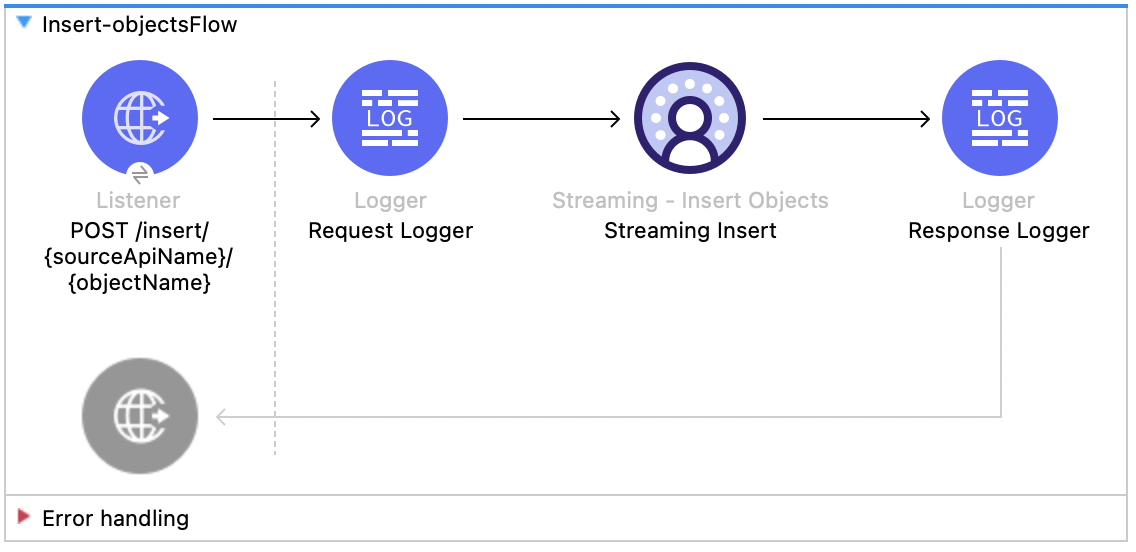
This Mule flow shows how to insert data via the streaming API to an object’s endpoint. Refer to the Salesforce API docs.
This example uses the following operations:
-
HTTP Listener
Accepts data from HTTP POST requests with the source and object name as the URI parameters. -
Logger
Shows the HTTP request received from the Listener, then later shows the HTTP response from the Insert Objects operation. -
Streaming Insert
-
Authenticates based on your choice of OAuth Client Credentials, OAuth JWT, or OAuth Username and Password.
-
Receives the source name, object name, and payload.
-
Calls the Salesforce API to insert the payload to that object’s endpoint.
-
XML for This Example
Paste this code into the Studio XML editor to quickly load the flow for this example into your Mule app:
<?xml version="1.0" encoding="UTF-8"?>

<mule xmlns:sdc="http://www.mulesoft.org/schema/mule/sdc" xmlns:http="http://www.mulesoft.org/schema/mule/http"
	  xmlns="http://www.mulesoft.org/schema/mule/core"
	  xmlns:doc="http://www.mulesoft.org/schema/mule/documentation" xmlns:xsi="http://www.w3.org/2001/XMLSchema-instance" xsi:schemaLocation="http://www.mulesoft.org/schema/mule/core http://www.mulesoft.org/schema/mule/core/current/mule.xsd
http://www.mulesoft.org/schema/mule/http http://www.mulesoft.org/schema/mule/http/current/mule-http.xsd
http://www.mulesoft.org/schema/mule/sdc http://www.mulesoft.org/schema/mule/sdc/current/mule-sdc.xsd">
	<http:listener-config name="HTTP_Listener_config" doc:name="HTTP Listener config" >
		<http:listener-connection host="0.0.0.0" port="8081" />
	</http:listener-config>
    <configuration-properties doc:name="Configuration properties" file="mule-app.properties" />
    <sdc:sdc-config name="Salesforce_Data_Cloud_OAuth_JWT_config" doc:name="Salesforce Data Cloud config" >
		<sdc:oauth-jwt-connection consumerKey="${server.consumerKey}" keyStorePath="${server.keyStorePath}" storePassword="${server.keyStorePassword}" subject="${server.userName}" keyAlias="${server.certificateAlias}" audienceUrl="${server.audienceUrl}"/>
	</sdc:sdc-config>
	<sdc:sdc-config name="Salesforce_Data_Cloud_OAuth_UsernamePassword_config" doc:name="Salesforce Data Cloud config" >
		<sdc:oauth-user-pass-connection audienceUrl="${server.audienceUrl}" username="${server.userName}" password="${server.password}" clientId="${server.consumerKey}" clientSecret="${server.consumerSecret}"/>
	</sdc:sdc-config>

	<flow name="Insert-objectsFlow" >
		<http:listener doc:name="POST /insert/{sourceApiName}/{objectName}" config-ref="HTTP_Listener_config" path="/insert/{sourceApiName}/{objectName}" allowedMethods="POST"/>
		<logger level="INFO" doc:name="Request Logger" message="#[payload]"/>
		<sdc:insert-objects doc:name="Streaming Insert" config-ref="Salesforce_Data_Cloud_OAuth_JWT_config" sourceNameUriParam="#[attributes.uriParams.sourceApiName]" objectNameUriParam="#[attributes.uriParams.objectName]"/>
		<logger level="INFO" doc:name="Response Logger" />
	</flow>
</mule>
Steps for Running This Example
-
Save the project.
-
Test the flow by sending a
POSTtolocalhost:8081/{SOURCE_API_NAME}/{OBJECT_NAME}with a JSON payload that matches your object’s schema, for example:{ "data": [ { "your_object_field_1": "value_1", "your_object_field_2": "value_2", "your_object_field_3": "value_3" } ] }
Delete Data - Streaming API
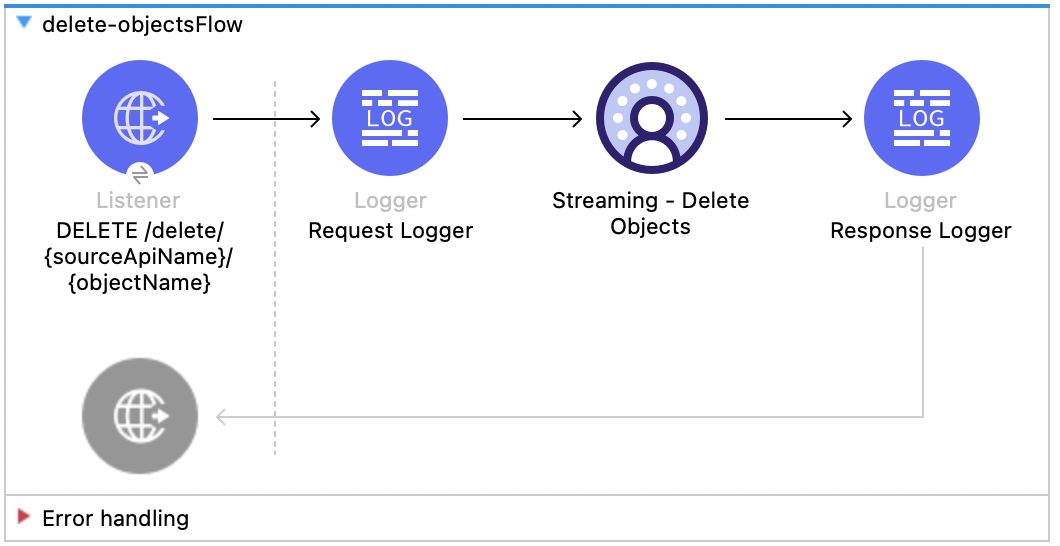
This Mule flow shows how to delete data via the streaming API using an object’s endpoint. Refer to the Salesforce API docs.
This example uses the following operations:
-
HTTP Listener
Accepts data from HTTP DELETE requests with the source api and object name as URI parameters and record IDs as query parameters. -
Logger
Shows the HTTP request received from the Listener, then later shows the HTTP response from the Streaming Delete operation. -
Streaming Delete
-
Authenticates based on your choice of OAuth Client Credentials, OAuth JWT, or OAuth Username and Password.
-
Receives the source api name, object name, and record IDs.
-
Calls the Salesforce API to delete the records from the query parameters using that object’s endpoint.
-
XML for This Example
Paste this code into the Studio XML editor to quickly load the flow for this example into your Mule app:
<?xml version="1.0" encoding="UTF-8"?>
<mule xmlns:sdc="http://www.mulesoft.org/schema/mule/sdc" xmlns:http="http://www.mulesoft.org/schema/mule/http"
xmlns="http://www.mulesoft.org/schema/mule/core"
xmlns:doc="http://www.mulesoft.org/schema/mule/documentation" xmlns:xsi="http://www.w3.org/2001/XMLSchema-instance" xsi:schemaLocation="http://www.mulesoft.org/schema/mule/core http://www.mulesoft.org/schema/mule/core/current/mule.xsd
http://www.mulesoft.org/schema/mule/http http://www.mulesoft.org/schema/mule/http/current/mule-http.xsd
http://www.mulesoft.org/schema/mule/sdc http://www.mulesoft.org/schema/mule/sdc/current/mule-sdc.xsd">
<http:listener-config name="HTTP_Listener_config" doc:name="HTTP Listener config" >
<http:listener-connection host="0.0.0.0" port="8081" />
</http:listener-config>
<configuration-properties doc:name="Configuration properties" file="mule-app.properties" />
<sdc:sdc-config name="Salesforce_Data_Cloud_OAuth_JWT_config" doc:name="Salesforce Data Cloud config" >
<sdc:oauth-jwt-connection consumerKey="${server.consumerKey}" keyStorePath="${server.keyStorePath}" storePassword="${server.keyStorePassword}" subject="${server.userName}" keyAlias="${server.certificateAlias}" audienceUrl="${server.audienceUrl}"/>
</sdc:sdc-config>
<sdc:sdc-config name="Salesforce_Data_Cloud_OAuth_UsernamePassword_config" doc:name="Salesforce Data Cloud config" >
<sdc:oauth-user-pass-connection audienceUrl="${server.audienceUrl}" username="${server.userName}" password="${server.password}" clientId="${server.consumerKey}" clientSecret="${server.consumerSecret}"/>
</sdc:sdc-config>
<flow name="delete-objectsFlow" >
<http:listener doc:name="DELETE /delete/{sourceApiName}/{objectName}" config-ref="HTTP_Listener_config" path="/delete/{sourceApiName}/{objectName}" allowedMethods="DELETE"/>
<logger level="INFO" doc:name="Request Logger" />
<sdc:delete-objects doc:name="Streaming - Delete Objects" config-ref="Salesforce_Data_Cloud_OAuth_JWT_config" idsQueryParams="#[output application/java --- [attributes.queryParams.ids]]" sourceNameUriParam="#[attributes.uriParams.sourceApiName]" objectNameUriParam="#[attributes.uriParams.objectName]"/>
<logger level="INFO" doc:name="Response Logger" />
</flow>
</mule>Create Job - Bulk API
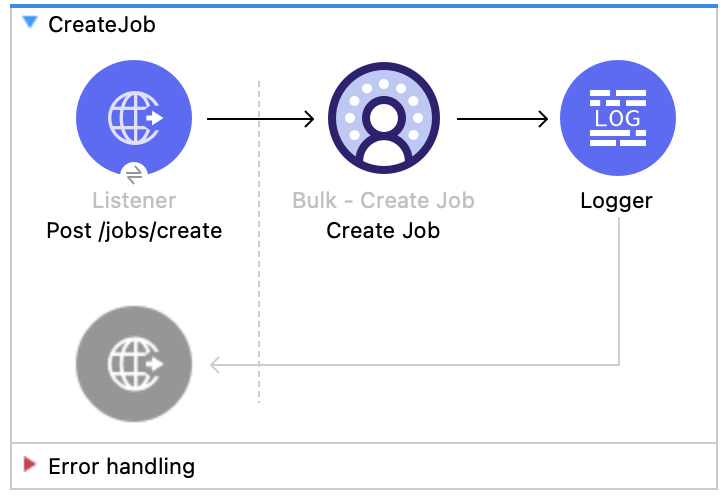
This Mule flow shows how to create a bulk job, which uploads data to a Salesforce Data 360 Ingestion API object. Refer to the Salesforce API docs.
This example uses the following operations:
-
HTTP Listener
Accepts data from HTTP POST requests with the source api and object name as URI parameters and record IDs as query parameters. -
Logger
Shows the HTTP request received from the Listener, then later shows the HTTP response from the Create Job operation. -
Create Job:
-
Authenticates based on your choice of OAuth Client Credentials, OAuth JWT, or OAuth Username and Password.
-
Receives the source api name, object name, and job operation. You can find the job operations in the Reference page.
-
Calls the Salesforce API to create the job and returns the response.
-
XML for This Example
Paste this code into the Studio XML editor to quickly load the flow for this example into your Mule app:
<?xml version="1.0" encoding="UTF-8"?>

<mule xmlns:salesforce="http://www.mulesoft.org/schema/mule/salesforce" xmlns:ee="http://www.mulesoft.org/schema/mule/ee/core"
	xmlns:file="http://www.mulesoft.org/schema/mule/file"
	xmlns:sdc="http://www.mulesoft.org/schema/mule/sdc" xmlns:http="http://www.mulesoft.org/schema/mule/http" xmlns="http://www.mulesoft.org/schema/mule/core" xmlns:doc="http://www.mulesoft.org/schema/mule/documentation" xmlns:xsi="http://www.w3.org/2001/XMLSchema-instance" xsi:schemaLocation="http://www.mulesoft.org/schema/mule/core http://www.mulesoft.org/schema/mule/core/current/mule.xsd
http://www.mulesoft.org/schema/mule/http http://www.mulesoft.org/schema/mule/http/current/mule-http.xsd
http://www.mulesoft.org/schema/mule/sdc http://www.mulesoft.org/schema/mule/sdc/current/mule-sdc.xsd
http://www.mulesoft.org/schema/mule/file http://www.mulesoft.org/schema/mule/file/current/mule-file.xsd
http://www.mulesoft.org/schema/mule/ee/core http://www.mulesoft.org/schema/mule/ee/core/current/mule-ee.xsd
http://www.mulesoft.org/schema/mule/salesforce http://www.mulesoft.org/schema/mule/salesforce/current/mule-salesforce.xsd">
	<http:listener-config name="HTTP_Listener_config" doc:name="HTTP Listener config" >
		<http:listener-connection host="0.0.0.0" port="8081" />
	</http:listener-config>
	<sdc:sdc-config name="Salesforce_Data_Cloud_OAuth_JWT_config" doc:name="Salesforce Data Cloud config" >
		<sdc:oauth-jwt-connection consumerKey="${server.consumerKey}" keyStorePath="${server.keyStorePath}" storePassword="${server.keyStorePassword}" subject="${server.userName}" audienceUrl="${server.audienceUrl}" keyAlias="${server.certificateAlias}" />
	</sdc:sdc-config>
	<configuration-properties doc:name="Configuration properties" file="mule-app.properties" />
	<sdc:sdc-config name="Salesforce_Data_Cloud_OAuth_UsernamePassword_config" doc:name="Salesforce Data Cloud config" >
		<sdc:oauth-user-pass-connection clientId="${server.consumerKey}" clientSecret="${server.consumerSecret}" username="${server.userName}" password="${server.password}" audienceUrl="${server.audienceUrl}" />
	</sdc:sdc-config>
	<flow name="CreateJob" >
		<http:listener doc:name="Post /jobs/create" config-ref="HTTP_Listener_config" path="/jobs/create/{sourceApiName}/{objectName}/{operation}"/>
		<sdc:create-bulk-job doc:name="Create Job" config-ref="Salesforce_Data_Cloud_OAuth_UsernamePassword_config" sourceNameUriParam="#[attributes.uriParams.sourceApiName]" objectNameUriParam="#[attributes.uriParams.objectName]" operationUriParam="#[attributes.uriParams.operation]"/>
		<logger level="INFO" doc:name="Logger" />
	</flow>
</mule>Upload Job Data - Bulk API
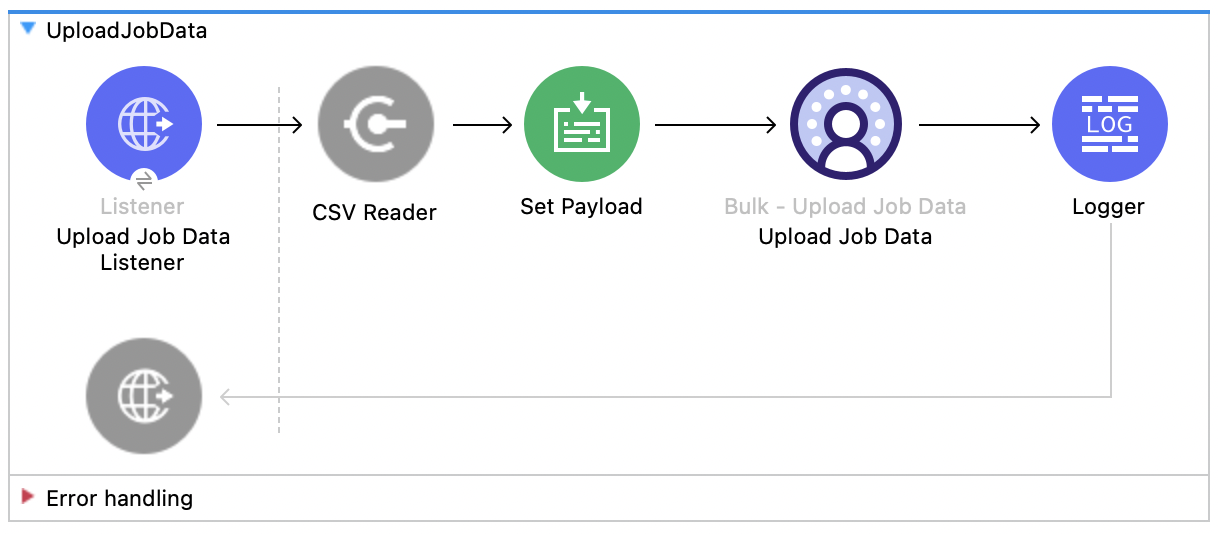
This Mule flow shows how to upload data for inserting to or deleting from a Salesforce Data 360 Ingestion API object specified by the job ID. Refer to the Salesforce API docs.
This example uses the following operations:
-
HTTP Listener
Accepts data from HTTP POST requests with the job ID in the URI. -
CSV Reader
Reads data from the CSV that is configured in the absolute file path. -
Set Payload
Updates the payload with the CSV data for Upload Job Data. -
Upload Job Data
-
Authenticates based on your choice of OAuth Client Credentials, OAuth JWT, or OAuth Username and Password.
-
Receives the job ID from the HTTP request and CSV data that is now in the payload.
-
Uploads data from the CSV to the Salesforce Data 360 Ingestion API object, and eventually returns an HTTP response.
-
-
Logger
Shows the HTTP result from the Upload Job Data operation.
XML for This Example
Paste this code into the Studio XML editor to quickly load the flow for this example into your Mule app:
<?xml version="1.0" encoding="UTF-8"?>

<mule xmlns:salesforce="http://www.mulesoft.org/schema/mule/salesforce" xmlns:ee="http://www.mulesoft.org/schema/mule/ee/core"
	xmlns:file="http://www.mulesoft.org/schema/mule/file"
	xmlns:sdc="http://www.mulesoft.org/schema/mule/sdc" xmlns:http="http://www.mulesoft.org/schema/mule/http" xmlns="http://www.mulesoft.org/schema/mule/core" xmlns:doc="http://www.mulesoft.org/schema/mule/documentation" xmlns:xsi="http://www.w3.org/2001/XMLSchema-instance" xsi:schemaLocation="http://www.mulesoft.org/schema/mule/core http://www.mulesoft.org/schema/mule/core/current/mule.xsd
http://www.mulesoft.org/schema/mule/http http://www.mulesoft.org/schema/mule/http/current/mule-http.xsd
http://www.mulesoft.org/schema/mule/sdc http://www.mulesoft.org/schema/mule/sdc/current/mule-sdc.xsd
http://www.mulesoft.org/schema/mule/file http://www.mulesoft.org/schema/mule/file/current/mule-file.xsd
http://www.mulesoft.org/schema/mule/ee/core http://www.mulesoft.org/schema/mule/ee/core/current/mule-ee.xsd
http://www.mulesoft.org/schema/mule/salesforce http://www.mulesoft.org/schema/mule/salesforce/current/mule-salesforce.xsd">
	<http:listener-config name="HTTP_Listener_config" doc:name="HTTP Listener config" >
		<http:listener-connection host="0.0.0.0" port="8081" />
	</http:listener-config>
	<sdc:sdc-config name="Salesforce_Data_Cloud_OAuth_JWT_config" doc:name="Salesforce Data Cloud config" >
		<sdc:oauth-jwt-connection consumerKey="${server.consumerKey}" keyStorePath="${server.keyStorePath}" storePassword="${server.keyStorePassword}" subject="${server.userName}" audienceUrl="${server.audienceUrl}" keyAlias="${server.certificateAlias}" />
	</sdc:sdc-config>
	<configuration-properties doc:name="Configuration properties" file="mule-app.properties" />
	<sdc:sdc-config name="Salesforce_Data_Cloud_OAuth_UsernamePassword_config" doc:name="Salesforce Data Cloud config" >
		<sdc:oauth-user-pass-connection clientId="${server.consumerKey}" clientSecret="${server.consumerSecret}" username="${server.userName}" password="${server.password}" audienceUrl="${server.audienceUrl}" />
	</sdc:sdc-config>
	<flow name="UploadJobData" >
        <http:listener doc:name="Upload Job Data Listener" config-ref="HTTP_Listener_config" path="/jobs/upload/{jobId}"/>
        <file:read doc:name="CSV Reader" path="" target="content"/>
        <set-payload value="#[vars.content]" doc:name="Set Payload" />
        <sdc:upload-data-bulk-job doc:name="Upload Job Data" config-ref="Salesforce_Data_Cloud_OAuth_JWT_config" idUriParam="#[attributes.uriParams.jobId]"/>
        <logger level="INFO" doc:name="Logger" message="#[message]"/>
    </flow>
</mule>
Steps for Running This Example
-
Enter a valid absolute file path to a CSV in the CSV Reader’s File Path attribute.
-
Save the project.
-
Create a job and copy its job ID.
-
Test the flow by sending a
POSTtolocalhost:8081/jobs/upload/{JOB_ID}using the job ID you copied earlier.
Close Job - Bulk API
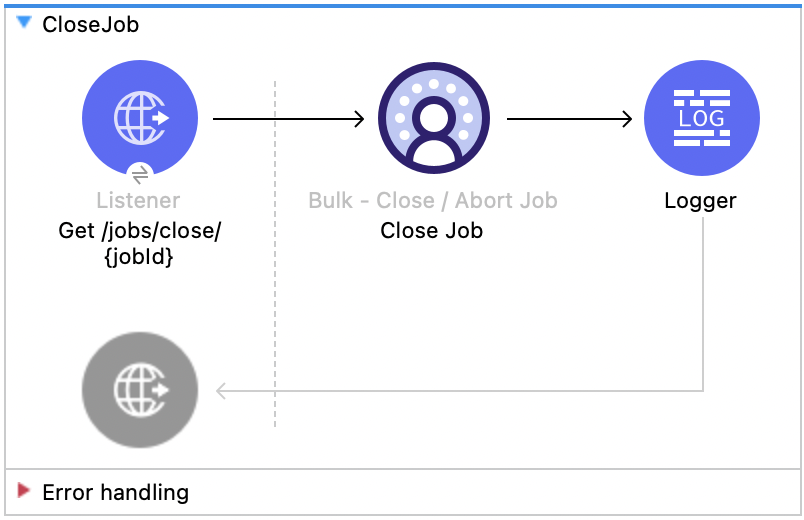
This Mule flow shows how to update the status of the specified job ID so that the job is closed. After a job is closed, it is queued for processing Salesforce API docs.
This example uses the following operations:
-
HTTP Listener
Accepts data from HTTP GET requests with the job ID as a URI parameter. -
Logger
Shows the HTTP response from the Close Job operation. -
Close Job
-
Authenticates based on your choice of OAuth Client Credentials, OAuth JWT, or OAuth Username and Password.
-
Receives the specified job ID.
-
Calls the Salesforce API with the
UploadCompletestate, which completes that job and subsequently receives an HTTP response.
-
XML for This Example
Paste this code into the Studio XML editor to quickly load the flow for this example into your Mule app:
<?xml version="1.0" encoding="UTF-8"?>

<mule xmlns:salesforce="http://www.mulesoft.org/schema/mule/salesforce" xmlns:ee="http://www.mulesoft.org/schema/mule/ee/core"
	xmlns:file="http://www.mulesoft.org/schema/mule/file"
	xmlns:sdc="http://www.mulesoft.org/schema/mule/sdc" xmlns:http="http://www.mulesoft.org/schema/mule/http" xmlns="http://www.mulesoft.org/schema/mule/core" xmlns:doc="http://www.mulesoft.org/schema/mule/documentation" xmlns:xsi="http://www.w3.org/2001/XMLSchema-instance" xsi:schemaLocation="http://www.mulesoft.org/schema/mule/core http://www.mulesoft.org/schema/mule/core/current/mule.xsd
http://www.mulesoft.org/schema/mule/http http://www.mulesoft.org/schema/mule/http/current/mule-http.xsd
http://www.mulesoft.org/schema/mule/sdc http://www.mulesoft.org/schema/mule/sdc/current/mule-sdc.xsd
http://www.mulesoft.org/schema/mule/file http://www.mulesoft.org/schema/mule/file/current/mule-file.xsd
http://www.mulesoft.org/schema/mule/ee/core http://www.mulesoft.org/schema/mule/ee/core/current/mule-ee.xsd
http://www.mulesoft.org/schema/mule/salesforce http://www.mulesoft.org/schema/mule/salesforce/current/mule-salesforce.xsd">
	<http:listener-config name="HTTP_Listener_config" doc:name="HTTP Listener config" >
		<http:listener-connection host="0.0.0.0" port="8081" />
	</http:listener-config>
	<sdc:sdc-config name="Salesforce_Data_Cloud_OAuth_JWT_config" doc:name="Salesforce Data Cloud config" >
		<sdc:oauth-jwt-connection consumerKey="${server.consumerKey}" keyStorePath="${server.keyStorePath}" storePassword="${server.keyStorePassword}" subject="${server.userName}" audienceUrl="${server.audienceUrl}" keyAlias="${server.certificateAlias}" />
	</sdc:sdc-config>
	<configuration-properties doc:name="Configuration properties" file="mule-app.properties" />
	<sdc:sdc-config name="Salesforce_Data_Cloud_OAuth_UsernamePassword_config" doc:name="Salesforce Data Cloud config" >
		<sdc:oauth-user-pass-connection clientId="${server.consumerKey}" clientSecret="${server.consumerSecret}" username="${server.userName}" password="${server.password}" audienceUrl="${server.audienceUrl}" />
	</sdc:sdc-config>
	<flow name="CloseJob" >
		<http:listener doc:name="Get /jobs/close/{jobId}" config-ref="HTTP_Listener_config" path="/jobs/close/{jobId}"/>
		<sdc:update-bulk-operation-job doc:name="Close Job" config-ref="Salesforce_Data_Cloud_OAuth_JWT_config" idUriParam="#[attributes.uriParams.jobId]" state="UploadComplete"/>
		<logger level="INFO" doc:name="Logger" />
	</flow>
</mule>Abort Job - Bulk API
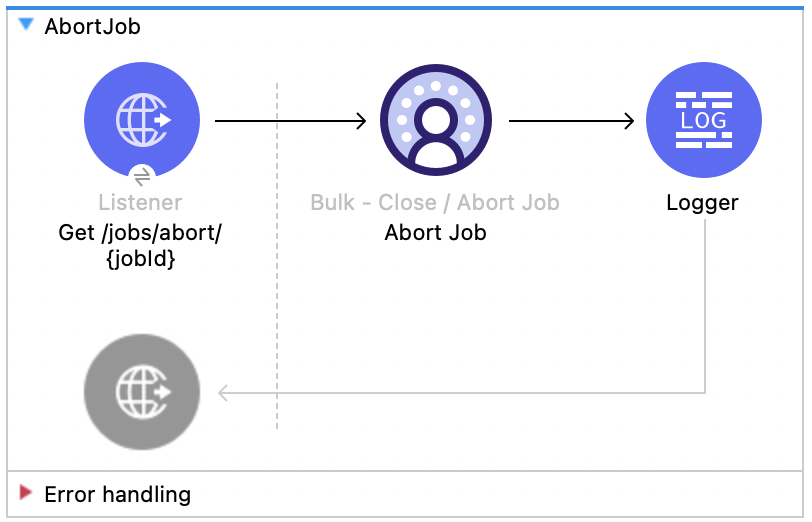
This Mule flow shows how to update the status of the specified job ID so that the job is aborted. After a job is aborted, it will not be queued for processing Salesforce API docs.
This example uses the following operations:
-
HTTP Listener
Accepts data from HTTP GET requests with the job ID as a URI parameter. -
Logger
Shows the HTTP response from the Abort Job operation. -
Abort Job:
-
Authenticates based on your choice of OAuth Client Credentials, OAuth JWT, or OAuth Username and Password.
-
Receives the job ID that was used as the URI parameter.
-
Calls the Salesforce API with the aborted state, aborts that job, and then receives an HTTP response.
-
XML for This Example
Paste this code into the Studio XML editor to quickly load the flow for this example into your Mule app:
<?xml version="1.0" encoding="UTF-8"?>

<mule xmlns:salesforce="http://www.mulesoft.org/schema/mule/salesforce" xmlns:ee="http://www.mulesoft.org/schema/mule/ee/core"
	xmlns:file="http://www.mulesoft.org/schema/mule/file"
	xmlns:sdc="http://www.mulesoft.org/schema/mule/sdc" xmlns:http="http://www.mulesoft.org/schema/mule/http" xmlns="http://www.mulesoft.org/schema/mule/core" xmlns:doc="http://www.mulesoft.org/schema/mule/documentation" xmlns:xsi="http://www.w3.org/2001/XMLSchema-instance" xsi:schemaLocation="http://www.mulesoft.org/schema/mule/core http://www.mulesoft.org/schema/mule/core/current/mule.xsd
http://www.mulesoft.org/schema/mule/http http://www.mulesoft.org/schema/mule/http/current/mule-http.xsd
http://www.mulesoft.org/schema/mule/sdc http://www.mulesoft.org/schema/mule/sdc/current/mule-sdc.xsd
http://www.mulesoft.org/schema/mule/file http://www.mulesoft.org/schema/mule/file/current/mule-file.xsd
http://www.mulesoft.org/schema/mule/ee/core http://www.mulesoft.org/schema/mule/ee/core/current/mule-ee.xsd
http://www.mulesoft.org/schema/mule/salesforce http://www.mulesoft.org/schema/mule/salesforce/current/mule-salesforce.xsd">
	<http:listener-config name="HTTP_Listener_config" doc:name="HTTP Listener config" >
		<http:listener-connection host="0.0.0.0" port="8081" />
	</http:listener-config>
	<sdc:sdc-config name="Salesforce_Data_Cloud_OAuth_JWT_config" doc:name="Salesforce Data Cloud config" >
		<sdc:oauth-jwt-connection consumerKey="${server.consumerKey}" keyStorePath="${server.keyStorePath}" storePassword="${server.keyStorePassword}" subject="${server.userName}" audienceUrl="${server.audienceUrl}" keyAlias="${server.certificateAlias}" />
	</sdc:sdc-config>
	<configuration-properties doc:name="Configuration properties" file="mule-app.properties" />
	<sdc:sdc-config name="Salesforce_Data_Cloud_OAuth_UsernamePassword_config" doc:name="Salesforce Data Cloud config" >
		<sdc:oauth-user-pass-connection clientId="${server.consumerKey}" clientSecret="${server.consumerSecret}" username="${server.userName}" password="${server.password}" audienceUrl="${server.audienceUrl}" />
	</sdc:sdc-config>
	<flow name="AbortJob" >
		<http:listener doc:name="Get /jobs/abort/{jobId}"  config-ref="HTTP_Listener_config" path="/jobs/abort/{jobId}"/>
		<sdc:update-bulk-operation-job doc:name="Abort Job" config-ref="Salesforce_Data_Cloud_OAuth_JWT_config" idUriParam="#[attributes.uriParams.jobId]" state="Aborted"/>
		<logger level="INFO" doc:name="Logger" />
	</flow>
</mule>
Steps for Running This Example
-
Save the project.
-
Create a job and copy the resulting job ID.
-
Test the flow by sending a
GETtolocalhost:8081/jobs/abort/{JOB_ID}with the job ID that you previously copied.
Get Job - Bulk API
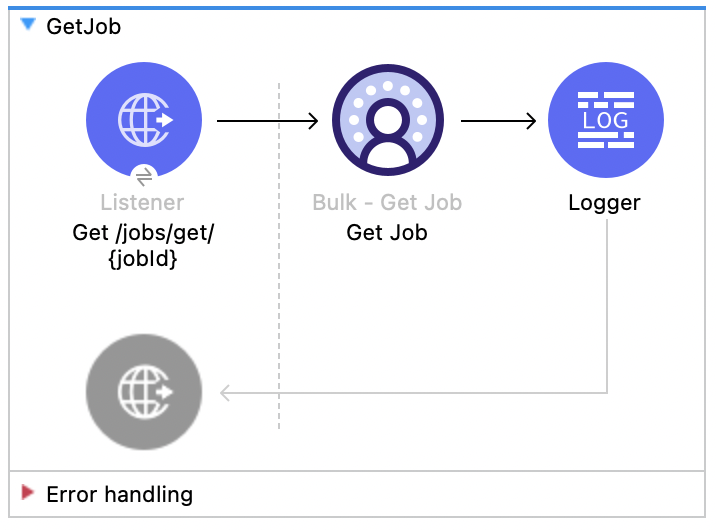
This Mule flow shows how to retrieve the current status of the specified job ID. Refer to the Salesforce API docs.
This example uses the following operations:
-
HTTP Listener
Accepts data from HTTP GET requests with the job ID included in the URI parameters. -
Logger
Shows the HTTP response from the Get Job operation. -
Get Job
-
Authenticates based on your choice of OAuth Client Credentials, OAuth JWT, or OAuth Username and Password.
-
Receives the job ID from the URI parameters.
-
Calls the Salesforce API and returns the job status.
-
XML for This Example
Paste this code into the Studio XML editor to quickly load the flow for this example into your Mule app:
<?xml version="1.0" encoding="UTF-8"?>

<mule xmlns:salesforce="http://www.mulesoft.org/schema/mule/salesforce" xmlns:ee="http://www.mulesoft.org/schema/mule/ee/core"
	xmlns:file="http://www.mulesoft.org/schema/mule/file"
	xmlns:sdc="http://www.mulesoft.org/schema/mule/sdc" xmlns:http="http://www.mulesoft.org/schema/mule/http" xmlns="http://www.mulesoft.org/schema/mule/core" xmlns:doc="http://www.mulesoft.org/schema/mule/documentation" xmlns:xsi="http://www.w3.org/2001/XMLSchema-instance" xsi:schemaLocation="http://www.mulesoft.org/schema/mule/core http://www.mulesoft.org/schema/mule/core/current/mule.xsd
http://www.mulesoft.org/schema/mule/http http://www.mulesoft.org/schema/mule/http/current/mule-http.xsd
http://www.mulesoft.org/schema/mule/sdc http://www.mulesoft.org/schema/mule/sdc/current/mule-sdc.xsd
http://www.mulesoft.org/schema/mule/file http://www.mulesoft.org/schema/mule/file/current/mule-file.xsd
http://www.mulesoft.org/schema/mule/ee/core http://www.mulesoft.org/schema/mule/ee/core/current/mule-ee.xsd
http://www.mulesoft.org/schema/mule/salesforce http://www.mulesoft.org/schema/mule/salesforce/current/mule-salesforce.xsd">
	<http:listener-config name="HTTP_Listener_config" doc:name="HTTP Listener config" >
		<http:listener-connection host="0.0.0.0" port="8081" />
	</http:listener-config>
	<sdc:sdc-config name="Salesforce_Data_Cloud_OAuth_JWT_config" doc:name="Salesforce Data Cloud config" >
		<sdc:oauth-jwt-connection consumerKey="${server.consumerKey}" keyStorePath="${server.keyStorePath}" storePassword="${server.keyStorePassword}" subject="${server.userName}" audienceUrl="${server.audienceUrl}" keyAlias="${server.certificateAlias}" />
	</sdc:sdc-config>
	<configuration-properties doc:name="Configuration properties" file="mule-app.properties" />
	<sdc:sdc-config name="Salesforce_Data_Cloud_OAuth_UsernamePassword_config" doc:name="Salesforce Data Cloud config" >
		<sdc:oauth-user-pass-connection clientId="${server.consumerKey}" clientSecret="${server.consumerSecret}" username="${server.userName}" password="${server.password}" audienceUrl="${server.audienceUrl}" />
	</sdc:sdc-config>
	<flow name="GetJob" >
		<http:listener doc:name="Get /jobs/get/{jobId}" config-ref="HTTP_Listener_config" path="/jobs/get/{jobId}"/>
		<sdc:get-bulk-job doc:name="Get Job" config-ref="Salesforce_Data_Cloud_OAuth_JWT_config" idUriParam="#[attributes.uriParams.jobId]"/>
		<logger level="INFO" doc:name="Logger" />
	</flow>
</mule>
Steps for Running This Example
-
Save the project.
-
Create a job and copy the resulting job ID.
-
Test the flow by sending a
GETtolocalhost:8081/jobs/get/{JOB_ID}, using the job ID you copied earlier.
List Jobs - Bulk API
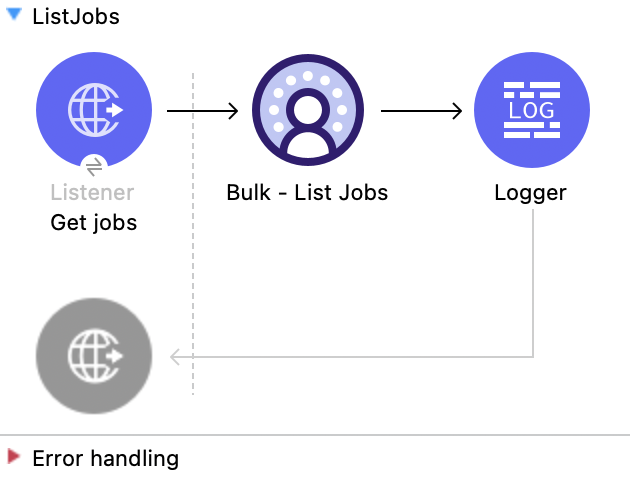
This Mule flow shows how to retrieve all bulk jobs. Refer to the Salesforce API docs.
This example uses the following operations:
-
HTTP Listener
Accepts data from HTTP GET requests with all jobs included in the URI parameters. -
Logger
Shows the HTTP response from the List Jobs operation. -
List Jobs
-
Authenticates based on your choice of OAuth Client Credentials, OAuth JWT, or OAuth Username and Password.
-
Receives all jobs from the URI parameters.
-
Calls the Salesforce API and returns the job status.
-
XML for This Example
Paste this code into the Studio XML editor to quickly load the flow for this example into your Mule app:
<?xml version="1.0" encoding="UTF-8"?>

<mule xmlns:salesforce="http://www.mulesoft.org/schema/mule/salesforce" xmlns:ee="http://www.mulesoft.org/schema/mule/ee/core"
	xmlns:file="http://www.mulesoft.org/schema/mule/file"
	xmlns:sdc="http://www.mulesoft.org/schema/mule/sdc" xmlns:http="http://www.mulesoft.org/schema/mule/http" xmlns="http://www.mulesoft.org/schema/mule/core" xmlns:doc="http://www.mulesoft.org/schema/mule/documentation" xmlns:xsi="http://www.w3.org/2001/XMLSchema-instance" xsi:schemaLocation="http://www.mulesoft.org/schema/mule/core http://www.mulesoft.org/schema/mule/core/current/mule.xsd
http://www.mulesoft.org/schema/mule/http http://www.mulesoft.org/schema/mule/http/current/mule-http.xsd
http://www.mulesoft.org/schema/mule/sdc http://www.mulesoft.org/schema/mule/sdc/current/mule-sdc.xsd
http://www.mulesoft.org/schema/mule/file http://www.mulesoft.org/schema/mule/file/current/mule-file.xsd
http://www.mulesoft.org/schema/mule/ee/core http://www.mulesoft.org/schema/mule/ee/core/current/mule-ee.xsd
http://www.mulesoft.org/schema/mule/salesforce http://www.mulesoft.org/schema/mule/salesforce/current/mule-salesforce.xsd">
	<http:listener-config name="HTTP_Listener_config" doc:name="HTTP Listener config" >
		<http:listener-connection host="0.0.0.0" port="8081" />
	</http:listener-config>
	<sdc:sdc-config name="Salesforce_Data_Cloud_OAuth_JWT_config" doc:name="Salesforce Data Cloud config" >
		<sdc:oauth-jwt-connection consumerKey="${server.consumerKey}" keyStorePath="${server.keyStorePath}" storePassword="${server.keyStorePassword}" subject="${server.userName}" audienceUrl="${server.audienceUrl}" keyAlias="${server.certificateAlias}" />
	</sdc:sdc-config>
	<configuration-properties doc:name="Configuration properties" file="mule-app.properties" />
	<sdc:sdc-config name="Salesforce_Data_Cloud_OAuth_UsernamePassword_config" doc:name="Salesforce Data Cloud config" >
		<sdc:oauth-user-pass-connection clientId="${server.consumerKey}" clientSecret="${server.consumerSecret}" username="${server.userName}" password="${server.password}" audienceUrl="${server.audienceUrl}" />
	</sdc:sdc-config>
	<sdc:sdc-config name="Salesforce_Data_Cloud_config" doc:name="Salesforce Data Cloud config" doc:id="c458e8ae-2484-463b-8ec8-b65f385f1816" >
		<sdc:oauth-jwt-connection />
	</sdc:sdc-config>
	<flow name="GetJob" >
		<http:listener doc:name="Get jobs" config-ref="HTTP_Listener_config" path="/jobs/get/"/>
		<sdc:get-bulk-jobs doc:name="Bulk - List Jobs" doc:id="8138e10a-91a7-40f7-9060-0ab5c1c58ad2" config-ref="Salesforce_Data_Cloud_config"/>
		<logger level="INFO" doc:name="Logger" />
	</flow>
</mule>Delete Job - Bulk API
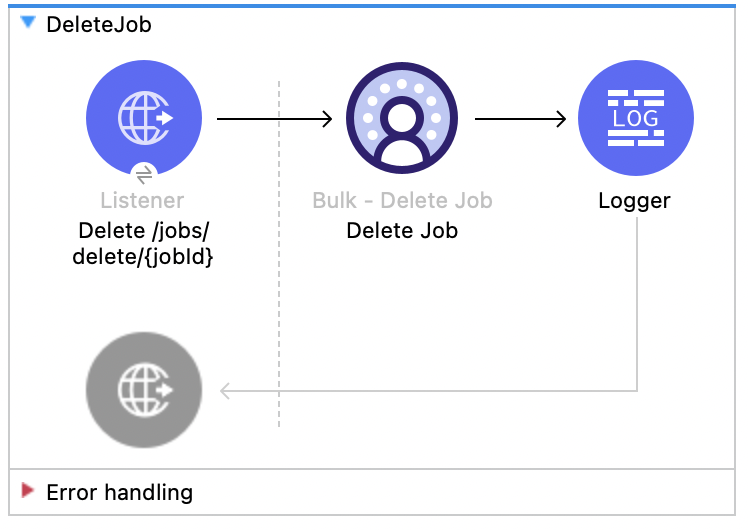
This Mule flow shows how to delete or close the specified job ID, which deletes job data and metadata that is stored by Salesforce.
In order to delete a job, a job must have a state of UploadComplete, JobComplete, Aborted, or Failed. Refer to the Salesforce API docs.
This example uses the following operations:
-
HTTP Listener
Accepts data from HTTP DELETE requests with the job ID included in the URI parameters. -
Logger
Shows the HTTP response from the Delete Job operation. -
Delete Job
-
Authenticates based on your choice of OAuth Client Credentials, OAuth JWT, or OAuth Username and Password.
-
Receives the job ID used in the URI parameters.
-
Calls the Salesforce API and deletes the job.
-
XML for This Example
Paste this code into the Studio XML editor to quickly load the flow for this example into your Mule app:
<?xml version="1.0" encoding="UTF-8"?>

<mule xmlns:salesforce="http://www.mulesoft.org/schema/mule/salesforce" xmlns:ee="http://www.mulesoft.org/schema/mule/ee/core"
	xmlns:file="http://www.mulesoft.org/schema/mule/file"
	xmlns:sdc="http://www.mulesoft.org/schema/mule/sdc" xmlns:http="http://www.mulesoft.org/schema/mule/http" xmlns="http://www.mulesoft.org/schema/mule/core" xmlns:doc="http://www.mulesoft.org/schema/mule/documentation" xmlns:xsi="http://www.w3.org/2001/XMLSchema-instance" xsi:schemaLocation="http://www.mulesoft.org/schema/mule/core http://www.mulesoft.org/schema/mule/core/current/mule.xsd
http://www.mulesoft.org/schema/mule/http http://www.mulesoft.org/schema/mule/http/current/mule-http.xsd
http://www.mulesoft.org/schema/mule/sdc http://www.mulesoft.org/schema/mule/sdc/current/mule-sdc.xsd
http://www.mulesoft.org/schema/mule/file http://www.mulesoft.org/schema/mule/file/current/mule-file.xsd
http://www.mulesoft.org/schema/mule/ee/core http://www.mulesoft.org/schema/mule/ee/core/current/mule-ee.xsd
http://www.mulesoft.org/schema/mule/salesforce http://www.mulesoft.org/schema/mule/salesforce/current/mule-salesforce.xsd">
	<http:listener-config name="HTTP_Listener_config" doc:name="HTTP Listener config" >
		<http:listener-connection host="0.0.0.0" port="8081" />
	</http:listener-config>
	<sdc:sdc-config name="Salesforce_Data_Cloud_OAuth_JWT_config" doc:name="Salesforce Data Cloud config" >
		<sdc:oauth-jwt-connection consumerKey="${server.consumerKey}" keyStorePath="${server.keyStorePath}" storePassword="${server.keyStorePassword}" subject="${server.userName}" audienceUrl="${server.audienceUrl}" keyAlias="${server.certificateAlias}" />
	</sdc:sdc-config>
	<configuration-properties doc:name="Configuration properties" file="mule-app.properties" />
	<sdc:sdc-config name="Salesforce_Data_Cloud_OAuth_UsernamePassword_config" doc:name="Salesforce Data Cloud config" >
		<sdc:oauth-user-pass-connection clientId="${server.consumerKey}" clientSecret="${server.consumerSecret}" username="${server.userName}" password="${server.password}" audienceUrl="${server.audienceUrl}" />
	</sdc:sdc-config>
	<flow name="DeleteJob" >
		<http:listener doc:name="Delete /jobs/delete/{jobId}" config-ref="HTTP_Listener_config" path="/jobs/delete/{jobId}"/>
		<sdc:delete-bulk-job doc:name="Delete Job" config-ref="Salesforce_Data_Cloud_OAuth_JWT_config" idUriParam="#[attributes.uriParams.jobId]"/>
		<logger level="INFO" doc:name="Logger" />
	</flow>
</mule>
Steps for Running This Example
-
Save the project.
-
Create a job and copy the resulting job ID.
-
Use the job you copied to close the job (see Close Job - Bulk API flow).
-
Test the flow by sending a
DELETEtolocalhost:8081/jobs/delete/{JOB_ID}, using the job ID that you copied earlier.
Query API
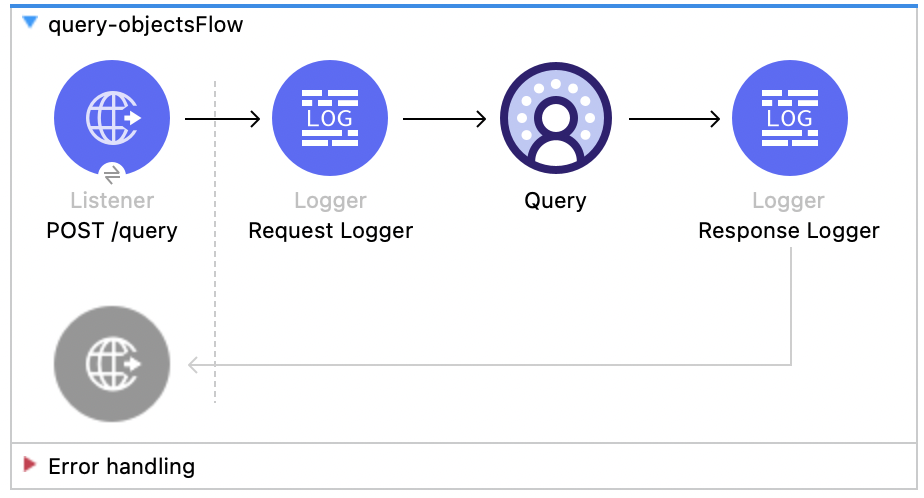
This Mule flow shows how to query data from Data 360 using a custom SOQL query. Refer to the Salesforce SOQL docs.
This example uses the following operations:
-
HTTP Listener
Accepts data from HTTP POST requests with the query in the payload. -
Logger
Shows the HTTP request received from the Listener, then later shows the HTTP response from the Query operation. -
Query
-
Authenticates based on your choice of OAuth Client Credentials, OAuth JWT, or OAuth Username and Password.
-
Receives the earlier SOQL query.
-
Calls the Salesforce API with the query and receives the result.
-
XML for This Example
Paste this code into the Studio XML editor to quickly load the flow for this example into your Mule app:
<?xml version="1.0" encoding="UTF-8"?>

<mule xmlns:sdc="http://www.mulesoft.org/schema/mule/sdc" xmlns:http="http://www.mulesoft.org/schema/mule/http"
	  xmlns="http://www.mulesoft.org/schema/mule/core"
	  xmlns:doc="http://www.mulesoft.org/schema/mule/documentation" xmlns:xsi="http://www.w3.org/2001/XMLSchema-instance" xsi:schemaLocation="http://www.mulesoft.org/schema/mule/core http://www.mulesoft.org/schema/mule/core/current/mule.xsd
http://www.mulesoft.org/schema/mule/http http://www.mulesoft.org/schema/mule/http/current/mule-http.xsd
http://www.mulesoft.org/schema/mule/sdc http://www.mulesoft.org/schema/mule/sdc/current/mule-sdc.xsd">
	<http:listener-config name="HTTP_Listener_config" doc:name="HTTP Listener config" >
		<http:listener-connection host="0.0.0.0" port="8081" />
	</http:listener-config>
    <configuration-properties doc:name="Configuration properties" file="mule-app.properties" />
    <sdc:sdc-config name="Salesforce_Data_Cloud_OAuth_JWT_config" doc:name="Salesforce Data Cloud config" >
		<sdc:oauth-jwt-connection consumerKey="${server.consumerKey}" keyStorePath="${server.keyStorePath}" storePassword="${server.keyStorePassword}" subject="${server.userName}" keyAlias="${server.certificateAlias}" audienceUrl="${server.audienceUrl}"/>
	</sdc:sdc-config>
	<sdc:sdc-config name="Salesforce_Data_Cloud_OAuth_UsernamePassword_config" doc:name="Salesforce Data Cloud config" >
		<sdc:oauth-user-pass-connection audienceUrl="${server.audienceUrl}" username="${server.userName}" password="${server.password}" clientId="${server.consumerKey}" clientSecret="${server.consumerSecret}"/>
	</sdc:sdc-config>

	<flow name="query-objectsFlow" >
		<http:listener doc:name="POST /query" config-ref="HTTP_Listener_config" path="/query" allowedMethods="POST"/>
		<logger level="INFO" doc:name="Request Logger" message="#[payload]"/>
		<sdc:query doc:name="Query" config-ref="Salesforce_Data_Cloud_OAuth_JWT_config"/>
		<logger level="INFO" doc:name="Response Logger" message="#[payload]"/>
	</flow>
</mule>Query v2
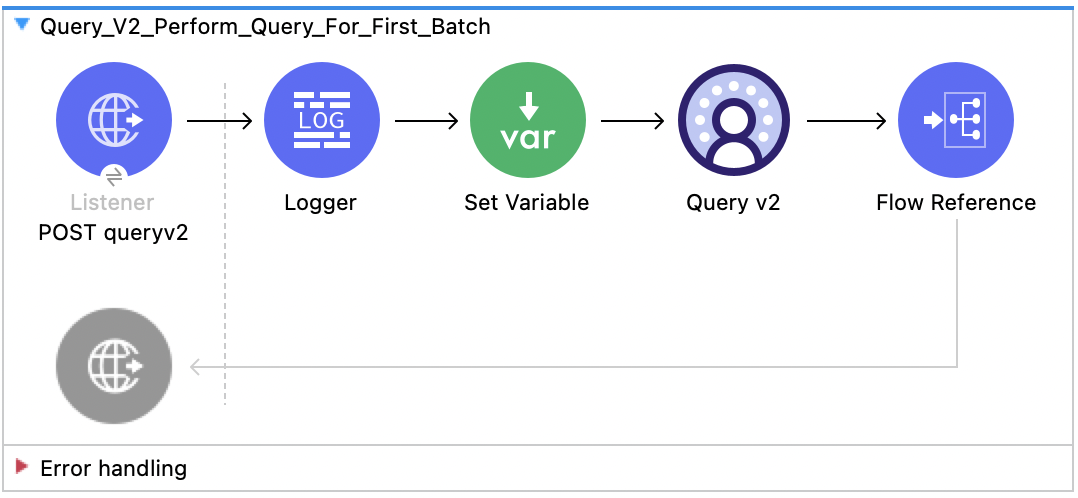
This Mule flow shows how to send an initial query. Use this flow before Query v2 - Get Next Batch. For more information about the Query v2 API, refer to the Data 360 Reference Guide.
This example uses the following operations:
-
HTTP Listener
Accepts data from HTTP POST requests with the query in the payload. -
Logger
Shows the HTTP request received from the Listener. -
Set Variable
Sets a variable calledsampleResultsto get a maximum sample of 10 results. Your paging calls are unaffected and this is to limit returned payloads to avoid having 40 MB large payloads on your testing calls. -
Query v2
Makes a query against the Data 360 data lake.
-
Flow Reference
Makes a reference to the Query v2 - Get Next Batch flow.
XML for This Example
Paste this code into the Studio XML editor to quickly load the flow for this example into your Mule app:
<?xml version="1.0" encoding="UTF-8"?>

<mule xmlns:file="http://www.mulesoft.org/schema/mule/file"
      xmlns:sdc="http://www.mulesoft.org/schema/mule/sdc"
      xmlns:http="http://www.mulesoft.org/schema/mule/http"
      xmlns="http://www.mulesoft.org/schema/mule/core"
      xmlns:doc="http://www.mulesoft.org/schema/mule/documentation"
      xmlns:xsi="http://www.w3.org/2001/XMLSchema-instance"
      xsi:schemaLocation="
http://www.mulesoft.org/schema/mule/file http://www.mulesoft.org/schema/mule/file/current/mule-file.xsd
      http://www.mulesoft.org/schema/mule/core http://www.mulesoft.org/schema/mule/core/current/mule.xsd
      http://www.mulesoft.org/schema/mule/http http://www.mulesoft.org/schema/mule/http/current/mule-http.xsd
      http://www.mulesoft.org/schema/mule/sdc http://www.mulesoft.org/schema/mule/sdc/current/mule-sdc.xsd">

    <sdc:sdc-config name="Salesforce_Data_Cloud_config" doc:name="Salesforce Data Cloud config" doc:id="8b8cb9b6-54eb-453d-92a0-33199d6c51d9" >
		<sdc:oauth-jwt-connection />
	</sdc:sdc-config>
	<http:listener-config name="HTTP_Listener_config" doc:name="HTTP Listener config" doc:id="3797f40d-21cd-43a6-9ed4-c52fa6353a51" >
		<http:listener-connection host="0.0.0.0" port="8081" />
	</http:listener-config>
	<flow name="Query_V2_Perform_Query_For_First_Batch" doc:id="f6661148-d0ed-4cf0-867e-4c5966562ff1" >
        <http:listener doc:name="POST queryv2" doc:id="50fccf50-6807-49e4-89ba-561e6ccf7ab1" config-ref="HTTP_Listener_config" allowedMethods="POST" path="queryv2" outputMimeType="application/json"/>
        <logger level="INFO" doc:name="Logger" doc:id="b7e78a46-731a-46c8-88a7-e025af92af66" message='#["Received query: " ++ payload.sql as String]'/>
        <set-variable value="#[attributes.queryParams.sampleResults]" doc:name="Set Variable" doc:id="065c7163-4f4d-49fa-81e7-b5bc4b490ba0" variableName="sampleResults"/>
        <sdc:query-ansi-sql-v2 doc:name="Query v2" doc:id="84d8f88e-2b03-4186-bf40-b490b08b5feb" config-ref="Salesforce_Data_Cloud_config"/>
        <flow-ref doc:name="Flow Reference" doc:id="98389a4a-a2cd-4de2-b0fd-79e3dfa1f761" name="Query_V2_Get_Next_Batch"/>
    </flow>
</mule>
Steps for Running This Example
-
Save the project.
-
Test the flow by sending a request, for example:
curl --location 'http://127.0.0.1:8081/queryv2' \
--header 'Content-Type: application/json' \
--data '{"sql": "SELECT assigned_to_uid__c, campaign_name__c, cdp_sys_PartitionDate__c, coupon_code__c, currency__c, DataSource__c, DataSourceObject__c, expiry_date__c, sent__c, value__c FROM MunitQueryV2Test_coupons_C7876AA7__dll "}'
This example request returns this example response, in which you can use
nextBatchIdto get the next set of results if any are present in the Query v2 - Get Next Batch:{ "data": [ [ "TorBsKqi", "kvoEyIhx", "2022-08-22 00:00:00.000 UTC", "pxMEsTAR", "GJWzpgut", "MunitQueryV2Test_b1ed190e_fd18_49ce_8813_f2f4ad59df50", "MunitQueryV2Test_coupons_C7876AA7", "2022-08-22 18:28:58.905 UTC", "RkXmYcdH", "87.000000000000000000" ], [...] ], "startTime": "2023-03-30T15:51:44.33103Z", "endTime": "2023-03-30T15:51:46.065576Z", "rowCount": 63803, "queryId": "20230330_155144_13391_5rx4m", "nextBatchId": "1449c1d1-2bf2-471d-824f-62c8f18c5c26", "done": false, "metadata": { "value__c": { "type": "DECIMAL", "placeInOrder": 9, "typeCode": 3 }, "sent__c": { "type": "VARCHAR", "placeInOrder": 8, "typeCode": 12 }, "assigned_to_uid__c": { "type": "VARCHAR", "placeInOrder": 0, "typeCode": 12 }, "currency__c": { "type": "VARCHAR", "placeInOrder": 4, "typeCode": 12 }, "DataSource__c": { "type": "VARCHAR", "placeInOrder": 5, "typeCode": 12 }, "campaign_name__c": { "type": "VARCHAR", "placeInOrder": 1, "typeCode": 12 }, "DataSourceObject__c": { "type": "VARCHAR", "placeInOrder": 6, "typeCode": 12 }, "coupon_code__c": { "type": "VARCHAR", "placeInOrder": 3, "typeCode": 12 }, "expiry_date__c": { "type": "TIMESTAMP WITH TIME ZONE", "placeInOrder": 7, "typeCode": 2014 }, "cdp_sys_PartitionDate__c": { "type": "TIMESTAMP WITH TIME ZONE", "placeInOrder": 2, "typeCode": 2014 } } }
Query v2 - Get Next Batch
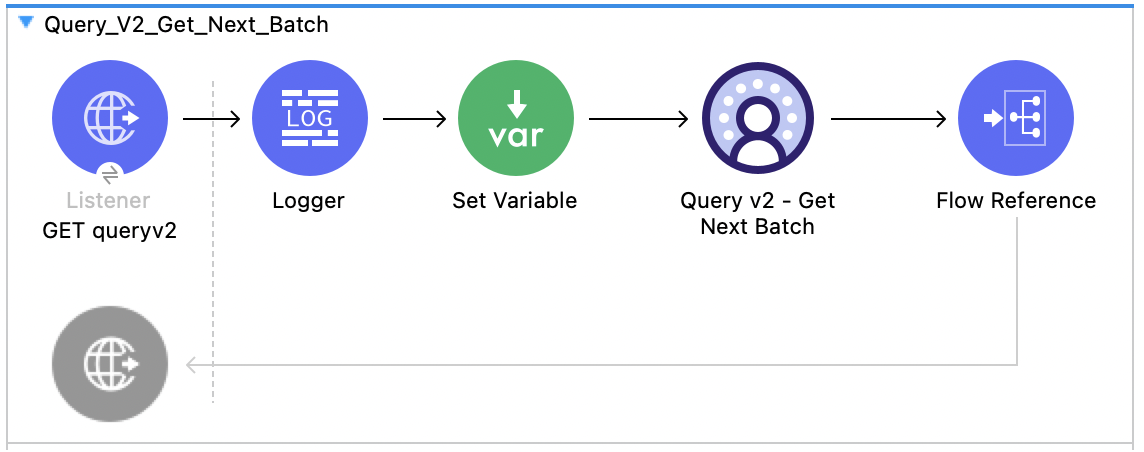
This Mule flow shows how to page through the results using the nextBatchId forward only cursor for Salesforce Data 360. Use this flow after Query v2. For more information about the Query v2 Get Next Batch API, refer to the Data 360 Reference Guide.
This example uses the following operations:
-
HTTP Listener
Accepts data from HTTP GET requests with the query in the payload. -
Logger
Shows the HTTP request received from the Listener. -
Set Variable
Sets a variable calledsampleResultsto get a maximum sample of 10 results. Your paging calls are unaffected and this is to limit returned payloads to avoid having 40 MB large payloads on your testing calls. -
Query v2 - Get Next Batch
Uses a forward cursor to get more results from the Query v2 and Query v2 - Get Next Batch flows using
nextBatchId. -
Flow Reference
Makes a reference to the Query v2 flow.
XML for This Example
Paste this code into the Studio XML editor to quickly load the flow for this example into your Mule app:
<?xml version="1.0" encoding="UTF-8"?>
<mule xmlns:file="http://www.mulesoft.org/schema/mule/file"
xmlns:sdc="http://www.mulesoft.org/schema/mule/sdc"
xmlns:http="http://www.mulesoft.org/schema/mule/http"
xmlns="http://www.mulesoft.org/schema/mule/core"
xmlns:doc="http://www.mulesoft.org/schema/mule/documentation"
xmlns:xsi="http://www.w3.org/2001/XMLSchema-instance"
xsi:schemaLocation="
http://www.mulesoft.org/schema/mule/file http://www.mulesoft.org/schema/mule/file/current/mule-file.xsd
http://www.mulesoft.org/schema/mule/core http://www.mulesoft.org/schema/mule/core/current/mule.xsd
http://www.mulesoft.org/schema/mule/http http://www.mulesoft.org/schema/mule/http/current/mule-http.xsd
http://www.mulesoft.org/schema/mule/sdc http://www.mulesoft.org/schema/mule/sdc/current/mule-sdc.xsd">
<sdc:sdc-config name="Salesforce_Data_Cloud_config" doc:name="Salesforce Data Cloud config" doc:id="8b8cb9b6-54eb-453d-92a0-33199d6c51d9" >
<sdc:oauth-jwt-connection />
</sdc:sdc-config>
<http:listener-config name="HTTP_Listener_config" doc:name="HTTP Listener config" doc:id="3797f40d-21cd-43a6-9ed4-c52fa6353a51" >
<http:listener-connection host="0.0.0.0" port="8081" />
</http:listener-config>
<sdc:sdc-config name="Salesforce_Data_Cloud_config1" doc:name="Salesforce Data Cloud config" doc:id="acb1d379-3715-4253-9c34-ab33d5977a4a" >
<sdc:oauth-jwt-connection />
</sdc:sdc-config>
<flow name="Query_V2_Get_Next_Batch" doc:id="041306ea-0617-4ae1-870b-5300dcf57ba6" >
<http:listener doc:name="GET queryv2" doc:id="0ab08df2-c966-4e0c-ba80-07249a92dfa0" config-ref="HTTP_Listener_config" path="queryv2" allowedMethods="GET"/>
<logger level="INFO" doc:name="Logger" doc:id="f197bc98-829d-489c-8318-ceee4bcdd8f6" message='#["Next Batch ID Received: " ++ attributes.queryParams.nextBatchId as String]'/>
<set-variable value="#[attributes.queryParams.sampleResults]" doc:name="Set Variable" doc:id="0ae026f9-1660-4d10-8025-213a9a4fb0f5" variableName="sampleResults"/>
<sdc:get-next-batch-ansi-sql-v2 doc:name="Query v2 - Get Next Batch" doc:id="1a9b3856-5991-4177-8783-1e4a2c0496a0" config-ref="Salesforce_Data_Cloud_config1" nextBatchIdUriParam="#[attributes.queryParams.nextBatchId]"/>
<flow-ref doc:name="Flow Reference" doc:id="ed91ecf6-821d-43e0-969b-4bc0ad921431" name="Query_V2_Perform_Query_For_First_Batch" />
</flow>
</mule>Steps for Running This Example
-
Save the project.
-
Test the flow by sending a request, for example:
curl --location 'http://127.0.0.1:8081/queryv2?nextBatchId=3e2f0036-f75b-4ee9-a29b-35d8f914e2f1'
This example request returns this example response:
{
    "data": [
        [
            "TorBsKqi",
            "kvoEyIhx",
            "2022-08-22 00:00:00.000 UTC",
            "pxMEsTAR",
            "GJWzpgut",
            "MunitQueryV2Test_b1ed190e_fd18_49ce_8813_f2f4ad59df50",
            "MunitQueryV2Test_coupons_C7876AA7",
            "2022-08-22 18:28:58.905 UTC",
            "RkXmYcdH",
            "87.000000000000000000"
        ],
        [...]
    ],
    "startTime": "2023-03-30T15:51:44.33103Z",
    "endTime": "2023-03-30T15:51:46.065576Z",
    "rowCount": 63803,
    "queryId": "20230330_155144_13391_5rx4m",
    "nextBatchId": "1449c1d1-2bf2-471d-824f-62c8f18c5c26",
    "done": false,
    "metadata": {
        "value__c": {
            "type": "DECIMAL",
            "placeInOrder": 9,
            "typeCode": 3
        },
        "sent__c": {
            "type": "VARCHAR",
            "placeInOrder": 8,
            "typeCode": 12
        },
        "assigned_to_uid__c": {
            "type": "VARCHAR",
            "placeInOrder": 0,
            "typeCode": 12
        },
        "currency__c": {
            "type": "VARCHAR",
            "placeInOrder": 4,
            "typeCode": 12
        },
        "DataSource__c": {
            "type": "VARCHAR",
            "placeInOrder": 5,
            "typeCode": 12
        },
        "campaign_name__c": {
            "type": "VARCHAR",
            "placeInOrder": 1,
            "typeCode": 12
        },
        "DataSourceObject__c": {
            "type": "VARCHAR",
            "placeInOrder": 6,
            "typeCode": 12
        },
        "coupon_code__c": {
            "type": "VARCHAR",
            "placeInOrder": 3,
            "typeCode": 12
        },
        "expiry_date__c": {
            "type": "TIMESTAMP WITH TIME ZONE",
            "placeInOrder": 7,
            "typeCode": 2014
        },
        "cdp_sys_PartitionDate__c": {
            "type": "TIMESTAMP WITH TIME ZONE",
            "placeInOrder": 2,
            "typeCode": 2014
        }
    }
}
Query v3
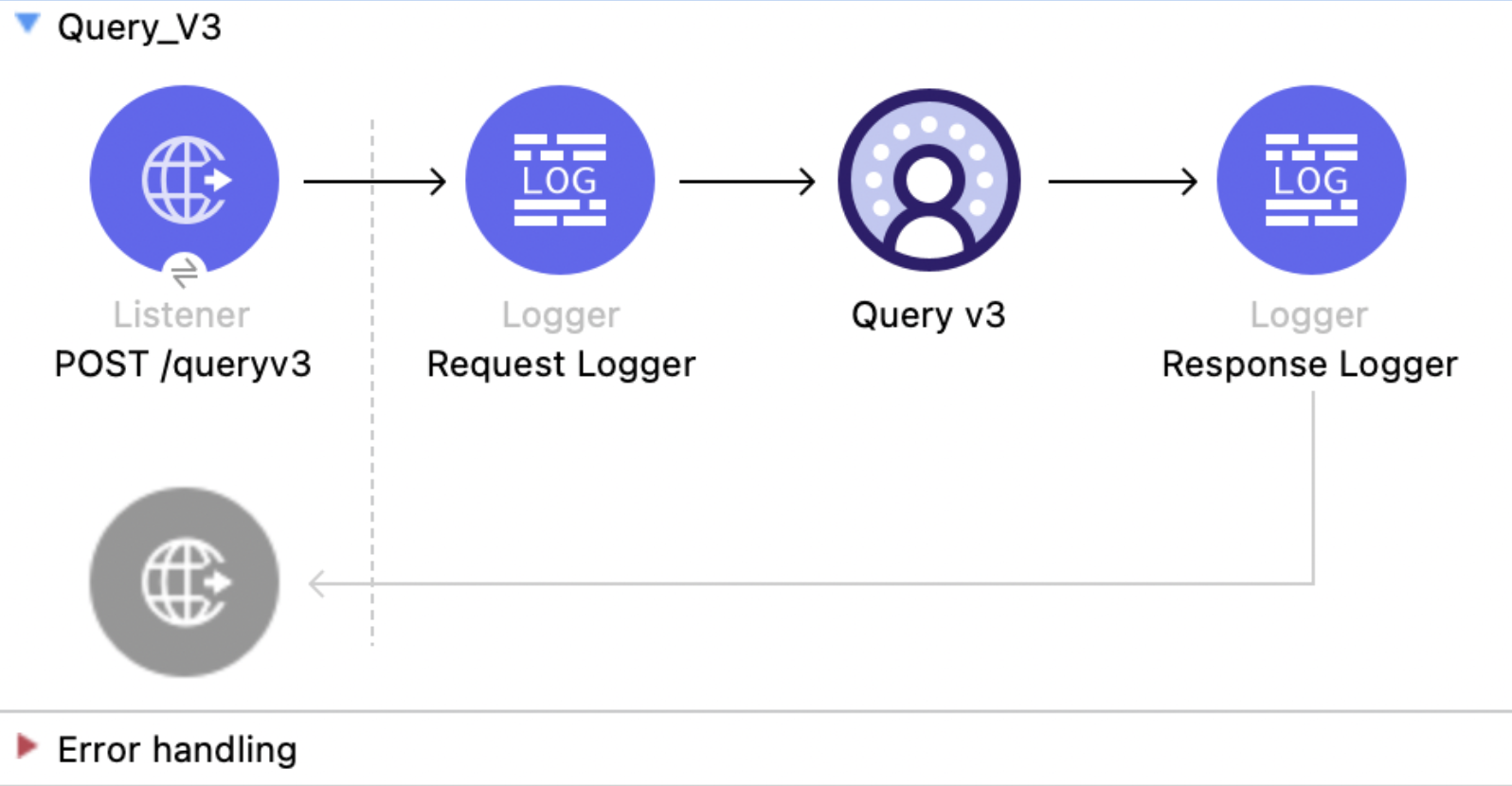
This Mule flow submits a SQL query against the Data 360 data lake. Submit the query in ASYNC mode to receive a query ID that the other Query v3 flows use, or in ADAPTIVE mode to receive rows in the same response when the query finishes quickly. For more information, refer to the Data 360 Reference Guide.
This example uses the following operations:
-
HTTP Listener
Accepts HTTP POST requests with the query in the payload. -
Logger
Shows the SQL received from the Listener, then shows the query status returned by the Query v3 operation. -
Query v3
-
Authenticates based on your choice of OAuth Client Credentials, OAuth JWT, or OAuth Username and Password.
-
Receives the request body as the query, which sets
sqland can optionally settransferMode. -
Calls the Salesforce API and returns the result schema, rows when the query completes within the adaptive timeout, and the query status in the response header.
-
XML for This Example
Paste this code into the Studio XML editor to quickly load the flow for this example into your Mule app:
<?xml version="1.0" encoding="UTF-8"?>
<mule xmlns:sdc="http://www.mulesoft.org/schema/mule/sdc" xmlns:http="http://www.mulesoft.org/schema/mule/http" xmlns="http://www.mulesoft.org/schema/mule/core" xmlns:doc="http://www.mulesoft.org/schema/mule/documentation" xmlns:xsi="http://www.w3.org/2001/XMLSchema-instance" xsi:schemaLocation="http://www.mulesoft.org/schema/mule/core http://www.mulesoft.org/schema/mule/core/current/mule.xsd http://www.mulesoft.org/schema/mule/http http://www.mulesoft.org/schema/mule/http/current/mule-http.xsd http://www.mulesoft.org/schema/mule/sdc http://www.mulesoft.org/schema/mule/sdc/current/mule-sdc.xsd">
    <http:listener-config name="HTTP_Listener_config" doc:name="HTTP Listener config"><http:listener-connection host="0.0.0.0" port="8081"/></http:listener-config>
    <configuration-properties doc:name="Configuration properties" file="mule-app.properties"/>
    <sdc:sdc-config name="Salesforce_Data_Cloud_config" doc:name="Salesforce Data Cloud config"><sdc:oauth-jwt-connection consumerKey="${server.consumerKey}" keyStorePath="${server.keyStorePath}" storePassword="${server.keyStorePassword}" subject="${server.userName}" keyAlias="${server.certificateAlias}" audienceUrl="${server.audienceUrl}"/></sdc:sdc-config>
    <flow name="Query_V3">
        <http:listener doc:name="POST /queryv3" config-ref="HTTP_Listener_config" path="/queryv3" allowedMethods="POST" outputMimeType="application/json"/>
        <logger level="INFO" doc:name="Request Logger" message='#["Received query: " ++ (payload.sql default "") as String]'/>
        <sdc:query-v3 doc:name="Query v3" config-ref="Salesforce_Data_Cloud_config"/>
        <logger level="INFO" doc:name="Response Logger" message='#["Query status header: " ++ (attributes.headers["x-hyperdb-status"] default "{}")]'/>
    </flow>
</mule>
Steps for Running This Example
-
Save the project.
-
Send a
POSTrequest tolocalhost:8081/queryv3:curl --location 'http://localhost:8081/queryv3' --header 'Content-Type: application/json' --data '{"sql":"SELECT ssot__id__c, ssot__name__c FROM ssot__account__dlm ORDER BY ssot__id__c LIMIT 3"}' -
This request returns the result schema and rows, for example:
{ "metadata": { "columns": [ { "type": "varchar", "nullable": false, "name": "ssot__id__c" }, { "type": "varchar", "nullable": true, "name": "ssot__name__c" } ] }, "data": [ ["0015b000029TJB8AAO", "Updated Account 1"], ["0015b00002DySwvAAF", "Create Composite Test Account adadad662000000"], ["0015b00002LLLTFAA5", "AccountTest"] ], "returnedRows": 3 } -
To retrieve a query ID for polling, use asynchronous mode:
curl --location 'http://localhost:8081/queryv3' --header 'Content-Type: application/json' --data '{"sql":"SELECT ssot__id__c, ssot__name__c, ssot__createddate__c FROM ssot__account__dlm ORDER BY ssot__id__c LIMIT 2500","transferMode":"ASYNC"}'
In ASYNC mode, the response body carries only the schema and returnedRows is 0, because no rows are streamed back:
{
  "metadata": {
    "columns": [
      { "type": "varchar", "nullable": false, "name": "ssot__id__c" },
      { "type": "varchar", "nullable": true, "name": "ssot__name__c" },
      { "type": "timestamptz", "nullable": true, "name": "ssot__createddate__c" }
    ]
  },
  "returnedRows": 0
}
The response logger writes the status header, including the queryId used by the other Query v3 examples, for example:
{
  "queryId": "MTAuNzguNjEuMTM1Ojc0ODQ_0731d532-152c-beba-bd44-6d0dd407b4da",
  "completionStatus": "RUNNING",
  "chunkCount": 0,
  "rowCount": 0,
  "progress": 0.0
}
Query v3 - Get Status
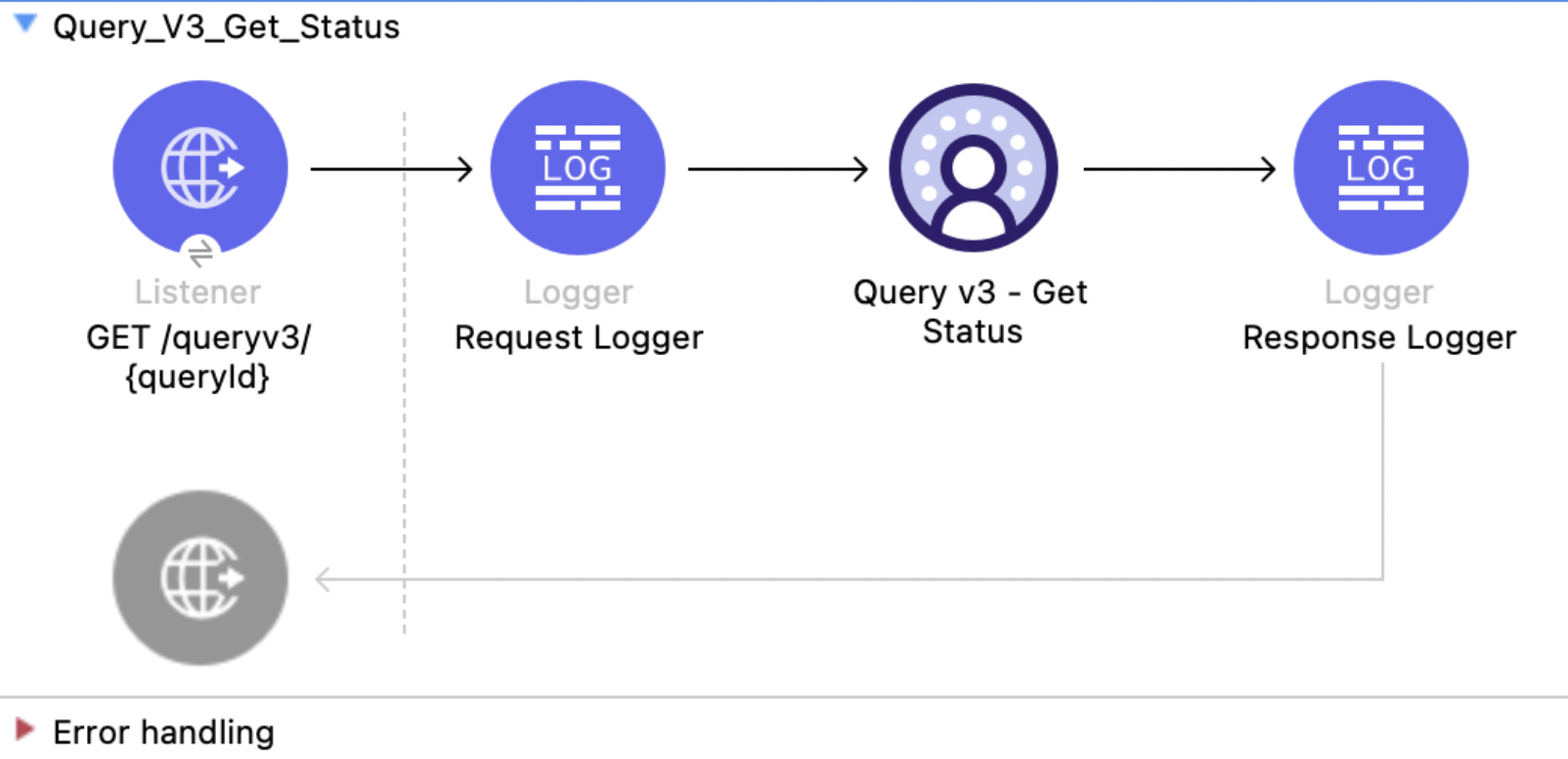
This Mule flow polls the execution status of a query submitted by Query v3. Poll until completionStatus is RESULTS_PRODUCED or FINISHED, then retrieve the results with Query v3 - Get Rows or Query v3 - Get Chunk. For more information, refer to the Data 360 Reference Guide.
This example uses the following operations:
-
HTTP Listener
Accepts HTTP GET requests with the query ID as a URI parameter. -
Logger
Shows the query ID received from the Listener, then shows the returned status. -
Query v3 - Get Status
-
Authenticates based on your choice of OAuth Client Credentials, OAuth JWT, or OAuth Username and Password.
-
Receives the query ID and a wait time of 10000 milliseconds.
-
Calls the Salesforce API and returns the completion status, row count, chunk count, progress, and execution statistics.
-
XML for This Example
Paste this code into the Studio XML editor to quickly load the flow for this example into your Mule app:
<?xml version="1.0" encoding="UTF-8"?>
<mule xmlns:sdc="http://www.mulesoft.org/schema/mule/sdc" xmlns:http="http://www.mulesoft.org/schema/mule/http" xmlns="http://www.mulesoft.org/schema/mule/core" xmlns:doc="http://www.mulesoft.org/schema/mule/documentation" xmlns:xsi="http://www.w3.org/2001/XMLSchema-instance" xsi:schemaLocation="http://www.mulesoft.org/schema/mule/core http://www.mulesoft.org/schema/mule/core/current/mule.xsd http://www.mulesoft.org/schema/mule/http http://www.mulesoft.org/schema/mule/http/current/mule-http.xsd http://www.mulesoft.org/schema/mule/sdc http://www.mulesoft.org/schema/mule/sdc/current/mule-sdc.xsd">
    <http:listener-config name="HTTP_Listener_config" doc:name="HTTP Listener config"><http:listener-connection host="0.0.0.0" port="8081"/></http:listener-config>
    <configuration-properties doc:name="Configuration properties" file="mule-app.properties"/>
    <sdc:sdc-config name="Salesforce_Data_Cloud_config" doc:name="Salesforce Data Cloud config"><sdc:oauth-jwt-connection consumerKey="${server.consumerKey}" keyStorePath="${server.keyStorePath}" storePassword="${server.keyStorePassword}" subject="${server.userName}" keyAlias="${server.certificateAlias}" audienceUrl="${server.audienceUrl}"/></sdc:sdc-config>
    <flow name="Query_V3_Get_Status">
        <http:listener doc:name="GET /queryv3/{queryId}" config-ref="HTTP_Listener_config" path="/queryv3/{queryId}" allowedMethods="GET" outputMimeType="application/json"/>
        <logger level="INFO" doc:name="Request Logger" message='#["Query ID received: " ++ attributes.uriParams.queryId]'/>
        <sdc:get-query-status-v3 doc:name="Query v3 - Get Status" config-ref="Salesforce_Data_Cloud_config" queryIdUriParam="#[attributes.uriParams.queryId]" waitTimeMs="10000"/>
        <logger level="INFO" doc:name="Response Logger" message="#[payload]"/>
    </flow>
</mule>
Steps for Running This Example
-
Save the project.
-
Submit a query with Query v3 and copy its query ID.
-
Send a
GETrequest tolocalhost:8081/queryv3/{QUERY_ID}. The operation long-polls for up to 10 seconds and returns the completion status, row count, chunk count, progress, and execution statistics:curl --location 'http://localhost:8081/queryv3/MTAuNzguNjEuMTM1Ojc0ODQ_0731d532-152c-beba-bd44-6d0dd407b4da'{ "queryId": "MTAuNzguNjEuMTM1Ojc0ODQ_0731d532-152c-beba-bd44-6d0dd407b4da", "completionStatus": "FINISHED", "chunkCount": 1, "rowCount": 2500, "progress": 1.0, "expirationTime": "2026-08-18T06:15:05Z", "executionStats": { "wallClockTime": 0.125647841, "rowsProcessed": 41577 } }
Query v3 - Get Rows
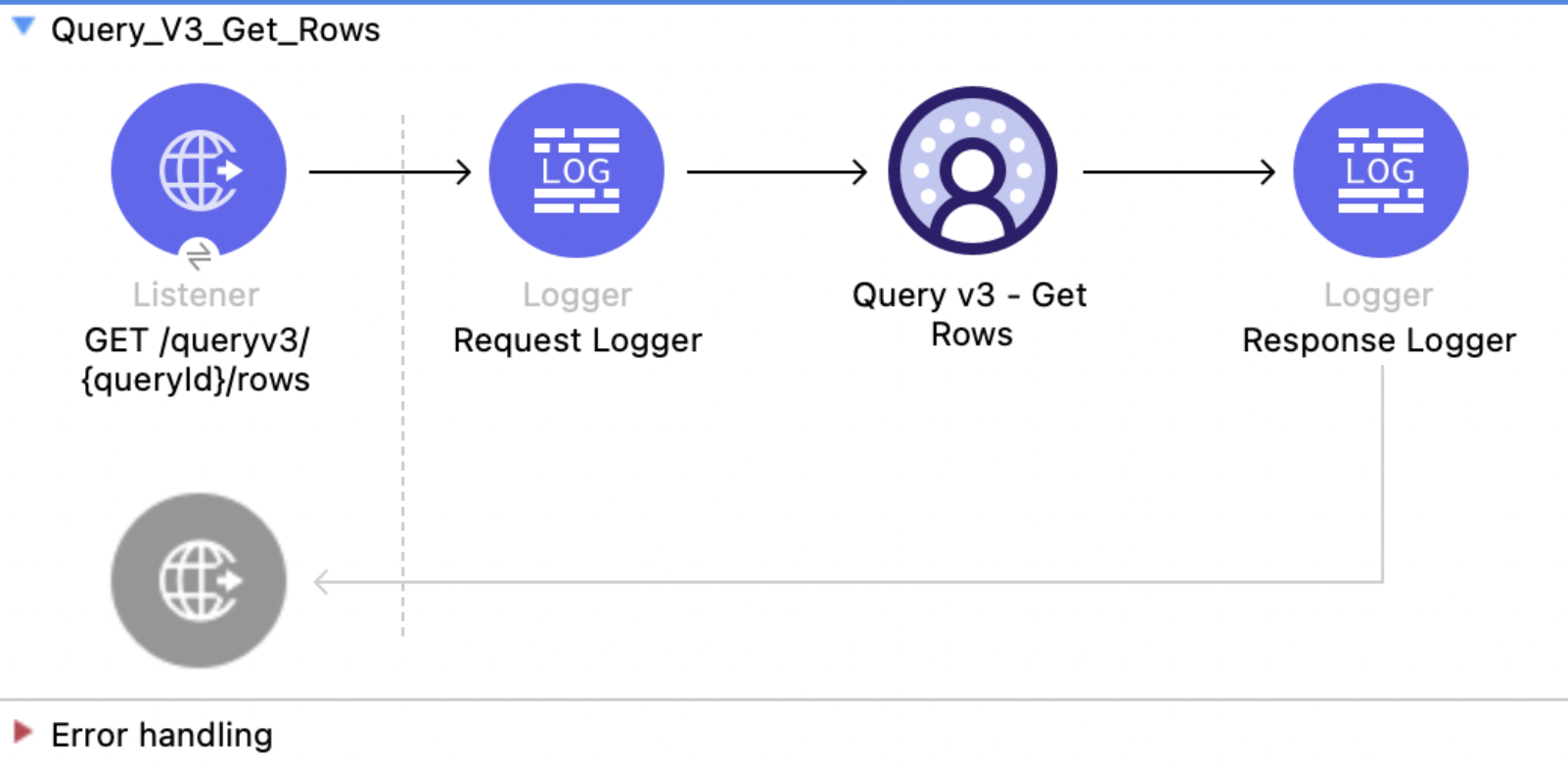
This Mule flow pages through the results of a completed query with an offset and limit. Use this flow after Query v3. For large result sets, use Query v3 - Get Chunk instead. For more information, refer to the Data 360 Reference Guide.
This example uses the following operations:
-
HTTP Listener
Accepts HTTP GET requests with the query ID as a URI parameter and offset and limit as query parameters. -
Logger
Shows the query ID received from the Listener, then shows the returned rows. -
Query v3 - Get Rows
-
Authenticates based on your choice of OAuth Client Credentials, OAuth JWT, or OAuth Username and Password.
-
Receives the query ID, offset, and limit. The example defaults offset to
0and limit to10. -
Calls the Salesforce API and returns the page of rows and schema.
-
XML for This Example
Paste this code into the Studio XML editor to quickly load the flow for this example into your Mule app:
<?xml version="1.0" encoding="UTF-8"?>
<mule xmlns:sdc="http://www.mulesoft.org/schema/mule/sdc" xmlns:http="http://www.mulesoft.org/schema/mule/http" xmlns="http://www.mulesoft.org/schema/mule/core" xmlns:doc="http://www.mulesoft.org/schema/mule/documentation" xmlns:xsi="http://www.w3.org/2001/XMLSchema-instance" xsi:schemaLocation="http://www.mulesoft.org/schema/mule/core http://www.mulesoft.org/schema/mule/core/current/mule.xsd http://www.mulesoft.org/schema/mule/http http://www.mulesoft.org/schema/mule/http/current/mule-http.xsd http://www.mulesoft.org/schema/mule/sdc http://www.mulesoft.org/schema/mule/sdc/current/mule-sdc.xsd">
    <http:listener-config name="HTTP_Listener_config" doc:name="HTTP Listener config"><http:listener-connection host="0.0.0.0" port="8081"/></http:listener-config>
    <configuration-properties doc:name="Configuration properties" file="mule-app.properties"/>
    <sdc:sdc-config name="Salesforce_Data_Cloud_config" doc:name="Salesforce Data Cloud config"><sdc:oauth-jwt-connection consumerKey="${server.consumerKey}" keyStorePath="${server.keyStorePath}" storePassword="${server.keyStorePassword}" subject="${server.userName}" keyAlias="${server.certificateAlias}" audienceUrl="${server.audienceUrl}"/></sdc:sdc-config>
    <flow name="Query_V3_Get_Rows">
        <http:listener doc:name="GET /queryv3/{queryId}/rows" config-ref="HTTP_Listener_config" path="/queryv3/{queryId}/rows" allowedMethods="GET" outputMimeType="application/json"/>
        <logger level="INFO" doc:name="Request Logger" message='#["Fetching rows for query: " ++ attributes.uriParams.queryId]'/>
        <sdc:get-query-rows-v3 doc:name="Query v3 - Get Rows" config-ref="Salesforce_Data_Cloud_config" queryIdUriParam="#[attributes.uriParams.queryId]" offset="#[(attributes.queryParams.offset default '0') as Number]" limit="#[(attributes.queryParams.limit default '10') as Number]"/>
        <logger level="INFO" doc:name="Response Logger" message="#[payload]"/>
    </flow>
</mule>
Steps for Running This Example
-
Save the project.
-
Submit a query with Query v3 and copy its query ID.
-
Send a
GETrequest tolocalhost:8081/queryv3/{QUERY_ID}/rows?offset=0&limit=3:curl --location \ 'http://localhost:8081/queryv3/MTAuNzguNjEuMTM1Ojc0ODQ_0731d532-152c-beba-bd44-6d0dd407b4da/rows?offset=0&limit=3' -
To retrieve the next page, increase
offsetby the number of rows already read, up to therowCountreturned by Query v3 - Get Status.The response includes the schema, rows, and
returnedRows, for example:
{
  "metadata": {
    "columns": [
      { "name": "ssot__id__c", "type": "varchar", "nullable": false },
      { "name": "ssot__name__c", "type": "varchar", "nullable": true },
      { "name": "ssot__createddate__c", "type": "timestamptz", "nullable": true }
    ]
  },
  "data": [["0015b000029TJB8AAO", "Updated Account 1", "2022-12-12T18:13:31+00:00"],
    ["0015b00002DySwvAAF", "Create Composite Test Account adadad662000000", "2023-05-12T01:11:55+00:00"],
    ["0015b00002LLLTFAA5", "AccountTest", "2023-11-15T11:34:47+00:00"]
  ],
  "returnedRows": 3
}
Query v3 - Get Chunk
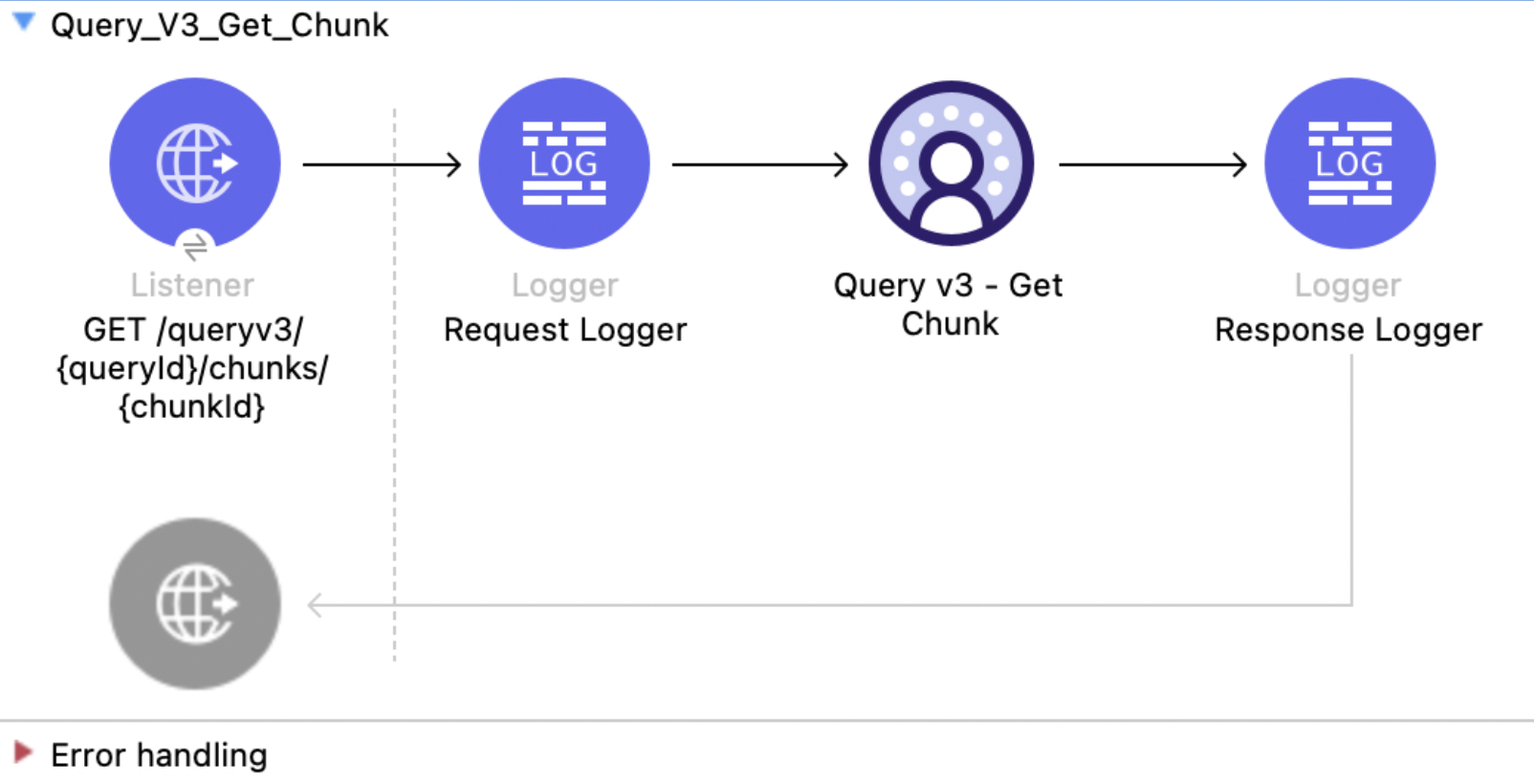
This Mule flow retrieves a chunk of a completed query result. Reading by chunk is the preferred way to consume a large result set because the service determines the chunk boundaries and streams each chunk. Chunk IDs are zero-indexed. For more information, refer to the Data 360 Reference Guide.
This example uses the following operations:
-
HTTP Listener
Accepts HTTP GET requests with the query ID and chunk ID as URI parameters. -
Logger
Shows the query ID and chunk ID received from the Listener, then shows the returned chunk. -
Query v3 - Get Chunk
-
Authenticates based on your choice of OAuth Client Credentials, OAuth JWT, or OAuth Username and Password.
-
Receives the query ID and zero-indexed chunk ID.
-
Calls the Salesforce API and returns the chunk rows and schema.
-
XML for This Example
Paste this code into the Studio XML editor to quickly load the flow for this example into your Mule app:
<?xml version="1.0" encoding="UTF-8"?>
<mule xmlns:sdc="http://www.mulesoft.org/schema/mule/sdc" xmlns:http="http://www.mulesoft.org/schema/mule/http" xmlns="http://www.mulesoft.org/schema/mule/core" xmlns:doc="http://www.mulesoft.org/schema/mule/documentation" xmlns:xsi="http://www.w3.org/2001/XMLSchema-instance" xsi:schemaLocation="http://www.mulesoft.org/schema/mule/core http://www.mulesoft.org/schema/mule/core/current/mule.xsd http://www.mulesoft.org/schema/mule/http http://www.mulesoft.org/schema/mule/http/current/mule-http.xsd http://www.mulesoft.org/schema/mule/sdc http://www.mulesoft.org/schema/mule/sdc/current/mule-sdc.xsd">
    <http:listener-config name="HTTP_Listener_config" doc:name="HTTP Listener config"><http:listener-connection host="0.0.0.0" port="8081"/></http:listener-config>
    <configuration-properties doc:name="Configuration properties" file="mule-app.properties"/>
    <sdc:sdc-config name="Salesforce_Data_Cloud_config" doc:name="Salesforce Data Cloud config"><sdc:oauth-jwt-connection consumerKey="${server.consumerKey}" keyStorePath="${server.keyStorePath}" storePassword="${server.keyStorePassword}" subject="${server.userName}" keyAlias="${server.certificateAlias}" audienceUrl="${server.audienceUrl}"/></sdc:sdc-config>
    <flow name="Query_V3_Get_Chunk">
        <http:listener doc:name="GET /queryv3/{queryId}/chunks/{chunkId}" config-ref="HTTP_Listener_config" path="/queryv3/{queryId}/chunks/{chunkId}" allowedMethods="GET" outputMimeType="application/json"/>
        <logger level="INFO" doc:name="Request Logger" message='#["Fetching chunk " ++ attributes.uriParams.chunkId ++ " of query " ++ attributes.uriParams.queryId]'/>
        <sdc:get-query-chunk-v3 doc:name="Query v3 - Get Chunk" config-ref="Salesforce_Data_Cloud_config" queryIdUriParam="#[attributes.uriParams.queryId]" chunkIdUriParam="#[attributes.uriParams.chunkId as Number]"/>
        <logger level="INFO" doc:name="Response Logger" message="#[payload]"/>
    </flow>
</mule>
Steps for Running This Example
-
Save the project.
-
Submit a query with Query v3 and obtain its
chunkCountfrom Query v3 - Get Status. -
Send a
GETrequest tolocalhost:8081/queryv3/{QUERY_ID}/chunks/0:curl --location 'http://localhost:8081/queryv3/MTAuNzguNjEuMTM1Ojc0ODQ_0731d532-152c-beba-bd44-6d0dd407b4da/chunks/0'The response includes the schema and all rows in the requested chunk. The
returnedRowsvalue can be larger than the page size used by Query v3 - Get Rows, for example:
{
  "metadata": {
    "columns": [
      { "name": "ssot__id__c", "type": "varchar", "nullable": false },
      { "name": "ssot__name__c", "type": "varchar", "nullable": true },
      { "name": "ssot__createddate__c", "type": "timestamptz", "nullable": true }
    ]
  },
  "data": [["0015b000029TJB8AAO", "Updated Account 1", "2022-12-12T18:13:31+00:00"],
    ["0015b00002DySwvAAF", "Create Composite Test Account adadad662000000", "2023-05-12T01:11:55+00:00"],
    ["0015b00002LLLTFAA5", "AccountTest", "2023-11-15T11:34:47+00:00"]
  ],
  "returnedRows": 2500
}
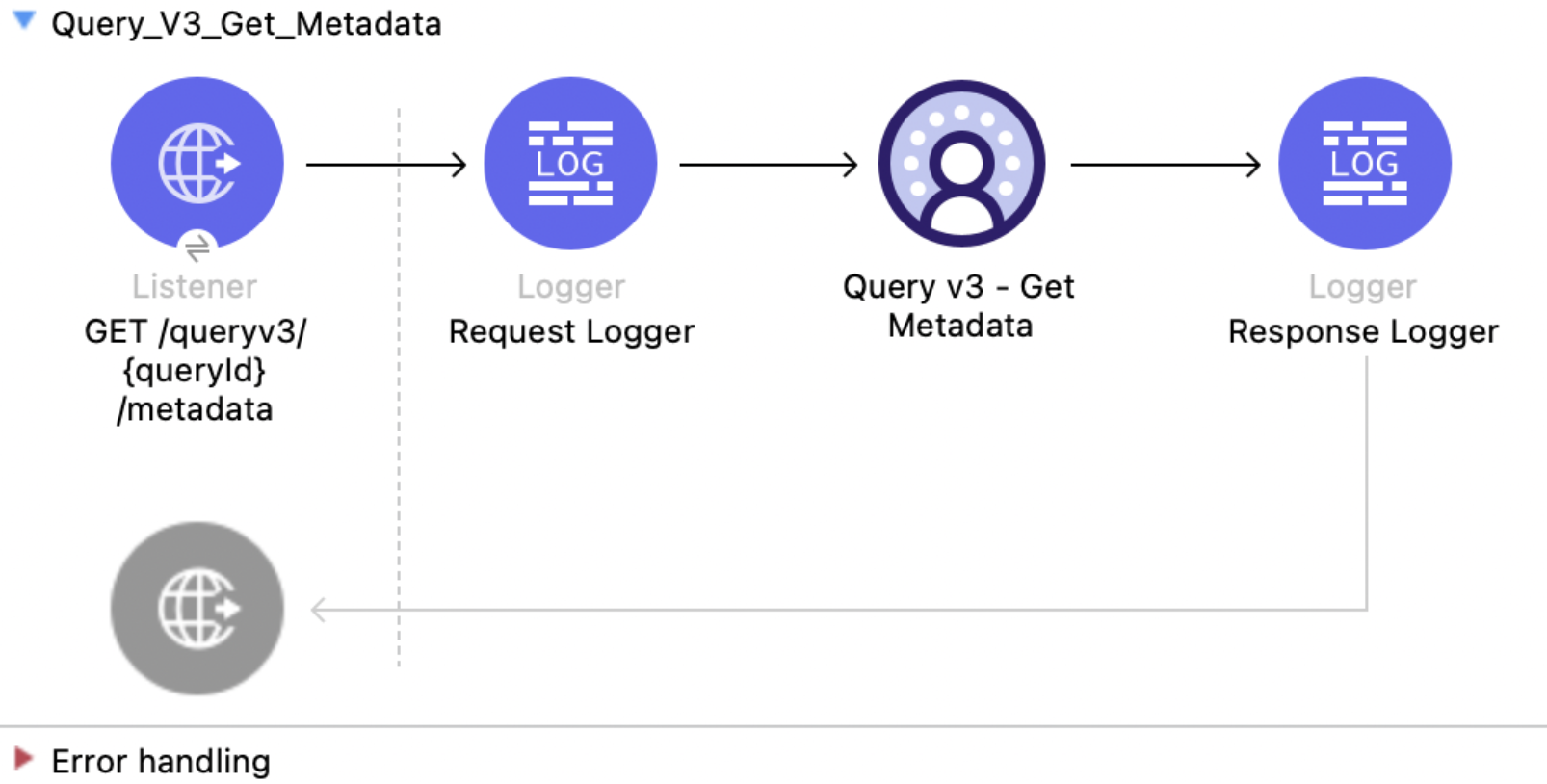
Query v3 - Get Metadata
This Mule flow retrieves a query result schema without fetching rows. Use it to inspect the column names, types, and nullability before reading a large result set. For more information, refer to the Data 360 Reference Guide.
This example uses the following operations:
-
HTTP Listener
Accepts HTTP GET requests with the query ID as a URI parameter. -
Logger
Shows the query ID received from the Listener, then shows the returned schema. -
Query v3 - Get Metadata
-
Authenticates based on your choice of OAuth Client Credentials, OAuth JWT, or OAuth Username and Password.
-
Receives the query ID.
-
Calls the Salesforce API and returns the column definitions without data rows.
-
XML for This Example
Paste this code into the Studio XML editor to quickly load the flow for this example into your Mule app:
<?xml version="1.0" encoding="UTF-8"?>
<mule xmlns:sdc="http://www.mulesoft.org/schema/mule/sdc" xmlns:http="http://www.mulesoft.org/schema/mule/http" xmlns="http://www.mulesoft.org/schema/mule/core" xmlns:doc="http://www.mulesoft.org/schema/mule/documentation" xmlns:xsi="http://www.w3.org/2001/XMLSchema-instance" xsi:schemaLocation="http://www.mulesoft.org/schema/mule/core http://www.mulesoft.org/schema/mule/core/current/mule.xsd http://www.mulesoft.org/schema/mule/http http://www.mulesoft.org/schema/mule/http/current/mule-http.xsd http://www.mulesoft.org/schema/mule/sdc http://www.mulesoft.org/schema/mule/sdc/current/mule-sdc.xsd">
    <http:listener-config name="HTTP_Listener_config" doc:name="HTTP Listener config"><http:listener-connection host="0.0.0.0" port="8081"/></http:listener-config>
    <configuration-properties doc:name="Configuration properties" file="mule-app.properties"/>
    <sdc:sdc-config name="Salesforce_Data_Cloud_config" doc:name="Salesforce Data Cloud config"><sdc:oauth-jwt-connection consumerKey="${server.consumerKey}" keyStorePath="${server.keyStorePath}" storePassword="${server.keyStorePassword}" subject="${server.userName}" keyAlias="${server.certificateAlias}" audienceUrl="${server.audienceUrl}"/></sdc:sdc-config>
    <flow name="Query_V3_Get_Metadata">
        <http:listener doc:name="GET /queryv3/{queryId}/metadata" config-ref="HTTP_Listener_config" path="/queryv3/{queryId}/metadata" allowedMethods="GET" outputMimeType="application/json"/>
        <logger level="INFO" doc:name="Request Logger" message='#["Fetching metadata for query: " ++ attributes.uriParams.queryId]'/>
        <sdc:get-query-metadata-v3 doc:name="Query v3 - Get Metadata" config-ref="Salesforce_Data_Cloud_config" queryIdUriParam="#[attributes.uriParams.queryId]"/>
        <logger level="INFO" doc:name="Response Logger" message="#[payload]"/>
    </flow>
</mule>
Steps for Running This Example
-
Save the project.
-
Submit a query with Query v3 and copy its query ID.
-
Send a
GETrequest tolocalhost:8081/queryv3/{QUERY_ID}/metadata:curl --location 'http://localhost:8081/queryv3/MTAuNzguNjEuMTM1Ojc0ODQ_0731d532-152c-beba-bd44-6d0dd407b4da/metadata'The response contains the result schema, for example:
{
  "metadata": {
    "columns": [
      { "name": "ssot__id__c", "type": "varchar", "nullable": false },
      { "name": "ssot__name__c", "type": "varchar", "nullable": true },
      { "name": "ssot__createddate__c", "type": "timestamptz", "nullable": true }
    ]
  }
}
Query v3 - Cancel
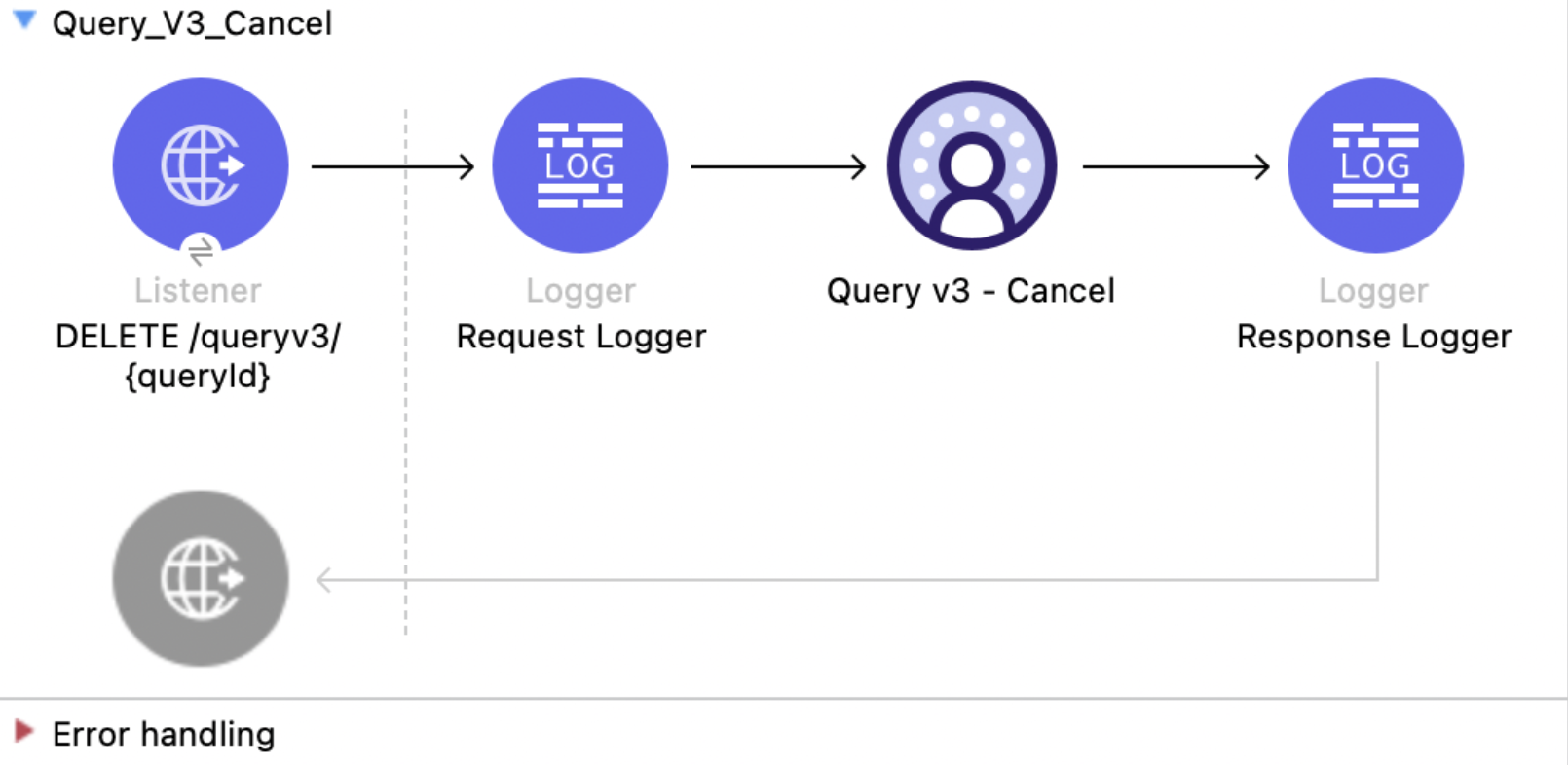
This Mule flow cancels a query and frees the server resources it holds. Cancel a query when its results are no longer needed, for example, if the requesting client has timed out. For more information, refer to the Data 360 Reference Guide.
This example uses the following operations:
-
HTTP Listener
Accepts HTTP DELETE requests with the query ID as a URI parameter. -
Logger
Shows the query ID received from the Listener, then shows the HTTP status returned by the cancel operation. -
Query v3 - Cancel
-
Authenticates based on your choice of OAuth Client Credentials, OAuth JWT, or OAuth Username and Password.
-
Receives the query ID.
-
Calls the Salesforce API to cancel the query. A successful call returns
204 No Contentwith an empty body.
-
XML for This Example
Paste this code into the Studio XML editor to quickly load the flow for this example into your Mule app:
<?xml version="1.0" encoding="UTF-8"?>
<mule xmlns:sdc="http://www.mulesoft.org/schema/mule/sdc" xmlns:http="http://www.mulesoft.org/schema/mule/http" xmlns="http://www.mulesoft.org/schema/mule/core" xmlns:doc="http://www.mulesoft.org/schema/mule/documentation" xmlns:xsi="http://www.w3.org/2001/XMLSchema-instance" xsi:schemaLocation="http://www.mulesoft.org/schema/mule/core http://www.mulesoft.org/schema/mule/core/current/mule.xsd http://www.mulesoft.org/schema/mule/http http://www.mulesoft.org/schema/mule/http/current/mule-http.xsd http://www.mulesoft.org/schema/mule/sdc http://www.mulesoft.org/schema/mule/sdc/current/mule-sdc.xsd">
    <http:listener-config name="HTTP_Listener_config" doc:name="HTTP Listener config"><http:listener-connection host="0.0.0.0" port="8081"/></http:listener-config>
    <configuration-properties doc:name="Configuration properties" file="mule-app.properties"/>
    <sdc:sdc-config name="Salesforce_Data_Cloud_config" doc:name="Salesforce Data Cloud config"><sdc:oauth-jwt-connection consumerKey="${server.consumerKey}" keyStorePath="${server.keyStorePath}" storePassword="${server.keyStorePassword}" subject="${server.userName}" keyAlias="${server.certificateAlias}" audienceUrl="${server.audienceUrl}"/></sdc:sdc-config>
    <flow name="Query_V3_Cancel">
        <http:listener doc:name="DELETE /queryv3/{queryId}" config-ref="HTTP_Listener_config" path="/queryv3/{queryId}" allowedMethods="DELETE"/>
        <logger level="INFO" doc:name="Request Logger" message='#["Cancelling query: " ++ attributes.uriParams.queryId]'/>
        <sdc:cancel-query-v3 doc:name="Query v3 - Cancel" config-ref="Salesforce_Data_Cloud_config" queryIdUriParam="#[attributes.uriParams.queryId]"/>
        <logger level="INFO" doc:name="Response Logger" message='#["Cancel returned HTTP " ++ attributes.statusCode]'/>
    </flow>
</mule>
Steps for Running This Example
-
Save the project.
-
Submit a query with Query v3 and copy its query ID.
-
Send a
DELETErequest tolocalhost:8081/queryv3/{QUERY_ID}:curl --location --request DELETE 'http://localhost:8081/queryv3/MTAuNzguNjEuMTM1Ojc0ODQ_7a6ce284-300e-3694-394a-55867c82422a'A successful cancel returns
204 No Contentwith an empty response body. The response logger writesCancel returned HTTP 204.
Insights - List Metadata API
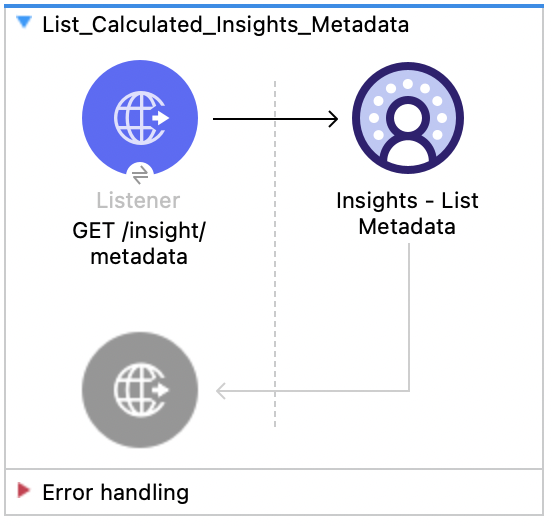
This Mule flow shows how to get the metadata, including the dimensions and filters for all calculated insights.
This example uses the following operations:
-
HTTP Listener
Accepts HTTP GET requests. -
Insights - List Metadata
-
Authenticates based on your choice of OAuth Client Credentials, OAuth JWT, or OAuth Username and Password.
-
Calls the Salesforce Data 360 API to return the metadata for all calculated insights.
-
XML for This Example
Paste this code into the Studio XML editor to quickly load the flow for this example into your Mule app:
<?xml version="1.0" encoding="UTF-8"?>

<mule xmlns:salesforce="http://www.mulesoft.org/schema/mule/salesforce" xmlns:ee="http://www.mulesoft.org/schema/mule/ee/core"
	xmlns:file="http://www.mulesoft.org/schema/mule/file"
	xmlns:sdc="http://www.mulesoft.org/schema/mule/sdc" xmlns:http="http://www.mulesoft.org/schema/mule/http" xmlns="http://www.mulesoft.org/schema/mule/core" xmlns:doc="http://www.mulesoft.org/schema/mule/documentation" xmlns:xsi="http://www.w3.org/2001/XMLSchema-instance" xsi:schemaLocation="http://www.mulesoft.org/schema/mule/core http://www.mulesoft.org/schema/mule/core/current/mule.xsd
http://www.mulesoft.org/schema/mule/http http://www.mulesoft.org/schema/mule/http/current/mule-http.xsd
http://www.mulesoft.org/schema/mule/sdc http://www.mulesoft.org/schema/mule/sdc/current/mule-sdc.xsd
http://www.mulesoft.org/schema/mule/file http://www.mulesoft.org/schema/mule/file/current/mule-file.xsd
http://www.mulesoft.org/schema/mule/ee/core http://www.mulesoft.org/schema/mule/ee/core/current/mule-ee.xsd
http://www.mulesoft.org/schema/mule/salesforce http://www.mulesoft.org/schema/mule/salesforce/current/mule-salesforce.xsd">
	<http:listener-config name="HTTP_Listener_config" doc:name="HTTP Listener config" >
		<http:listener-connection host="0.0.0.0" port="8081" />
	</http:listener-config>
	<sdc:sdc-config name="Salesforce_Data_Cloud_OAuth_JWT_config" doc:name="Salesforce Data Cloud config" >
		<sdc:oauth-jwt-connection consumerKey="${server.consumerKey}" keyStorePath="${server.keyStorePath}" storePassword="${server.keyStorePassword}" subject="${server.userName}" audienceUrl="${server.audienceUrl}" keyAlias="${server.certificateAlias}" />
	</sdc:sdc-config>
	<configuration-properties doc:name="Configuration properties" file="mule-app.properties" />
	<sdc:sdc-config name="Salesforce_Data_Cloud_OAuth_UsernamePassword_config" doc:name="Salesforce Data Cloud config" >
		<sdc:oauth-user-pass-connection clientId="${server.consumerKey}" clientSecret="${server.consumerSecret}" username="${server.userName}" password="${server.password}" audienceUrl="${server.audienceUrl}" />
	</sdc:sdc-config>
	<flow name="List_Calculated_Insights_Metadata" >
		<http:listener doc:name="GET /insight/metadata" allowedMethods="GET" path="/insight/metadata" config-ref="HTTP_Listener_config"/>
		<sdc:get-all-calculated-insight-metadata doc:name="Insights - List Metadata"  config-ref="Salesforce_Data_Cloud_OAuth_JWT_config"/>
	</flow>
</mule>Insights - Get Metadata API
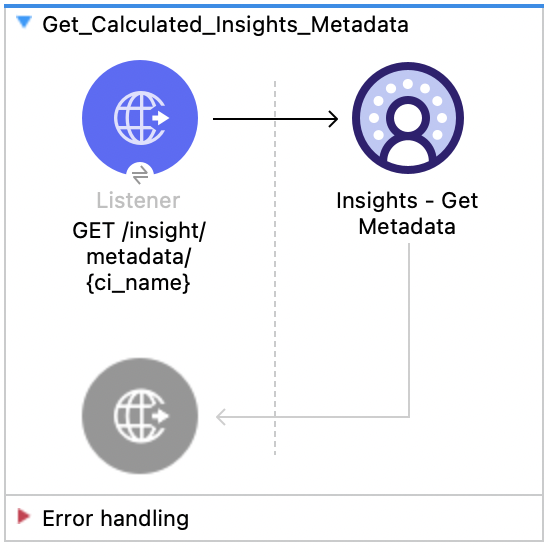
This Mule flow shows how to retrieve the metadata, including the dimensions and filters for a calculated insight. Refer to the Salesforce Data 360 API Developer Guide for usage and further details.
This example uses the following operations:
-
HTTP Listener
Accepts HTTP GET requests with the calculated insight name as the required URI parameter. -
Insights - Get Metadata
-
Authenticates based on your choice of OAuth Client Credentials, OAuth JWT, or OAuth Username and Password.
-
Receives the calculated insight name.
-
Calls the Salesforce Data 360 API to return the metadata for the requested calculated insight.
-
XML for This Example
Paste this code into the Studio XML editor to quickly load the flow for this example into your Mule app:
<?xml version="1.0" encoding="UTF-8"?>

<mule xmlns:salesforce="http://www.mulesoft.org/schema/mule/salesforce" xmlns:ee="http://www.mulesoft.org/schema/mule/ee/core"
	xmlns:file="http://www.mulesoft.org/schema/mule/file"
	xmlns:sdc="http://www.mulesoft.org/schema/mule/sdc" xmlns:http="http://www.mulesoft.org/schema/mule/http" xmlns="http://www.mulesoft.org/schema/mule/core" xmlns:doc="http://www.mulesoft.org/schema/mule/documentation" xmlns:xsi="http://www.w3.org/2001/XMLSchema-instance" xsi:schemaLocation="http://www.mulesoft.org/schema/mule/core http://www.mulesoft.org/schema/mule/core/current/mule.xsd
http://www.mulesoft.org/schema/mule/http http://www.mulesoft.org/schema/mule/http/current/mule-http.xsd
http://www.mulesoft.org/schema/mule/sdc http://www.mulesoft.org/schema/mule/sdc/current/mule-sdc.xsd
http://www.mulesoft.org/schema/mule/file http://www.mulesoft.org/schema/mule/file/current/mule-file.xsd
http://www.mulesoft.org/schema/mule/ee/core http://www.mulesoft.org/schema/mule/ee/core/current/mule-ee.xsd
http://www.mulesoft.org/schema/mule/salesforce http://www.mulesoft.org/schema/mule/salesforce/current/mule-salesforce.xsd">
	<http:listener-config name="HTTP_Listener_config" doc:name="HTTP Listener config" >
		<http:listener-connection host="0.0.0.0" port="8081" />
	</http:listener-config>
	<sdc:sdc-config name="Salesforce_Data_Cloud_OAuth_JWT_config" doc:name="Salesforce Data Cloud config" >
		<sdc:oauth-jwt-connection consumerKey="${server.consumerKey}" keyStorePath="${server.keyStorePath}" storePassword="${server.keyStorePassword}" subject="${server.userName}" audienceUrl="${server.audienceUrl}" keyAlias="${server.certificateAlias}" />
	</sdc:sdc-config>
	<configuration-properties doc:name="Configuration properties" file="mule-app.properties" />
	<sdc:sdc-config name="Salesforce_Data_Cloud_OAuth_UsernamePassword_config" doc:name="Salesforce Data Cloud config" >
		<sdc:oauth-user-pass-connection clientId="${server.consumerKey}" clientSecret="${server.consumerSecret}" username="${server.userName}" password="${server.password}" audienceUrl="${server.audienceUrl}" />
	</sdc:sdc-config>
	<flow name="Get_Calculated_Insights_Metadata" >
		<http:listener doc:name="GET /insight/metadata/{ci_name}" config-ref="HTTP_Listener_config" path="/insight/metadata/{ci_name}" allowedMethods="GET"/>
		<sdc:get-calculated-insight-metadata doc:name="Insights - Get Metadata" config-ref="Salesforce_Data_Cloud_OAuth_JWT_config" ciNameUriParam="#[attributes.uriParams.ci_name]"/>
	</flow>
</mule>Insights - Get Insights API
This Mule flow shows how to query the calculated insights. Users can slice, dice, and filter by selecting different dimensions, measures, and filters. Refer to the Salesforce Data 360 API Developer Guide for usage and further details.
This example uses the following operations:
-
HTTP Listener
Accepts HTTP GET requests with the calculated insight name as the required URI parameter and a combination of any optional query parameters. -
Insights - Get Insights
-
Authenticates based on your choice of OAuth Client Credentials, OAuth JWT, or OAuth Username and Password.
-
Receives the calculated insight name and any other optional URI parameters.
-
Calls the Salesforce Data 360 API to return the records of the requested calculated insight that match the query criteria.
-
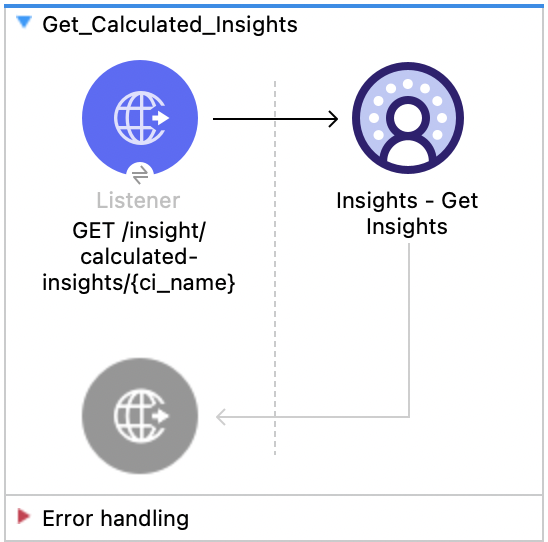
XML for This Example
Paste this code into the Studio XML editor to quickly load the flow for this example into your Mule app:
<?xml version="1.0" encoding="UTF-8"?>

<mule xmlns:salesforce="http://www.mulesoft.org/schema/mule/salesforce" xmlns:ee="http://www.mulesoft.org/schema/mule/ee/core"
	xmlns:file="http://www.mulesoft.org/schema/mule/file"
	xmlns:sdc="http://www.mulesoft.org/schema/mule/sdc" xmlns:http="http://www.mulesoft.org/schema/mule/http" xmlns="http://www.mulesoft.org/schema/mule/core" xmlns:doc="http://www.mulesoft.org/schema/mule/documentation" xmlns:xsi="http://www.w3.org/2001/XMLSchema-instance" xsi:schemaLocation="http://www.mulesoft.org/schema/mule/core http://www.mulesoft.org/schema/mule/core/current/mule.xsd
http://www.mulesoft.org/schema/mule/http http://www.mulesoft.org/schema/mule/http/current/mule-http.xsd
http://www.mulesoft.org/schema/mule/sdc http://www.mulesoft.org/schema/mule/sdc/current/mule-sdc.xsd
http://www.mulesoft.org/schema/mule/file http://www.mulesoft.org/schema/mule/file/current/mule-file.xsd
http://www.mulesoft.org/schema/mule/ee/core http://www.mulesoft.org/schema/mule/ee/core/current/mule-ee.xsd
http://www.mulesoft.org/schema/mule/salesforce http://www.mulesoft.org/schema/mule/salesforce/current/mule-salesforce.xsd">
	<http:listener-config name="HTTP_Listener_config" doc:name="HTTP Listener config" >
		<http:listener-connection host="0.0.0.0" port="8081" />
	</http:listener-config>
	<sdc:sdc-config name="Salesforce_Data_Cloud_OAuth_JWT_config" doc:name="Salesforce Data Cloud config" >
		<sdc:oauth-jwt-connection consumerKey="${server.consumerKey}" keyStorePath="${server.keyStorePath}" storePassword="${server.keyStorePassword}" subject="${server.userName}" audienceUrl="${server.audienceUrl}" keyAlias="${server.certificateAlias}" />
	</sdc:sdc-config>
	<configuration-properties doc:name="Configuration properties" file="mule-app.properties" />
	<sdc:sdc-config name="Salesforce_Data_Cloud_OAuth_UsernamePassword_config" doc:name="Salesforce Data Cloud config" >
		<sdc:oauth-user-pass-connection clientId="${server.consumerKey}" clientSecret="${server.consumerSecret}" username="${server.userName}" password="${server.password}" audienceUrl="${server.audienceUrl}" />
	</sdc:sdc-config>
	<flow name="Get_Calculated_Insights" >
		<http:listener doc:name="GET /insight/calculated-insights/{ci_name}" config-ref="HTTP_Listener_config" path="/insight/calculated-insights/{ci_name}" allowedMethods="GET"/>
		<sdc:get-calculated-insight-with-filters-fields-and-limit doc:name="Insights - Get Insights" config-ref="Salesforce_Data_Cloud_OAuth_JWT_config" ciNameUriParam="#[attributes.uriParams.ci_name]" dimensionsQueryParam="#[attributes.queryParams.dimensions]" measuresQueryParam="#[attributes.queryParams.measures]" limitQueryParam="#[attributes.queryParams.limit]" offsetQueryParam="#[attributes.queryParams.offset]" filtersQueryParam="#[attributes.queryParams.filters]" orderbyQueryParam="#[attributes.queryParams.orderby]" timeGranularityQueryParam="#[attributes.queryParams.timeGranularity]"/>
	</flow>
</mule>Profile - List Metadata API
This Mule flow shows how to retrieve the list of data model objects and their fields and category. Refer to the Salesforce Data 360 API Developer Guide for usage and further details.
This example uses the following operations:
-
HTTP Listener
Accepts HTTP GET requests. -
Profile - List Metadata
-
Authenticates based on your choice of OAuth Client Credentials, OAuth JWT, or OAuth Username and Password.
-
Calls the Salesforce Data 360 API to return the list of data model objects and their fields and category.
-
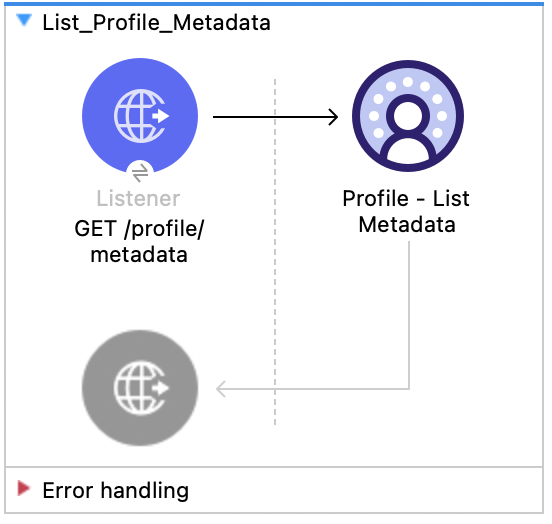
XML for This Example
Paste this code into the Studio XML editor to quickly load the flow for this example into your Mule app:
<?xml version="1.0" encoding="UTF-8"?>

<mule xmlns:salesforce="http://www.mulesoft.org/schema/mule/salesforce" xmlns:ee="http://www.mulesoft.org/schema/mule/ee/core"
	xmlns:file="http://www.mulesoft.org/schema/mule/file"
	xmlns:sdc="http://www.mulesoft.org/schema/mule/sdc" xmlns:http="http://www.mulesoft.org/schema/mule/http" xmlns="http://www.mulesoft.org/schema/mule/core" xmlns:doc="http://www.mulesoft.org/schema/mule/documentation" xmlns:xsi="http://www.w3.org/2001/XMLSchema-instance" xsi:schemaLocation="http://www.mulesoft.org/schema/mule/core http://www.mulesoft.org/schema/mule/core/current/mule.xsd
http://www.mulesoft.org/schema/mule/http http://www.mulesoft.org/schema/mule/http/current/mule-http.xsd
http://www.mulesoft.org/schema/mule/sdc http://www.mulesoft.org/schema/mule/sdc/current/mule-sdc.xsd
http://www.mulesoft.org/schema/mule/file http://www.mulesoft.org/schema/mule/file/current/mule-file.xsd
http://www.mulesoft.org/schema/mule/ee/core http://www.mulesoft.org/schema/mule/ee/core/current/mule-ee.xsd
http://www.mulesoft.org/schema/mule/salesforce http://www.mulesoft.org/schema/mule/salesforce/current/mule-salesforce.xsd">
	<http:listener-config name="HTTP_Listener_config" doc:name="HTTP Listener config" >
		<http:listener-connection host="0.0.0.0" port="8081" />
	</http:listener-config>
	<sdc:sdc-config name="Salesforce_Data_Cloud_OAuth_JWT_config" doc:name="Salesforce Data Cloud config" >
		<sdc:oauth-jwt-connection consumerKey="${server.consumerKey}" keyStorePath="${server.keyStorePath}" storePassword="${server.keyStorePassword}" subject="${server.userName}" audienceUrl="${server.audienceUrl}" keyAlias="${server.certificateAlias}" />
	</sdc:sdc-config>
	<configuration-properties doc:name="Configuration properties" file="mule-app.properties" />
	<sdc:sdc-config name="Salesforce_Data_Cloud_OAuth_UsernamePassword_config" doc:name="Salesforce Data Cloud config" >
		<sdc:oauth-user-pass-connection clientId="${server.consumerKey}" clientSecret="${server.consumerSecret}" username="${server.userName}" password="${server.password}" audienceUrl="${server.audienceUrl}" />
	</sdc:sdc-config>
	<flow name="List_Profile_Metadata" >
		<http:listener doc:name="GET /profile/metadata" allowedMethods="GET" path="/profile/metadata" config-ref="HTTP_Listener_config"/>
		<sdc:get-meta-by-category doc:name="Profile - List Metadata" config-ref="Salesforce_Data_Cloud_OAuth_JWT_config"/>
	</flow>
</mule>Profile - Get Metadata API
This Mule flow shows how to retrieve the metadata for a data model object. Refer to the Salesforce Data 360 API Developer Guide for usage and further details.
This example uses the following operations:
-
HTTP Listener
Accepts HTTP GET requests with the data model name as the required URI parameter. -
Profile - Get Metadata
-
Authenticates based on your choice of OAuth Client Credentials, OAuth JWT, or OAuth Username and Password.
-
Receives the data model name.
-
Calls the Salesforce Data 360 API to return the metadata for the requested data model object.
-
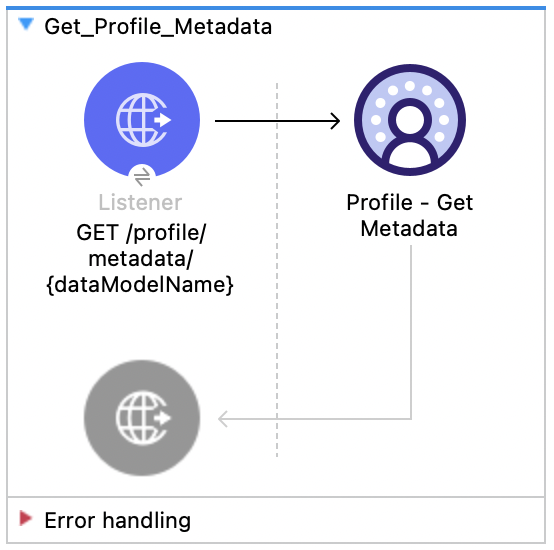
XML for This Example
Paste this code into the Studio XML editor to quickly load the flow for this example into your Mule app:
<?xml version="1.0" encoding="UTF-8"?>

<mule xmlns:salesforce="http://www.mulesoft.org/schema/mule/salesforce" xmlns:ee="http://www.mulesoft.org/schema/mule/ee/core"
	xmlns:file="http://www.mulesoft.org/schema/mule/file"
	xmlns:sdc="http://www.mulesoft.org/schema/mule/sdc" xmlns:http="http://www.mulesoft.org/schema/mule/http" xmlns="http://www.mulesoft.org/schema/mule/core" xmlns:doc="http://www.mulesoft.org/schema/mule/documentation" xmlns:xsi="http://www.w3.org/2001/XMLSchema-instance" xsi:schemaLocation="http://www.mulesoft.org/schema/mule/core http://www.mulesoft.org/schema/mule/core/current/mule.xsd
http://www.mulesoft.org/schema/mule/http http://www.mulesoft.org/schema/mule/http/current/mule-http.xsd
http://www.mulesoft.org/schema/mule/sdc http://www.mulesoft.org/schema/mule/sdc/current/mule-sdc.xsd
http://www.mulesoft.org/schema/mule/file http://www.mulesoft.org/schema/mule/file/current/mule-file.xsd
http://www.mulesoft.org/schema/mule/ee/core http://www.mulesoft.org/schema/mule/ee/core/current/mule-ee.xsd
http://www.mulesoft.org/schema/mule/salesforce http://www.mulesoft.org/schema/mule/salesforce/current/mule-salesforce.xsd">
	<http:listener-config name="HTTP_Listener_config" doc:name="HTTP Listener config" >
		<http:listener-connection host="0.0.0.0" port="8081" />
	</http:listener-config>
	<sdc:sdc-config name="Salesforce_Data_Cloud_OAuth_JWT_config" doc:name="Salesforce Data Cloud config" >
		<sdc:oauth-jwt-connection consumerKey="${server.consumerKey}" keyStorePath="${server.keyStorePath}" storePassword="${server.keyStorePassword}" subject="${server.userName}" audienceUrl="${server.audienceUrl}" keyAlias="${server.certificateAlias}" />
	</sdc:sdc-config>
	<configuration-properties doc:name="Configuration properties" file="mule-app.properties" />
	<sdc:sdc-config name="Salesforce_Data_Cloud_OAuth_UsernamePassword_config" doc:name="Salesforce Data Cloud config" >
		<sdc:oauth-user-pass-connection clientId="${server.consumerKey}" clientSecret="${server.consumerSecret}" username="${server.userName}" password="${server.password}" audienceUrl="${server.audienceUrl}" />
	</sdc:sdc-config>
	<flow name="Get_Profile_Metadata" >
		<http:listener doc:name="GET /profile/metadata/{dataModelName}" allowedMethods="GET" path="/profile/metadata/{dataModelName}" config-ref="HTTP_Listener_config"/>
		<sdc:get-meta doc:name="Profile - Get Metadata" config-ref="Salesforce_Data_Cloud_OAuth_JWT_config" dataModelNameUriParam="#[attributes.uriParams.dataModelName]"/>
	</flow>
</mule>Profile - Search Records API
This Mule flow shows how to retrieve data model object records based on search filters. Refer to the Salesforce Data 360 API Developer Guide for usage and further details.
This example uses the following operations:
-
HTTP Listener
Accepts HTTP GET requests with the data model name as the required URI parameter, fields as the required query parameter, and a combination of any other query parameters. -
Profile - Search Records
-
Authenticates based on your choice of OAuth Client Credentials, OAuth JWT, or OAuth Username and Password.
-
Receives the data model name, fields and any optional query parameters.
-
Calls the Salesforce Data 360 API to return the data model object records based on search filters.
-
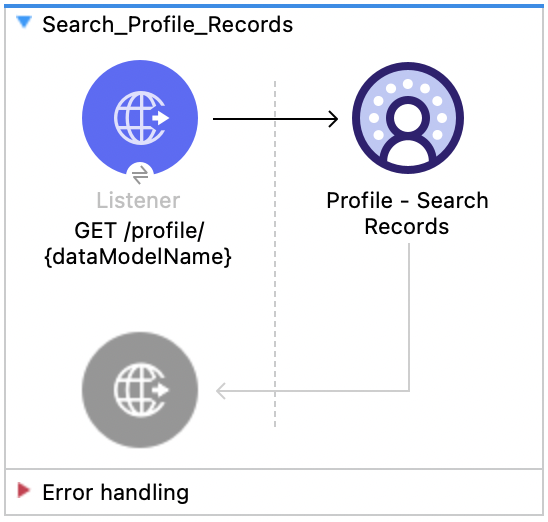
XML for This Example
Paste this code into the Studio XML editor to quickly load the flow for this example into your Mule app:
<?xml version="1.0" encoding="UTF-8"?>

<mule xmlns:salesforce="http://www.mulesoft.org/schema/mule/salesforce" xmlns:ee="http://www.mulesoft.org/schema/mule/ee/core"
	xmlns:file="http://www.mulesoft.org/schema/mule/file"
	xmlns:sdc="http://www.mulesoft.org/schema/mule/sdc" xmlns:http="http://www.mulesoft.org/schema/mule/http" xmlns="http://www.mulesoft.org/schema/mule/core" xmlns:doc="http://www.mulesoft.org/schema/mule/documentation" xmlns:xsi="http://www.w3.org/2001/XMLSchema-instance" xsi:schemaLocation="http://www.mulesoft.org/schema/mule/core http://www.mulesoft.org/schema/mule/core/current/mule.xsd
http://www.mulesoft.org/schema/mule/http http://www.mulesoft.org/schema/mule/http/current/mule-http.xsd
http://www.mulesoft.org/schema/mule/sdc http://www.mulesoft.org/schema/mule/sdc/current/mule-sdc.xsd
http://www.mulesoft.org/schema/mule/file http://www.mulesoft.org/schema/mule/file/current/mule-file.xsd
http://www.mulesoft.org/schema/mule/ee/core http://www.mulesoft.org/schema/mule/ee/core/current/mule-ee.xsd
http://www.mulesoft.org/schema/mule/salesforce http://www.mulesoft.org/schema/mule/salesforce/current/mule-salesforce.xsd">
	<http:listener-config name="HTTP_Listener_config" doc:name="HTTP Listener config" >
		<http:listener-connection host="0.0.0.0" port="8081" />
	</http:listener-config>
	<sdc:sdc-config name="Salesforce_Data_Cloud_OAuth_JWT_config" doc:name="Salesforce Data Cloud config" >
		<sdc:oauth-jwt-connection consumerKey="${server.consumerKey}" keyStorePath="${server.keyStorePath}" storePassword="${server.keyStorePassword}" subject="${server.userName}" audienceUrl="${server.audienceUrl}" keyAlias="${server.certificateAlias}" />
	</sdc:sdc-config>
	<configuration-properties doc:name="Configuration properties" file="mule-app.properties" />
	<sdc:sdc-config name="Salesforce_Data_Cloud_OAuth_UsernamePassword_config" doc:name="Salesforce Data Cloud config" >
		<sdc:oauth-user-pass-connection clientId="${server.consumerKey}" clientSecret="${server.consumerSecret}" username="${server.userName}" password="${server.password}" audienceUrl="${server.audienceUrl}" />
	</sdc:sdc-config>
	<flow name="Search_Profile_Records" >
		<http:listener doc:name="GET /profile/{dataModelName}" config-ref="HTTP_Listener_config" path="/profile/{dataModelName}"/>
		<sdc:get-parent-with-filters doc:name="Profile - Search Records"  config-ref="Salesforce_Data_Cloud_OAuth_JWT_config" dataModelNameUriParam="#[attributes.uriParams.dataModelName]" orderbyQueryParam="#[attributes.queryParams.orderby]" filtersQueryParam="#[attributes.queryParams.filters]" fieldsQueryParam="#[attributes.queryParams.fields]" limitQueryParam="#[attributes.queryParams.limit]" offsetQueryParam="#[attributes.queryParams.offset]"/>
	</flow>
</mule>Profile - Search Records By ID API
This Mule flow shows how to retrieve data model object records based on search indexes and filters. Refer to the Salesforce Data 360 API Developer Guide for usage and further details.
This example uses the following operations:
-
HTTP Listener
Accepts HTTP GET requests with the data model name and ID as the required URI parameters, and a combination of any optional query parameters. -
Profile - Search Records By Id
-
Authenticates based on your choice of OAuth Client Credentials, OAuth JWT, or OAuth Username and Password.
-
Receives the data model name, ID, and any optional query parameters.
-
Calls the Salesforce Data 360 API to return the data model object records based on search indexes and filters.
-
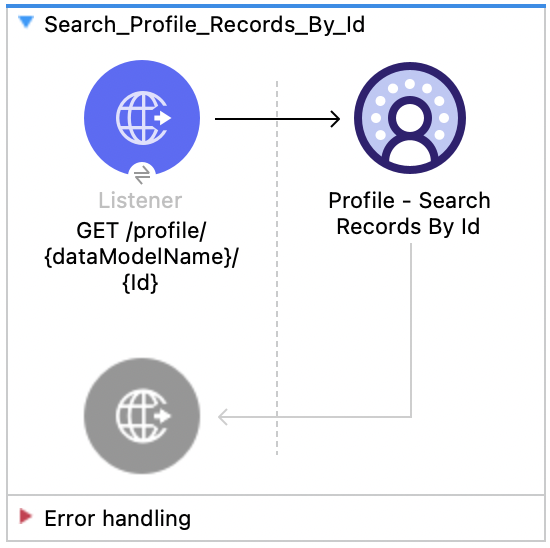
XML for This Example
Paste this code into the Studio XML editor to quickly load the flow for this example into your Mule app:
<?xml version="1.0" encoding="UTF-8"?>

<mule xmlns:salesforce="http://www.mulesoft.org/schema/mule/salesforce" xmlns:ee="http://www.mulesoft.org/schema/mule/ee/core"
	xmlns:file="http://www.mulesoft.org/schema/mule/file"
	xmlns:sdc="http://www.mulesoft.org/schema/mule/sdc" xmlns:http="http://www.mulesoft.org/schema/mule/http" xmlns="http://www.mulesoft.org/schema/mule/core" xmlns:doc="http://www.mulesoft.org/schema/mule/documentation" xmlns:xsi="http://www.w3.org/2001/XMLSchema-instance" xsi:schemaLocation="http://www.mulesoft.org/schema/mule/core http://www.mulesoft.org/schema/mule/core/current/mule.xsd
http://www.mulesoft.org/schema/mule/http http://www.mulesoft.org/schema/mule/http/current/mule-http.xsd
http://www.mulesoft.org/schema/mule/sdc http://www.mulesoft.org/schema/mule/sdc/current/mule-sdc.xsd
http://www.mulesoft.org/schema/mule/file http://www.mulesoft.org/schema/mule/file/current/mule-file.xsd
http://www.mulesoft.org/schema/mule/ee/core http://www.mulesoft.org/schema/mule/ee/core/current/mule-ee.xsd
http://www.mulesoft.org/schema/mule/salesforce http://www.mulesoft.org/schema/mule/salesforce/current/mule-salesforce.xsd">
	<http:listener-config name="HTTP_Listener_config" doc:name="HTTP Listener config" >
		<http:listener-connection host="0.0.0.0" port="8081" />
	</http:listener-config>
	<sdc:sdc-config name="Salesforce_Data_Cloud_OAuth_JWT_config" doc:name="Salesforce Data Cloud config" >
		<sdc:oauth-jwt-connection consumerKey="${server.consumerKey}" keyStorePath="${server.keyStorePath}" storePassword="${server.keyStorePassword}" subject="${server.userName}" audienceUrl="${server.audienceUrl}" keyAlias="${server.certificateAlias}" />
	</sdc:sdc-config>
	<configuration-properties doc:name="Configuration properties" file="mule-app.properties" />
	<sdc:sdc-config name="Salesforce_Data_Cloud_OAuth_UsernamePassword_config" doc:name="Salesforce Data Cloud config" >
		<sdc:oauth-user-pass-connection clientId="${server.consumerKey}" clientSecret="${server.consumerSecret}" username="${server.userName}" password="${server.password}" audienceUrl="${server.audienceUrl}" />
	</sdc:sdc-config>
	<flow name="Search_Profile_Records_By_Id" >
		<http:listener doc:name="GET /profile/{dataModelName}/{Id}" config-ref="HTTP_Listener_config" path="/profile/{dataModelName}/{Id}"/>
		<sdc:get-parent doc:name="Profile - Search Records By Id" config-ref="Salesforce_Data_Cloud_OAuth_JWT_config" dataModelNameUriParam="#[attributes.uriParams.dataModelName]" idUriParam="#[attributes.uriParams.Id]" searchKeyQueryParam="#[attributes.queryParams.searchKey]" fieldsQueryParam="#[attributes.queryParams.fields]" filtersQueryParam="#[attributes.queryParams.filters]" limitQueryParam="#[attributes.queryParams.limit]" orderbyQueryParam="#[attributes.queryParams.orderby]" offsetQueryParam="#[attributes.queryParams.offset]"/>
	</flow>
</mule>Profile - Search Records With Child Records API
This Mule flow shows how to retrieve data model object records along with child data model object records based on indexes and search filters. Refer to the Salesforce Data 360 API Developer Guide for usage and further details.
This example uses the following operations:
-
HTTP Listener
Accepts HTTP GET requests with the data model name, child data model name, and ID as the required URI parameters, and a combination of any optional query parameters. -
Profile - Search Records With Child Records
-
Authenticates based on your choice of OAuth Client Credentials, OAuth JWT, or OAuth Username and Password.
-
Receives the data model name, child data model name, ID, and any optional query parameters.
-
Calls the Salesforce Data 360 API to return the data model object records along with child data model object records based on indexes and search filters.
-
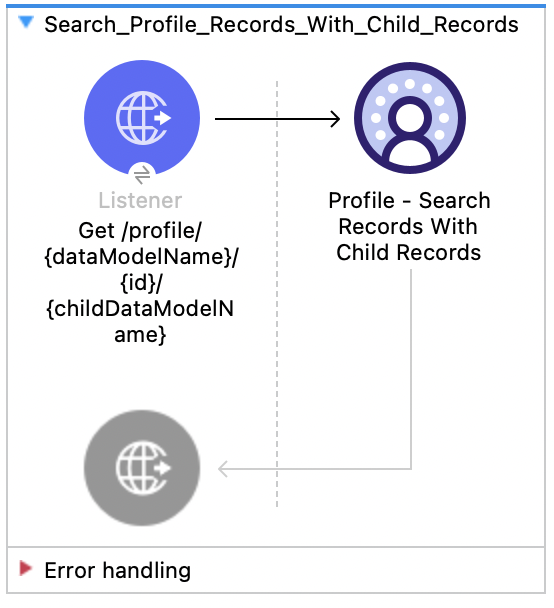
XML for This Example
Paste this code into the Studio XML editor to quickly load the flow for this example into your Mule app:
<?xml version="1.0" encoding="UTF-8"?>

<mule xmlns:salesforce="http://www.mulesoft.org/schema/mule/salesforce" xmlns:ee="http://www.mulesoft.org/schema/mule/ee/core"
	xmlns:file="http://www.mulesoft.org/schema/mule/file"
	xmlns:sdc="http://www.mulesoft.org/schema/mule/sdc" xmlns:http="http://www.mulesoft.org/schema/mule/http" xmlns="http://www.mulesoft.org/schema/mule/core" xmlns:doc="http://www.mulesoft.org/schema/mule/documentation" xmlns:xsi="http://www.w3.org/2001/XMLSchema-instance" xsi:schemaLocation="http://www.mulesoft.org/schema/mule/core http://www.mulesoft.org/schema/mule/core/current/mule.xsd
http://www.mulesoft.org/schema/mule/http http://www.mulesoft.org/schema/mule/http/current/mule-http.xsd
http://www.mulesoft.org/schema/mule/sdc http://www.mulesoft.org/schema/mule/sdc/current/mule-sdc.xsd
http://www.mulesoft.org/schema/mule/file http://www.mulesoft.org/schema/mule/file/current/mule-file.xsd
http://www.mulesoft.org/schema/mule/ee/core http://www.mulesoft.org/schema/mule/ee/core/current/mule-ee.xsd
http://www.mulesoft.org/schema/mule/salesforce http://www.mulesoft.org/schema/mule/salesforce/current/mule-salesforce.xsd">
	<http:listener-config name="HTTP_Listener_config" doc:name="HTTP Listener config" >
		<http:listener-connection host="0.0.0.0" port="8081" />
	</http:listener-config>
	<sdc:sdc-config name="Salesforce_Data_Cloud_OAuth_JWT_config" doc:name="Salesforce Data Cloud config" >
		<sdc:oauth-jwt-connection consumerKey="${server.consumerKey}" keyStorePath="${server.keyStorePath}" storePassword="${server.keyStorePassword}" subject="${server.userName}" audienceUrl="${server.audienceUrl}" keyAlias="${server.certificateAlias}" />
	</sdc:sdc-config>
	<configuration-properties doc:name="Configuration properties" file="mule-app.properties" />
	<sdc:sdc-config name="Salesforce_Data_Cloud_OAuth_UsernamePassword_config" doc:name="Salesforce Data Cloud config" >
		<sdc:oauth-user-pass-connection clientId="${server.consumerKey}" clientSecret="${server.consumerSecret}" username="${server.userName}" password="${server.password}" audienceUrl="${server.audienceUrl}" />
	</sdc:sdc-config>
	<flow name="Search_Profile_Records_With_Child_Records" >
		<http:listener doc:name="Get /profile/{dataModelName}/{id}/{childDataModelName}" allowedMethods="GET" config-ref="HTTP_Listener_config" path="/profile/{dataModelName}/{id}/{childDataModelName}"/>
		<sdc:get-parent-and-child doc:name="Profile - Search Records With Child Records" searchKeyQueryParam="#[attributes.queryParams.searchKey]" fieldsQueryParam="#[attributes.queryParams.fields]" limitQueryParam="#[attributes.queryParams.limit]" filtersQueryParam="#[attributes.queryParams.filters]" offsetQueryParam="#[attributes.queryParams.offset]" orderbyQueryParam="#[attributes.queryParams.orderby]" dataModelNameUriParam="#[attributes.uriParams.dataModelName]" idUriParam="#[attributes.uriParams.id]" childDataModelNameUriParam="#[attributes.uriParams.childDataModelName]" config-ref="Salesforce_Data_Cloud_OAuth_JWT_config"/>
	</flow>
</mule>Profile - Search Records With Insight API
This Mule flow shows how to retrieve data model object records and a computed view based on indexes and search filters. Refer to the Salesforce Data 360 API Developer Guide for usage and further details.
This example uses the following operations:
-
HTTP Listener
Accepts HTTP GET requests with the data model name, ID, and calculated insight name as the required URI parameters, and a combination of any optional query parameters. -
Profile - Search Records With Insight
-
Authenticates based on your choice of OAuth Client Credentials, OAuth JWT, or OAuth Username and Password.
-
Receives the data model name, ID, calculated insight name, and any optional query parameters.
-
Calls the Salesforce Data 360 API to return the data model object records and a computed view based on indexes and search filters.
-
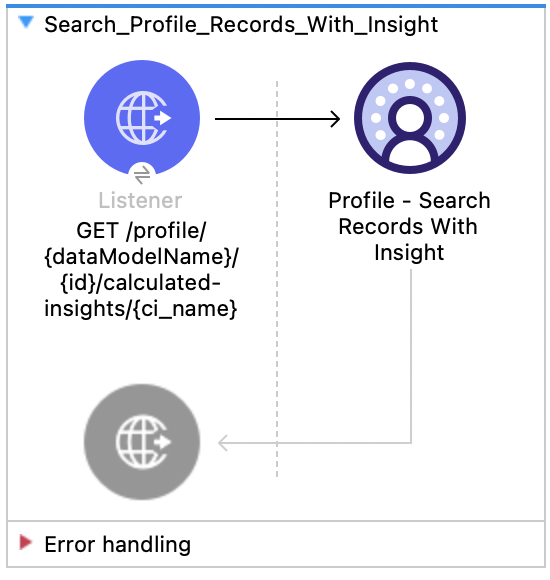
XML for This Example
Paste this code into the Studio XML editor to quickly load the flow for this example into your Mule app:
<?xml version="1.0" encoding="UTF-8"?>

<mule xmlns:salesforce="http://www.mulesoft.org/schema/mule/salesforce" xmlns:ee="http://www.mulesoft.org/schema/mule/ee/core"
	xmlns:file="http://www.mulesoft.org/schema/mule/file"
	xmlns:sdc="http://www.mulesoft.org/schema/mule/sdc" xmlns:http="http://www.mulesoft.org/schema/mule/http" xmlns="http://www.mulesoft.org/schema/mule/core" xmlns:doc="http://www.mulesoft.org/schema/mule/documentation" xmlns:xsi="http://www.w3.org/2001/XMLSchema-instance" xsi:schemaLocation="http://www.mulesoft.org/schema/mule/core http://www.mulesoft.org/schema/mule/core/current/mule.xsd
http://www.mulesoft.org/schema/mule/http http://www.mulesoft.org/schema/mule/http/current/mule-http.xsd
http://www.mulesoft.org/schema/mule/sdc http://www.mulesoft.org/schema/mule/sdc/current/mule-sdc.xsd
http://www.mulesoft.org/schema/mule/file http://www.mulesoft.org/schema/mule/file/current/mule-file.xsd
http://www.mulesoft.org/schema/mule/ee/core http://www.mulesoft.org/schema/mule/ee/core/current/mule-ee.xsd
http://www.mulesoft.org/schema/mule/salesforce http://www.mulesoft.org/schema/mule/salesforce/current/mule-salesforce.xsd">
	<http:listener-config name="HTTP_Listener_config" doc:name="HTTP Listener config" >
		<http:listener-connection host="0.0.0.0" port="8081" />
	</http:listener-config>
	<sdc:sdc-config name="Salesforce_Data_Cloud_OAuth_JWT_config" doc:name="Salesforce Data Cloud config" >
		<sdc:oauth-jwt-connection consumerKey="${server.consumerKey}" keyStorePath="${server.keyStorePath}" storePassword="${server.keyStorePassword}" subject="${server.userName}" audienceUrl="${server.audienceUrl}" keyAlias="${server.certificateAlias}" />
	</sdc:sdc-config>
	<configuration-properties doc:name="Configuration properties" file="mule-app.properties" />
	<sdc:sdc-config name="Salesforce_Data_Cloud_OAuth_UsernamePassword_config" doc:name="Salesforce Data Cloud config" >
		<sdc:oauth-user-pass-connection clientId="${server.consumerKey}" clientSecret="${server.consumerSecret}" username="${server.userName}" password="${server.password}" audienceUrl="${server.audienceUrl}" />
	</sdc:sdc-config>
	<flow name="Search_Profile_Records_With_Insight" >
		<http:listener doc:name="GET /profile/{dataModelName}/{id}/calculated-insights/{ci_name}" allowedMethods="GET" config-ref="HTTP_Listener_config" path="/profile/{dataModelName}/{id}/calculated-insights/{ci_name}"/>
		<sdc:get-computed-view-for-profile doc:name="Profile - Search Records With Insight" config-ref="Salesforce_Data_Cloud_OAuth_JWT_config" dataModelNameUriParam="#[attributes.uriParams.dataModelName]" idUriParam="#[attributes.uriParams.id]" ciNameUriParam="#[attributes.uriParams.ci_name]" searchKeyQueryParam="#[attributes.queryParams.searchKey]" dimensionsQueryParam="#[attributes.queryParams.dimensions]" measuresQueryParam="#[attributes.queryParams.measures]" limitQueryParam="#[attributes.queryParams.limit]" filtersQueryParam="#[attributes.queryParams.filters]" offsetQueryParam="#[attributes.queryParams.offset]" orderbyQueryParam="#[attributes.queryParams.orderby]" timeGranularityQueryParam="#[attributes.queryParams.timeGranularity]"/>
	</flow>
</mule>Data Action Webhook
This Mule flow shows how to create a webhook that logs its payload when triggered by a Data Action. Refer to the Salesforce Data Action docs.
This example uses the following operations:
-
Data Action Webhook
Creates a webhook as the target of a Salesforce Data 360 Data Action. -
Logger
Shows the payload sent to the Data Action Webhook.
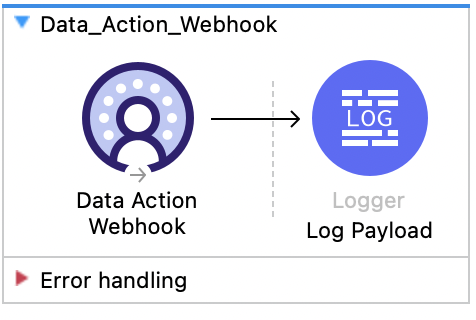
XML for This Example
Paste this code into the Studio XML editor to quickly load the flow for this example into your Mule app:
<?xml version="1.0" encoding="UTF-8"?>

<mule xmlns:sdc="http://www.mulesoft.org/schema/mule/sdc"
	xmlns:http="http://www.mulesoft.org/schema/mule/http"
    xmlns="http://www.mulesoft.org/schema/mule/core"
	xmlns:doc="http://www.mulesoft.org/schema/mule/documentation"
	xmlns:xsi="http://www.w3.org/2001/XMLSchema-instance"
    xsi:schemaLocation="
    http://www.mulesoft.org/schema/mule/core http://www.mulesoft.org/schema/mule/core/current/mule.xsd
    http://www.mulesoft.org/schema/mule/sdc http://www.mulesoft.org/schema/mule/sdc/current/mule-sdc.xsd">
	<flow name="Data_Action_Webhook" doc:id="3072197f-ee1f-4ed5-99d2-a9fa62230dbf" >
		<sdc:webhook-listener doc:name="Data Action Webhook" doc:id="fe3a924a-ba94-447d-9d3c-df079fc01de2" config-ref="Salesforce_Data_Cloud_Sdc_webhook_config" path="${webhook.path}" signingKey="${webhook.signingKey}" signingAlgorithm="HmacSHA256"/>
		<logger level="INFO" doc:name="Log Payload" doc:id="716538d3-7d06-4e9c-a4f7-b0d350b4dafe" message="#[output application/json --- payload]"/>
	</flow>
</mule>
Steps for Running This Example
-
Create a Data Action Target with an Action Target Type of
Webhook. -
Create a Data Action that uses the Data Action Target and runs on a condition against your streaming Calculated Insight.
-
Save the Mule project.
-
Point the data action target to your application’s URL.
Your application URL looks like this:
https://{{app-name}}.{{region}}.cloudhub.io/webhook. -
Trigger the data action’s condition to test the flow, and observe the logged payload.