
Configuring Identity Management in Anypoint Platform
As an Anypoint Platform organization administrator, you can configure identity management to enable single sign-on (SSO) for your organization’s users. Anypoint Platform supports OpenID Connect for end-user identity verification and SAML 2.0 for web-based authorization, and allows up to 25 external identity providers (IdPs).
Configure identity management using one of these single sign-on standards:
-
OpenID Connect: End user identity verification by an authorization server including SSO
-
SAML 2.0: Web-based authorization including cross-domain SSO
This diagram shows the SAML identity management process:
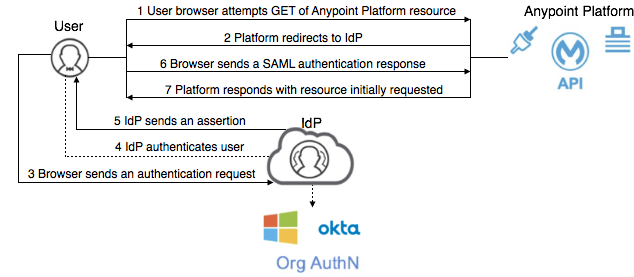
Before configuring OpenID Connect or SAML 2.0, select an OpenID Connect-compliant provider, such as PingFederate, OpenAM, or Okta. If you are not using OpenID Connect, select any SAML 2.0-compliant provider.
Anypoint Platform fully supports these SAML providers:
-
Salesforce
-
PingFederate (versions: 6, 7, 8)
-
OpenAM (version: 14)
-
Okta
These SAML providers are known to work, but aren’t actively tested:
-
Active Directory Federation Services (AD FS)
-
Shibboleth
-
onelogin
-
CA Single Sign-On
-
SecureAuth
Anypoint Platform fully supports these OpenID Connect providers:
-
Salesforce
-
PingFederate (versions: 6, 7, 8)
-
OpenAM (version: 14)
-
Okta
After you select an identity provider:
-
Set up your Anypoint Platform organization as your audience in your identity provider configuration.
The IdP you select is effective for the entire organization and all business groups. -
Configure identity management in the Anypoint Platform root organization.
-
Configure attribute names on the IdP and Anypoint Platform to match.
For more information, see the documentation for your identity provider.
Manage Users with an External Identity Provider
After configuring external identity management, you must add new SSO users using your external identity management solution and internal provisioning process. If you use the Invite User feature to add users to your organization after you have configured an external identity provider, the credentials for these users are stored in your organization using the Anypoint identity provider rather than with the external identity provider.
Users that sign in with SSO are new users to the system. If the new user has the same username as a user that already exists in your Anypoint Platform organization, the new user co-exists with the original user with the same username. Users with the same username are managed independently from one another.