
Creating Clusters
Creating clusters enables high availability and load distribution across multiple Mule runtime instances in your hybrid standalone environment.
Understanding Clusters
A cluster is a set of up to eight servers that work together as a single deployment target with high availability. Unlike server groups where applications run independently, cluster nodes communicate with each other and share information.
Key characteristics of clusters:
-
Application instances know about each other and share common information
-
Nodes coordinate and synchronize their statuses across the cluster
-
If one server fails, another server automatically takes over processing
-
A single cluster can run multiple applications simultaneously
-
Provides continuous service even when individual nodes fail
Understanding Shared Memory in Clusters
Clusters use distributed shared memory grids to enable data sharing and coordination between cluster nodes. This shared memory system allows applications to maintain state and share information across all nodes in the cluster.
How Shared Memory Works
The distributed shared memory grid enables:
-
Data is automatically replicated across all cluster nodes
-
Uses in-memory distributed storage for optimal performance
-
Changes are automatically synchronized across all nodes
-
Data remains available even if individual nodes fail
Shared Memory Components
The shared memory grid manages several key components:
-
Object Stores
-
Persistent and non-persistent Object stores are replicated across the cluster.
-
Data survives application redeploys and individual node restarts.
-
Maintains consistency across all cluster nodes.
-
-
VM Queues
-
Persistent and transient VM queues are shared across the cluster
-
Messages can be processed by any available node
-
Ensures message delivery even during node failures
-
-
Lock Factory
-
Distributed locking mechanism for cluster coordination
-
Prevents race conditions in multi-node environments
-
Manages concurrent access to shared resources
-
Memory vs Database Storage
-
Memory-Based Storage (Recommended)
-
Fastest access times with in-memory operations
-
Automatically scales with cluster size
-
No external database configuration required
-
-
Built-in replication and synchronization
-
Database-Based Storage (Alternative)
-
Data survives complete cluster shutdown
-
Requires JDBC database configuration
-
Slower than memory-based storage
-
Additional configuration and maintenance
-
Performance Considerations
-
Memory-Based Storage Benefits:
-
Optimal performance for most use cases
-
Automatic load distribution across nodes
-
Built-in high availability features
-
No external database dependencies
-
-
When to Use Database Storage:
-
Long-term data persistence requirements
-
Compliance with data retention policies
-
Integration with existing database infrastructure
-
Audit and logging requirements
-
Configuration Options
-
Default Memory Grid Configuration
-
Automatic replication across all nodes
-
In-memory storage for optimal performance
-
Built-in failover and recovery mechanisms
-
-
Custom Database Configuration
-
Configure Object Store to use JDBC-based storage
-
Requires external database setup and maintenance
-
Provides persistent storage beyond cluster lifecycle
-
| For most hybrid standalone deployments, memory-based shared storage provides the best balance of performance, simplicity, and reliability. Use database-based storage only when long-term persistence is required beyond cluster restarts. |
Understanding Multicast vs Unicast Clusters
Choose between two cluster discovery methods based on your network requirements:
Unicast Clusters
-
You must configure the IP addresses of all nodes in the cluster
-
Configure the internal IP that allows direct communication between nodes
-
Cannot use DHCP for dynamic IP assignment since Mule identifies servers by IP address
-
Servers must have Running status to join a unicast cluster
-
When you add a server to a unicast cluster, all existing servers in the cluster are restarted
-
Clustering across availability zones or regions can cause performance issues due to network latency
-
Place all nodes on one subnet or availability zone to reduce performance risks
-
If a server restarts with a new IP address, you must manually add it back to the cluster
Multicast Clusters
-
Servers discover each other without manual IP configuration
-
All servers must be on the same network segment to communicate
-
Server status doesn’t need to be Running to configure as a cluster node
-
You can add nodes to the cluster without restarting the entire cluster
-
Many networks block multicast functionality, so check with your network administrator
-
Reduce configuration overhead compared to unicast clusters
Before You Begin
Before creating clusters, make sure you have:
-
At least one Mule server added to Runtime Manager (add servers first, then create the cluster to deploy applications)
-
Network connectivity between all cluster nodes
-
Proper firewall configuration for cluster communication
-
Sufficient resources on each node
Additionally, review these limitations:
-
Servers can’t contain any previously deployed applications.
-
Servers can’t belong to another cluster or group.
-
Multicast servers can be in the Running or Disconnected state.
-
Unicast servers must be in the Running state.
-
All servers in a cluster must be running the same Mule runtime engine version (including monthly update) and Runtime Manager agent version.
Creating a Cluster
To create a new cluster:
-
From Anypoint Platform, select Runtime Manager.
-
Select Servers.
-
Click Create Cluster:
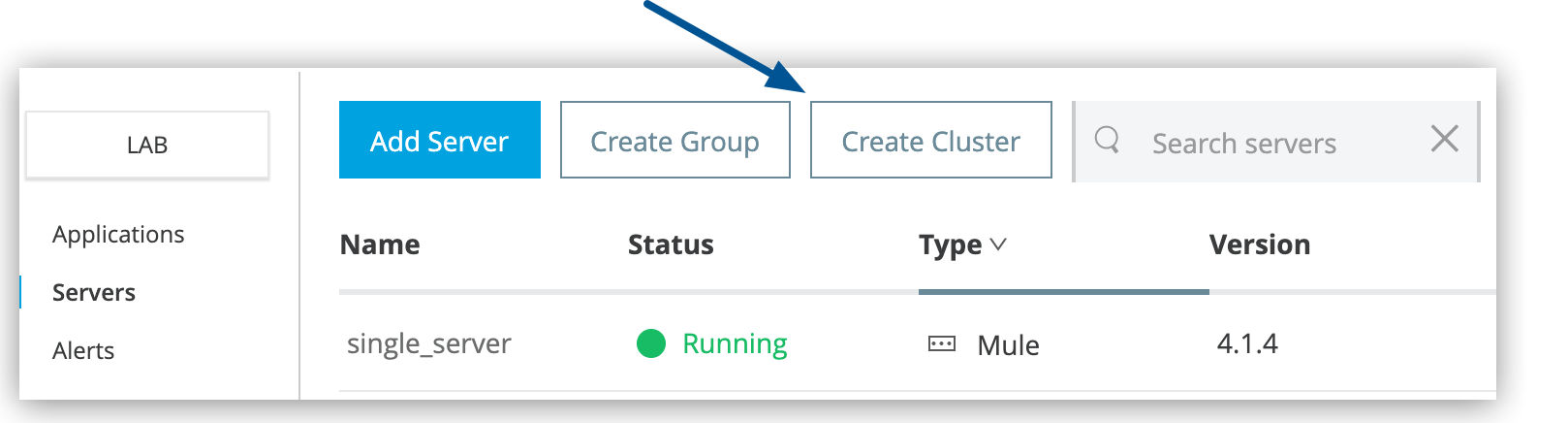 Figure 1. The arrow shows the Create Cluster button on the Servers page.
 -
In the Create Cluster page, enter the name for the cluster.
Cluster names can contain between 3-40 alphanumeric characters (a-z, A-Z, 0-9) and hyphens (-). They can’t start or end with a hyphen and can’t contain spaces or other characters.
-
Select Unicast or Multicast.
-
Select the servers to include in your new cluster.
-
Click Create Cluster.
-
The new cluster appears in the Servers list.
-
The servers no longer appear in the Servers list.
-
To see the list of servers in the cluster, select the cluster name.
| For Object Store persistence on all the servers in your cluster, create your cluster manually and use Quorum Management. |